
SteelSeries Apex Pro Mechanical Gaming Keyboard Review: OmniPoint 2.0, Rapid Trigger, and Elite Performance
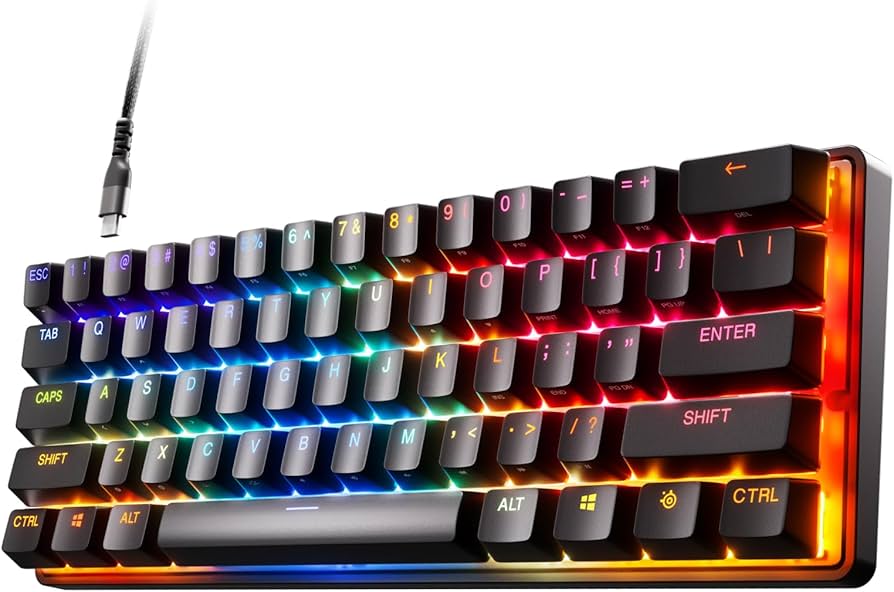
The SteelSeries Apex Pro is one of the most talked‑about premium gaming keyboards for good reason. Combining adjustable OmniPoint magnetic switches with per‑key actuation tuning, Rapid Trigger responsiveness, and a sturdy aluminum frame, it’s engineered to deliver measurable competitive advantages without sacrificing day‑to‑day comfort. In this hands‑on review, we break down its features, performance, build, and value, and compare it to top alternatives so you can decide if the Apex Pro is the right upgrade for your setup.
Key Features and Specifications
The Apex Pro’s headline feature is its OmniPoint adjustable mechanical switch technology (often referred to as OmniPoint 2.0 on newer models). Instead of relying on a fixed actuation point, these magnetic switches let you set per‑key actuation anywhere in a broad range—typically from about 0.2 mm (hair‑trigger) to around 3.8 mm (deep press), depending on the model year. The result is a keyboard that adapts to you, not the other way around.
- Switches: SteelSeries OmniPoint adjustable magnetic switches (per‑key actuation; dual‑actuation support on recent models)
- Rapid Trigger: Near‑instant re‑arming for ultra‑fast repeated inputs and micro‑adjustments
- Actuation Range: Approx. 0.2 mm to 3.8 mm (model‑dependent)
- Durability: Rated for up to 100M+ key presses
- Layout Options: Full‑size, TKL, and compact variants (Apex Pro, Apex Pro TKL, Apex Pro Mini)
- Display and Controls: OLED Smart Display with a multifunction media wheel on many full‑size/TKL models; profile & lighting controls
- Lighting: Per‑key RGB with extensive effects and sync via SteelSeries GG/Engine
- Software: SteelSeries GG (Engine) for actuation tuning, Rapid Trigger, macros, dual‑actuation, lighting, and profiles
- Connectivity: Wired USB (detachable USB‑C on newer TKL/Mini variants; fixed cable or USB passthrough on some earlier full‑size models)
- Build: Aircraft‑grade aluminum alloy top plate; sturdy chassis; optional magnetic wrist rest on many variants
- Anti‑Ghosting: Full N‑key rollover with 100% anti‑ghosting
- Onboard Memory: Multiple profiles stored directly on the keyboard
Note: Exact specs can vary by model year and form factor. The core experience—adjustable actuation, Rapid Trigger, per‑key RGB, and premium build—remains consistent, but details like detachable cables, USB passthrough, and included wrist rest differ. Always verify the configuration on the product page for the specific variant you’re considering.
Performance and Quality
If you’re shopping the Apex Pro, you’re likely chasing performance headroom—inputs that feel faster, more controllable, and more consistent. That’s where OmniPoint and Rapid Trigger shine. Dialing actuation down to the minimum makes the keyboard feel extremely responsive for FPS, where even subtle strafing adjustments matter. Pair that with Rapid Trigger and keys re‑arm as soon as you begin to lift your finger, enabling feather‑light taps, faster counter‑strafes, and smoother movement corrections.
Per‑key tuning is the sleeper feature. You can, for example, set WASD to 0.2–0.4 mm for lightning‑fast movement, ability keys to a more conservative 1.2–1.5 mm to reduce misfires, and typing clusters to 1.8–2.2 mm for comfort and accuracy. This granular control lets you create profiles tailored to each game and task. It’s especially useful in tactical shooters and MOBAs, where one mis‑press can cost a round or team fight.
Typing quality is better than you might expect from a performance‑oriented gaming board. OmniPoint switches are linear and smooth, with a consistent glide through the travel. They don’t deliver the “mechanical bump” of tactile switches—nor the click of clicky ones—but they are quiet, stable, and precise. Set actuation deeper and you’ll reduce accidental key presses while drafting documents or chatting; set it shallower when you hop back into a match.
Latency is effectively a non‑issue. While SteelSeries doesn’t always publish a single universal figure across versions, the Apex Pro family is well‑known for very low input latency and responsive feel. In practice, movement and ability triggers feel instantaneous, and the board keeps up with high‑APM gameplay without a hitch. N‑key rollover means you can press as many keys as needed without ghosting.
Macro and dual‑actuation support deepen the utility. On recent models, a single key can trigger two different actions at separate actuation depths—light press to ready a grenade, deeper press to throw; light press to walk, deeper press to sprint. That’s the kind of nuanced control previously limited to analog inputs.
Stability is excellent. The board sits solidly on the desk with minimal flex, and the stabilizers on longer keys (space, enter, shift) are tuned to prevent rattle on most units. Noise levels are moderate to low for a linear switch keyboard, and if you use the included or optional wrist rest, long sessions remain comfortable.
Design and Build Quality
The Apex Pro’s design balances gamer‑centric features with a clean, premium aesthetic. The aluminum alloy top plate is both durable and refined, shrugging off flex and giving the board a dense, reassuring feel. The chassis is well‑braced, and the feet provide two-stage angle adjustment on most variants. Cable implementation varies—detachable USB‑C on newer TKL/Mini versions improves portability and cable management, while some earlier full‑size models include a USB passthrough port and a fixed cable.
Lighting is a strong point. Per‑key RGB with SteelSeries’ Prism effects looks vibrant and evenly diffused, with layers that can be tied to profiles, game states, or notifications. If you prefer subtlety, static and low‑saturation themes are easy to implement in SteelSeries GG. The optional OLED Smart Display on many full‑size/TKL versions is surprisingly practical for quick profile switching, volume control, real‑time stats, or even a tiny custom logo.
Keycaps can vary by package and region. Many Apex Pro configurations ship with durable, shine‑resistant caps and crisp legends; enthusiasts sometimes upgrade to PBT “PrismCaps” for an even more textured feel and improved long‑term wear. Either way, the typing surface feels stable, and legends remain readable under RGB backlighting. The stabilizers are well‑lubed from the factory on most units, limiting ping and rattle.
Comfort matters in marathon sessions, and the magnetic wrist rest available on many models earns its keep. It attaches quickly, stays put, and provides a wide, lightly textured surface that supports a neutral wrist angle. Combined with the adjustable feet, it helps tailor ergonomics for different desk heights and chair positions.
Pros and Cons
- Pros
- Adjustable OmniPoint switches with per‑key actuation let you optimize for both gaming and typing
- Rapid Trigger delivers buttery‑smooth re‑arming for precise strafing and repeated inputs
- Dual‑actuation (on recent models) enables two actions on a single key for advanced control schemes
- Sturdy aluminum frame with premium fit and finish
- Vivid per‑key RGB and useful OLED Smart Display on many variants
- SteelSeries GG software offers deep tuning, macros, profiles, and easy lighting control
- Full N‑key rollover and consistent low‑latency feel
- Comfortable magnetic wrist rest included with many versions
- Cons
- Premium pricing—you pay for the tech, and wireless or special editions can be especially costly
- Linear feel may not satisfy fans of tactile/clicky switches
- Some features (USB‑C vs. passthrough, included wrist rest, keycaps) vary by model year, which can be confusing
- Not hot‑swappable; you’re committed to OmniPoint switches
- Software depth is great, but first‑time setup can be overwhelming
Value Proposition and Pricing
The Apex Pro sits in the premium tier of gaming keyboards. Depending on the size and generation, MSRP commonly ranges from around $179 to $229 for wired full‑size or TKL variants, with compact and wireless editions sometimes priced higher. Seasonal sales frequently bring the cost down, and it’s not unusual to find significant discounts during major shopping events.
Is it worth the price? If you’ll use the adjustable actuation, Rapid Trigger, and dual‑actuation to their full potential, the Apex Pro offers performance you can genuinely feel. It’s one of the few boards where paying more translates into functional advantages rather than purely aesthetic upgrades. Competitive players and enthusiasts who tinker with per‑game profiles will extract the most value.
If your priorities are primarily build quality, RGB, and a solid typing experience—and you don’t need per‑key actuation or Rapid Trigger—you can spend less and still be happy. SteelSeries’ own Apex 7, Corsair’s K70 line, or Logitech’s G Pro/G512 are often cheaper while retaining great switches and strong software. But none match the Apex Pro’s adjustability.
Long‑term value is also strong: the aluminum chassis, switch durability, and software support mean the board won’t feel outdated quickly. As developers embrace analog‑style or depth‑based inputs, dual‑actuation and Rapid Trigger features continue to grow in usefulness.
Comparison with Alternatives
There are a handful of competitors that aim to deliver similarly fine‑grained control and ultra‑fast responsiveness. Here’s how the Apex Pro stacks up against the most notable options:
- Wooting 60HE / Wooting Two HE
- What’s similar: Magnetic Hall‑effect switches, adjustable actuation, and excellent Rapid Trigger implementation; very popular with competitive FPS players.
- Where Wooting wins: Industry‑leading Rapid Trigger tuning, deep analog emulation, and community‑driven firmware.
- Where Apex Pro wins: More layout options beyond 60%, premium aluminum build on many variants, OLED display and media controls, and broader retail availability.
- Bottom line: If you want a 60% layout with best‑in‑class Rapid Trigger, Wooting is outstanding. If you prefer TKL or full‑size, a metal chassis, and polished software with media/OLED niceties, the Apex Pro is compelling.
- Razer Huntsman V2 Analog / Analog‑capable models
- What’s similar: Adjustable actuation via optical analog switches, per‑key RGB, robust software.
- Where Razer wins: Deep analog input options and Chroma ecosystem integrations.
- Where Apex Pro wins: Clean, rigid aluminum build on many versions, OLED screen on select models, and broadly praised Rapid Trigger feel.
- Bottom line: Razer leans into analog range and ecosystem; SteelSeries emphasizes Rapid Trigger smoothness, per‑key tuning ease, and premium build.
- Corsair K70 RGB Pro / K70 variants
- What’s similar: Excellent build quality, vibrant RGB, strong software (iCUE), and tournament features.
- Where Corsair wins: Often cheaper street prices and wide switch choices (Cherry, etc.).
- Where Apex Pro wins: Per‑key adjustable actuation and Rapid Trigger, which the K70’s traditional switches do not offer.
- Bottom line: For raw adjustability and re‑arming speed, Apex Pro is the performance pick. For a classic mechanical board with great execution, Corsair remains a value favorite.
- Logitech G915 TKL / G Pro X
- What’s similar: Premium build and software; G915 TKL adds low‑profile wireless convenience.
- Where Logitech wins: Wireless reliability (Lightspeed) and low‑profile aesthetics on G915.
- Where Apex Pro wins: Adjustable actuation, Rapid Trigger, and deeper control over key behavior.
- Bottom line: If you care more about wireless and low‑profile design, Logitech is appealing. If you prioritize switch adjustability and raw input control, Apex Pro leads.
In short, alternatives can match the Apex Pro on build or lighting, and some beat it on wireless or extreme analog customization. But the unique blend of adjustable actuation + Rapid Trigger + refined chassis gives the Apex Pro a clear identity in the premium tier.
Who Should Buy This Product
- Competitive FPS and MOBA players who want faster counter‑strafes, precise movement, and per‑key control over mis‑press risk.
- Enthusiasts and tinkerers who enjoy dialing in actuation depths per game, using dual‑actuation, and saving multiple profiles.
- Streamers and creators who benefit from quick profile switching, macros, and the OLED display for at‑a‑glance status or media controls.
- Office + gaming hybrid users who need a single board that can be tuned for quiet, accurate typing by day and hair‑trigger gaming by night.
- Buyers prioritizing build quality: aluminum top plate, stable chassis, and a comfortable wrist rest on many models.
You might skip the Apex Pro if you’re on a strict budget, prefer tactile/clicky feedback, or simply won’t use adjustable actuation and Rapid Trigger. In those cases, a mid‑range mechanical with traditional switches will save money without sacrificing day‑to‑day satisfaction.
Conclusion
The SteelSeries Apex Pro justifies its premium status by delivering real performance advantages and a refined typing experience in a durable chassis. Adjustable OmniPoint switches, Rapid Trigger, dual‑actuation, and per‑key tuning add up to a keyboard that adapts to you and your games. If you’ll leverage those features, it’s one of the most capable boards you can buy. If not, excellent—and cheaper—alternatives exist, but few match the Apex Pro’s unique combination of speed, control, and polish.