
SteelSeries Apex 3 RGB Gaming Keyboard Review: Quiet, Spill-Resistant Value for Budget Gamers
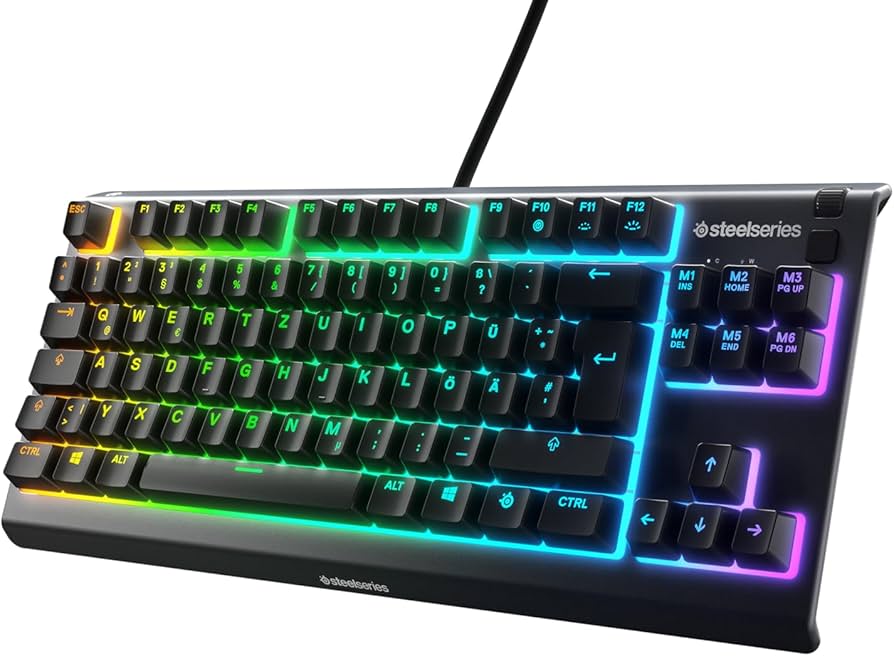
The SteelSeries Apex 3 RGB Gaming Keyboard targets players who want a quiet, spill-resistant, and feature-rich deck without paying mechanical prices. This full-size board pairs whisper-quiet membrane switches with 10-zone RGB lighting, a comfortable magnetic wrist rest, and SteelSeries’ proven software. In this in-depth SteelSeries Apex 3 review, we’ll break down its features, examine real-world gaming and typing performance, compare it with key rivals, and help you decide if it’s the right budget gaming keyboard for your setup.. For a As a direct alternative if you want a similarly quiet, non-mechanical board with RGB and a low-profile feel., consider our Razer Ornata V3 gaming keyboard.
Key Features and Specifications
The Apex 3 was designed as a value-forward gaming keyboard that keeps essential premium touches while trimming the extras that inflate cost. Here are the highlights:
- Switches: Whisper-Quiet gaming switches (membrane) tuned for soft, low-noise keypresses; rated for long-term durability.
- RGB Illumination: 10-zone RGB backlighting with multiple effects and PrismSync support across SteelSeries peripherals.
- Water Resistance: IP32 rating helps protect against accidental spills and dust—ideal for busy desks or shared spaces.
- Form Factor: Full-size layout with numpad and function row for productivity and gaming versatility.
- Media Controls: Dedicated media keys plus a clickable volume roller for quick, tactile control.
- Wrist Rest: Detachable magnetic wrist rest with a soft-touch finish for improved long-session comfort.
- Anti-Ghosting: Gaming-grade anti-ghosting optimized for the most frequently used key clusters.
- Software: SteelSeries GG (Engine) for lighting, profiles, macros, and per-app/game configurations on Windows and macOS.
- Cable Management: Built-in three-way cable routing channels to keep your desk tidy.
- Build & Materials: Rigid plastic chassis with ABS keycaps and durable legending.
- Connectivity & Compatibility: USB-wired; plug-and-play with Windows and macOS; works with PlayStation and Xbox consoles for basic typing and navigation.
SteelSeries positions the Apex 3 as a quiet, comfortable alternative to clicky entry-level mechanical boards. It preserves the core experience most gamers need—customizable lighting, reliable input, and convenient media controls—while adding the peace of mind that comes with spill resistance.
Performance and Quality
In moment-to-moment gameplay, the Apex 3 feels responsive and dependable. The whisper-quiet membrane switches activate smoothly with a gentle, cushioned bottom-out that keeps noise levels down—great for late-night sessions or shared living spaces. While they don’t deliver the crisp tactile pop or ultra-fast reset of mechanical switches, their consistency and stability stand out for a keyboard in this price bracket.
Gaming performance is strongest in genres where quiet operation and comfort take priority: story-driven adventures, RPGs, strategy games, and MOBAs. Repeated skill rotations, hotkey spamming, and map panning remain accurate thanks to the keyboard’s gaming-grade anti-ghosting in typical WASD clusters and adjacent action keys. Fast-twitch shooters are absolutely playable, though mechanical switch aficionados may notice the softer actuation and longer travel compared to linear or tactile mech switches.
Typing is pleasant and subdued. The membrane domes deliver a gentle springiness that reduces finger fatigue over extended writing sessions. If you’re moving from a laptop or office keyboard, the transition will feel natural. Coming from a mechanical board with tactile or clicky switches, however, you’ll likely perceive less definition at the actuation point. The upside is very low acoustic output—keystrokes are discreet and deskmates will appreciate the quiet profile.
SteelSeries GG software brings the Apex 3 to life. You can:
- Create multiple lighting profiles and apply 10-zone effects (wave, reactive, breathing, static, and more).
- Assign macros to function layers or remap keys for specific games/apps.
- Auto-switch profiles when launching games.
- Sync lighting with other SteelSeries gear via PrismSync.
Although the Apex 3 doesn’t have per-key RGB or true N-key rollover like pricier mechanical boards, it hits the mark for budget gaming. Input feel is consistent, lighting looks even and bright (especially in dim rooms), and the board maintains a snappy, low-latency experience over USB. For console use, it works reliably for text input and menu navigation; on PC, you unlock its full customization suite.
Durability is a quiet strength. The IP32 rating adds resilience against splashes and dust. While it’s not designed for immersion or heavy liquid exposure, real-world coffee and soda mishaps are less likely to cause a panic, and that’s a big confidence booster in dorms, offices, and family rooms.
Design and Build Quality
The Apex 3 embraces a clean, gamer-ready aesthetic without going overboard. The chassis is an all-black, matte plastic that resists fingerprints and looks professional on-camera or in the office. The key legends are clear and legible, and the font strikes an effective balance—distinctive but not cartoonish.
The 10-zone RGB backlighting is the main visual flourish. Unlike per-key RGB, zones illuminate sections of the board together, producing smooth waves and gradients with simpler configuration. It looks striking under ambient light and especially good at night, where the diffusion provides a soft glow across multiple keys. If you’re accustomed to intricate per-key animations, you’ll notice the difference, but many buyers prefer the easier, set-and-forget nature of zones.
Build quality is robust for the price. The frame exhibits minimal flex and feels more rigid than many competing membrane boards. The detachable magnetic wrist rest is a standout; it snaps into place firmly, aligns well, and offers a broad surface with a soft-touch coating that’s comfortable for marathon sessions. Combined with the two-stage tilt feet and rubber pads, the board stays put under heavy typing or intense matches.
The IP32 water resistance is practical, not gimmicky. IP32 means it can withstand light splashes and dripping water at an angle, plus intrusion of larger dust particles. It’s not waterproof—don’t rinse it under a faucet—but it’s far more forgiving than standard keyboards in the face of everyday spills. Internal channels and the top-plate design help route small amounts of liquid away from critical components.
Thoughtful touches include the three-way cable routing that exits left, right, or center to match your desk setup and the dedicated media keys with a clickable volume roller. The roller has defined notches with each increment, allowing for quick, eyes-off volume adjustments—an underrated quality-of-life feature when streaming or voice chatting.
As for materials, the keycaps are ABS with durable legending. Over very long use, ABS can develop shine, which is typical at this tier. Stabilization on larger keys (spacebar, enter, shift) is solid with minimal rattle for a membrane board, and the overall acoustics remain satisfyingly muted.
Pros and Cons
Pros
- Exceptionally quiet switches—ideal for shared spaces and late-night gaming.
- IP32 water resistance offers real peace of mind for accidental spills.
- Comfortable magnetic wrist rest included at this price point.
- Dedicated media keys and a tactile volume roller for quick controls.
- Simple, attractive 10-zone RGB with PrismSync and profile switching.
- Solid build quality and stable typing platform for a membrane board.
- Useful cable routing channels and rubberized feet to keep the deck in place.
- Broad compatibility across PC, Mac, and consoles for core functions.
Cons
- Membrane feel lacks the crisp actuation and fast reset of mechanical switches.
- 10-zone lighting isn’t as granular as per-key RGB; fewer advanced effects.
- No hot-swap support or switch customization.
- ABS keycaps can develop shine over time with heavy use.
- No USB passthrough or dedicated macro column.
- Anti-ghosting is good but not full n-key rollover like on many mechanicals.
Value Proposition and Pricing
The SteelSeries Apex 3 lands in a sweet spot for budget-conscious players who still want premium creature comforts. It consistently undercuts mechanical boards with similar aesthetics while offering genuine advantages for certain users—most notably near-silent operation and IP32 spill protection, both of which can be more meaningful day-to-day than ultra-fast mechanical actuation.
Pricing varies by retailer and region, but the Apex 3 generally sits in the affordable bracket of mainstream gaming keyboards. Sales are frequent, and bundles with SteelSeries mice and headsets occasionally sweeten the deal. Even at standard pricing, the inclusion of a quality wrist rest, dedicated media controls, and robust software helps the Apex 3 stand out from generic budget options.
If your priorities are comfort, quietness, and reliability on a tight budget, the Apex 3’s value proposition is hard to beat. If you’re an aspiring esports competitor chasing the fastest possible actuation or per-key RGB customization, stepping up to a mid-range mechanical model may be worth the extra spend. For everyone else, the Apex 3 delivers a polished experience for less.
Comparison with Alternatives
SteelSeries Apex 5 / Apex 7: If you like the Apex 3’s design language and software but want the crisp feel of mechanical switches, look at the Apex 5 (hybrid mechanical) or Apex 7 (full mechanical). You’ll gain per-key RGB, stronger anti-ghosting/NKRO, and faster-feeling actuation. You’ll lose the quietness of the membrane keys and pay a good deal more, and you won’t get IP32 spill resistance on all variants. For silence-first users, the Apex 3 still has an edge.
Razer Cynosa V2: One of the most direct competitors. It’s also membrane and quiet, with individual key backlighting. Razer Synapse offers deep customization, though it can be heavier on system resources. The Cynosa V2’s per-key lighting is a visual advantage; the Apex 3’s wrist rest and water resistance push back on value. Pick the Cynosa if you care more about granular lighting; choose the Apex 3 if comfort and spill protection are priorities.
Corsair K55 RGB Pro (and K55 RGB Pro XT): Another budget-friendly membrane board. The K55 line often includes extra macro keys and iCUE software integration. The XT variant offers per-key lighting. Corsair’s macro column is attractive for MMO/MOBA players, but build feel and included wrist rest quality tilt in SteelSeries’ favor at similar prices. If you want a dedicated macro column, the K55 is tempting; otherwise, the Apex 3 provides a cleaner, more compact footprint and stronger water resistance story.
Logitech G213 Prodigy: A quieter, membrane-based competitor with Logitech’s Gaming Software/G HUB. The G213 is comfortable and straightforward but lacks the Apex 3’s magnetic wrist rest, water resistance rating, and volume roller. Logitech’s software is excellent; however, as an everyday package, the Apex 3 feels more feature-complete for similar money.
Budget Mechanical Options (e.g., Redragon K552, Outemu/Blue switch boards): These often deliver true mechanical feel and, sometimes, hot-swappability at aggressive prices. They can be louder, and build/preset tuning varies widely. If you crave a mechanical switch experience and can tolerate clicky noise and fewer creature comforts (no water resistance, simpler media controls), a budget mechanical might make sense. Otherwise, for quiet environments and spill-prone desks, the Apex 3 is the safer, more polished bet.
Who Should Buy This Product
- Quiet-first gamers: If you share a space or stream/record with a live mic, the Apex 3’s subdued acoustics are a big win.
- Students, families, and office users: IP32 spill resistance offers peace of mind around drinks, kids, and chaotic desks.
- Console players: Plug-and-play compatibility makes it a straightforward upgrade for typing, navigation, and supported games.
- Newcomers to gaming keyboards: A great starter deck with intuitive software, without the steeper price of mechanical models.
- Value hunters: Frequent discounts make the Apex 3 a compelling buy versus similarly priced competitors.
- Comfort-focused typists: The included magnetic wrist rest and gentle key feel reduce strain in long sessions.
Conversely, gamers who demand the crisp feedback of tactile or linear mechanical switches, ultra-precise per-key RGB programming, or advanced hardware features like USB passthrough should consider moving up the SteelSeries stack or exploring mid-range mechanical alternatives.
Conclusion
The SteelSeries Apex 3 RGB Gaming Keyboard is a thoughtful, well-rounded budget pick. It delivers quiet, reliable performance, attractive 10-zone RGB, a surprisingly premium wrist rest, and spill resistance that genuinely lowers day-to-day anxiety. While it won’t convert mechanical diehards, it nails the essentials for most players at a wallet-friendly price. If you value comfort, low noise, and practical features over raw switch speed, the Apex 3 is easy to recommend.. For those interested in For readers who like the Apex 3’s design but want to step up to a premium mechanical option with adjustable actuation and Rapid Trigger., check out our SteelSeries Apex Pro mechanical keyboard.