
Redragon K552 Mechanical Gaming Keyboard Review: Budget Clicky Performer for Gamers and Typists
Introduction
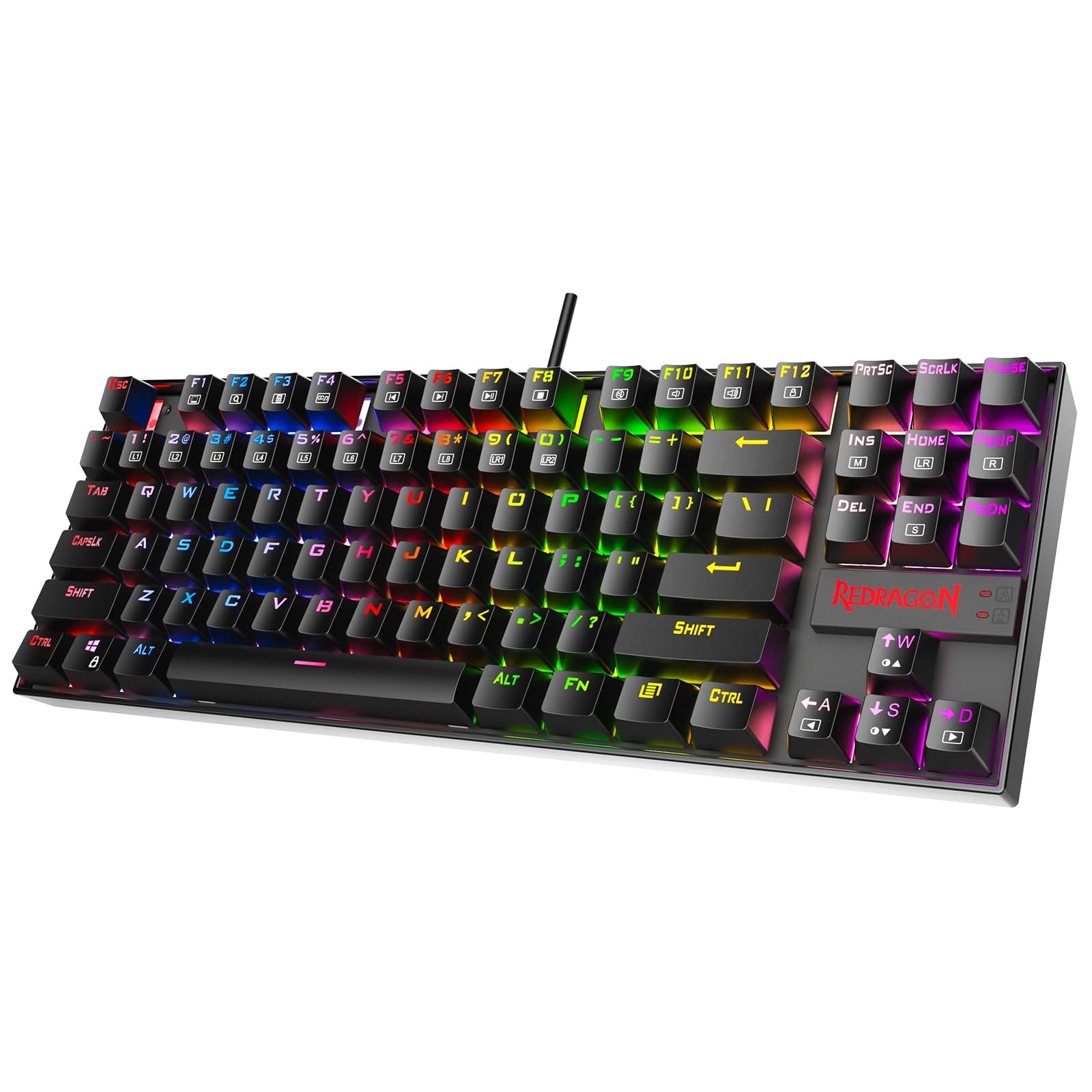
The Redragon K552 Mechanical Gaming Keyboard, often dubbed the "Kumara," has earned cult status as one of the best-value mechanical keyboards on the market. This tenkeyless, no-frills board promises tactile precision, durable construction, and vibrant lighting at an aggressively affordable price. In this review, we dive into its real-world performance, build quality, features, and trade-offs to help you decide whether the K552 is the right budget-friendly workhorse for gaming, typing, and everyday use.. For a Prefer a similar budget price but quieter keys for shared spaces? The SteelSeries Apex 3 offers silent membrane switches and spill resistance., consider our SteelSeries Apex 3.
Key Features and Specifications
The K552 is designed to deliver mechanical performance without inflating the price tag. While minor details differ by variant, the core platform remains consistent. Below is a consolidated look at what you can expect:
- Form factor: Tenkeyless (TKL) 87-key layout for a compact desk footprint and more mousing space.
- Switches: Primarily Outemu Blue (clicky, tactile). Some variants may offer Outemu Red (linear) or Brown (tactile, quieter). Switches are plate-mounted for stability.
- Backlighting: Available in single-color (red), rainbow (zoned), or full RGB depending on the model. RGB versions typically include multiple lighting effects and adjustable brightness.
- Anti-ghosting/N-key rollover: 87-key anti-ghosting with full rollover support in most scenarios, enabling simultaneous key presses without conflicts.
- Construction: Metal top plate with a durable ABS chassis; double-shot or injection-molded ABS keycaps with shine-through legends.
- Connectivity: Wired USB with a braided, non-detachable cable (approx. 1.8 m/6 ft).
- Multimedia and shortcuts: 12 FN-accessible media and function shortcuts (volume, playback, lighting controls, etc.).
- Durability: Switches rated up to 50 million actuations; robust plate-mount design minimizes wobble.
- Software: RGB variants typically support Redragon software for lighting customization and basic macro assignment; rainbow/single-color models rely on onboard lighting modes.
- Dimensions & weight (approximate): 354 x 123 x 37 mm (14.0 x 4.9 x 1.5 in); around 0.8–0.9 kg (1.8–2.0 lb), which helps it stay planted during intense sessions.
- Spill resistance: Some versions include drainage channels and splash resistance for added peace of mind.
What makes the K552 particularly compelling is how it threads the needle between affordability and everyday usability. It avoids the bloat of unnecessary extras while delivering staples that matter: a compact footprint, reliable switches, and a chassis that feels firmer than its price suggests.
Performance and Quality
For competitive play and fast-paced typing, the Redragon K552 punches above its price class. The Outemu Blue switches deliver a classic clicky feedback curve—noticeable tactile bump followed by a snappy, audible click. For many users, this translates into improved typing accuracy and satisfying key recognition, especially during rapid input. In games, the clear actuation feedback is useful for rhythm-based commands or repeated key taps in FPS and MOBA titles.
Latency is effectively a non-issue thanks to its wired USB connection. Input registration feels immediate and consistent, and rollover performance is solid—even when multiple keys are mashed during frantic firefights or spell rotations. The stabilized keys (spacebar, enter, shift) are adequately tuned for the price, though experienced enthusiasts will notice some rattle compared to premium boards. That said, the plate-mounted design keeps key wobble in check and provides a firm, confident press.
Reliability is a standout. Over time, the K552 maintains a consistent actuation feel with limited keycap wobble, and the switch housings resist the sponginess that often plagues low-cost mechanicals. While you won’t get the out-of-box refinement of pricier models (like premium lubed stabilizers or ultra-quiet operation), the K552 offers a remarkably dependable, day-in/day-out typing and gaming experience that belies its price tag.
Acoustically, the Outemu Blue switches are loud by design. The click jacket mechanism produces both a tactile bump and a clear click on actuation and release. This is a boon for users who crave audible confirmation and a deal-breaker for shared or quiet environments. If you need stealthier operation, consider the Brown or Red switch variants, if available, or opt for O-rings to soften the bottom-out sound (with a minor impact on travel and feel).
Lighting implementation depends on the version. Full RGB models provide multiple effects, per-zone or per-key customization (software dependent), and brightness control. Rainbow (zoned) versions offer preset color regions with adjustable effects but lack full per-key editing. Either way, the LEDs are bright, the legends are clear, and the lighting does a fine job of enhancing visibility and aesthetic flair without overpowering your desk setup.
Design and Build Quality
One of the K552’s biggest surprises is its sturdiness. The metal top plate adds rigidity and heft, cutting down on flex and helping the keyboard stay put under heavy typing or gaming. The ABS bottom shell is well-fitted, and there’s minimal creak when twisted. Rubber feet and fold-out legs with rubberized tips keep it stable, whether you type flat or angled.
The tenkeyless layout is ergonomically friendly for gamers who need more room to maneuver their mouse. It also brings your shoulders closer together, which can help reduce fatigue during long sessions. Despite its compact footprint, the K552 retains dedicated arrow keys and a full function row—crucial for productivity and keybind-heavy games.
Keycaps are serviceable ABS with shine-through legends, ensuring good backlight visibility. Over time, ABS can develop gloss from finger oils, and legends may soften in appearance, but double-shot or high-quality injection ensures longevity that’s respectable at this price. Enthusiasts can swap keycaps for aftermarket sets (standard ANSI layout on most models), though check stem compatibility for spacebar/stabilized keys if you plan a full makeover.
The cable is braided and sturdy, but it is non-detachable. That’s a reasonable trade-off at this price point, but if you travel frequently or prefer custom cables, it’s something to note. Some variants tout splash resistance with drainage channels—a welcome safety net against minor spills, though it’s not a license to be careless around liquids.
In terms of aesthetics, the K552 skews toward clean and purposeful rather than flashy. The simple top plate, minimal branding, and symmetrical frame work well on both gaming setups and home offices. RGB variants offer more visual flair, while the red-backlit option delivers a subtler, gamer-forward glow without the complexity of software.
Pros and Cons
- Pros
- Excellent price-to-performance ratio; a genuine mechanical feel at a budget price.
- Sturdy metal-plate construction with minimal deck flex and satisfying heft.
- Tenkeyless layout saves desk space and improves mouse ergonomics.
- Consistent wired performance with full anti-ghosting and reliable rollover.
- Bright, legible backlighting; multiple variants to match your preference (red, rainbow, RGB).
- Plate-mounted switches provide stability; decent stabilizers for the price.
- Durable switches rated up to 50M actuations; good long-term reliability.
- Cons
- Loud clicky switches on common variants; not ideal for shared or quiet spaces.
- Non-detachable cable limits portability and custom-cable options.
- ABS keycaps can shine over time; legends lack the crispness of premium PBT.
- Limited macro/customization on non-RGB versions; software is basic on supported models.
- Not hot-swappable on most units, making switch changes more involved.
- Stabilizers can exhibit mild rattle compared to premium boards.
Value Proposition and Pricing
The K552’s value story is straightforward: it delivers authentic mechanical performance and a solid chassis for significantly less than many big-brand alternatives. Street prices typically range from budget-friendly to mid-budget depending on backlight variant and regional availability. Even at the upper end for the RGB version, it often undercuts competitors with similar features.
For students, first-time mechanical buyers, or budget-conscious gamers, this keyboard is a persuasive entry point. It’s reliable, reasonably customizable, and tough enough to withstand daily use. The compromises—loud switches, basic software, ABS caps, non-detachable cable—are sensible in context and won’t matter to many users who simply want a dependable, clicky workhorse.
Long-term, the K552 ages gracefully. The plate-mounted design and stronger-than-expected chassis resist the loosening and creaking you might see in cheaper membrane or hybrid boards. When you add in lighting options that scale with price and a proven track record of durability, the value math stays in Redragon’s favor.
Comparison with Alternatives
If you’re cross-shopping, here’s how the K552 stacks up against popular alternatives in and around its price bracket:. If you're considering alternatives, our HyperX Alloy FPS Pro review covers a If you want a more refined TKL mechanical with a sturdier deck and FPS-focused design, consider the HyperX Alloy FPS Pro as a step‑up alternative..
- HyperX Alloy Origins Core (TKL): A premium-feel TKL with aircraft-grade aluminum, excellent HyperX switches, and refined stabilizers. Superior build and lighting software, but often two to three times the price of a K552. If budget allows and you want a more polished experience, the HyperX is a worthy upgrade.
- Logitech G413 SE (TKL): A sturdy mainstream option with a brushed top plate and quieter tactile switches. Software integration is better, but pricing can sit notably higher than the K552. It lacks true RGB on some variants and still forgoes hot-swapping.
- Keychron C1/C1 Pro (TKL): A productivity-leaning alternative with Mac/Windows compatibility, hot-swappable options on some models, and PBT keycaps on higher trims. Typically more expensive, but quieter switch choices and hot-swap flexibility appeal to mixed-use buyers.
- Royal Kludge RK61 (60%): Popular for compact setups and wireless capability. It saves more desk space and offers Bluetooth on many models, but the 60% layout sacrifices arrows and function keys without layers, which some users dislike. Typing feel can be comparable, but the K552’s TKL layout is more versatile for productivity.
- Tecware Phantom (TKL): An enthusiast-leaning budget board that often includes hot-swappable Outemu sockets and respectable stabilizers for the price. Lighting and software vary by model. If hot-swap matters and you enjoy tinkering, this can be a compelling peer to the K552.
- Corsair K63 (TKL): Brand-name reliability with Cherry MX switches and robust software. Often significantly pricier than the K552 and typically lacks per-key RGB on some variants. Better stabilizers and ecosystem, but you pay for it.
Bottom line: the K552 remains one of the best values for a wired, clicky, compact board. If you prioritize wireless, hot-swapping, or quieter operation, the alternatives above may fit better. If you want a straightforward, robust mechanical experience for less, the K552 is tough to beat.
Who Should Buy This Product
The Redragon K552 shines for users who want a dependable mechanical keyboard with a lively, tactile feel—without paying premium-brand prices. Consider it if you match any of the following profiles:
- First-time mechanical buyers who want to experience true clicky feedback and fast input at a low cost.
- Budget-conscious gamers seeking a compact TKL layout with solid anti-ghosting and reliable wired performance.
- Students and home office users who value durability and clear key legends for long typing sessions.
- DIY-curious users comfortable upgrading keycaps or adding O-rings, but who don’t require hot-swapping.
- RGB enthusiasts on a budget who want bright, customizable lighting (RGB variants) without overspending.
You may want to look elsewhere if you need quiet operation (shared offices, late-night typing near others), wireless connectivity, hot-swappable switch sockets, or premium software with deep macro layers and device sync.
Conclusion
The Redragon K552 Mechanical Gaming Keyboard delivers impressive mechanical performance, robust construction, and eye-catching lighting at a price few rivals can match. Its clicky switches, sturdy plate-mounted design, and compact TKL layout make it a pleasure for both gaming and typing. While loud switches, a non-detachable cable, and basic software limit its appeal for some, the overall value is exceptional. If you want a tough, satisfying mechanical board on a tight budget, the K552 remains a standout recommendation.