
Razer Viper Ultimate Review: Is This Ultralight Wireless Legend Still Worth It in 2025?
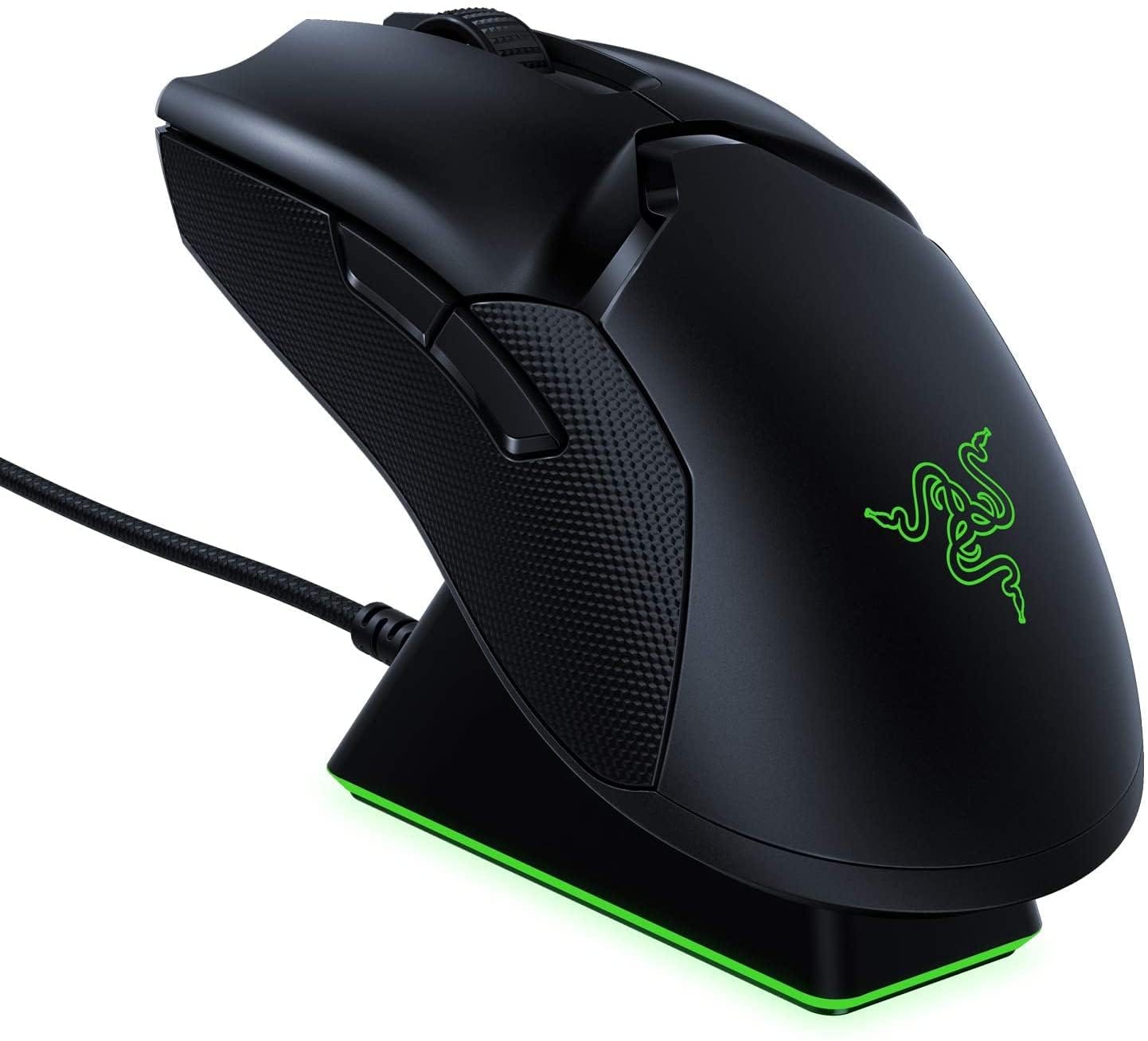
The Razer Viper Ultimate has been a fan-favorite among competitive gamers since launch, promising lag-free wireless performance in a featherweight, ambidextrous shell. But with newer mice flooding the market, is the Viper Ultimate still a smart buy today? In this in-depth review, we break down its specs, real-world performance, build quality, value, and competitors to help you decide whether the Viper Ultimate remains the right wireless gaming mouse for your setup.. For a Prefer a larger, right-handed ergonomic shape with extra buttons and RGB? The Corsair Dark Core RGB Pro Wireless offers a feature-rich alternative., consider our Corsair Dark Core RGB Pro Wireless.
Key Features and Specifications
The Razer Viper Ultimate is designed to deliver tournament-grade performance without cords. It marries a low-profile, ambidextrous shape with Razer’s speedy wireless tech and optical switches. Here are the essentials:
- Sensor: Razer Focus+ Optical Sensor with up to 20,000 DPI, 650 IPS tracking speed, 50G acceleration, and 99.6% resolution accuracy.
- Switches: Razer Optical Mouse Switches (Gen 1) featuring infrared actuation for near-zero debounce delay, rated for up to 70 million clicks.
- Wireless: Razer HyperSpeed 2.4 GHz for low latency and robust signal; wired mode via Speedflex cable.
- Polling Rate: Up to 1000 Hz (1 ms). No 8K polling support.
- Weight: Approx. 74 g (without cable), no honeycomb cutouts.
- Battery Life: Up to 70 hours (lighting off). Charges via included cable or optional RGB charging dock.
- Buttons: 8 programmable inputs (L/R, scroll click, two side buttons on each flank, and a DPI/profile switch on the underside).
- Feet: 100% PTFE skates for smooth glide.
- Dimensions: ~126.7 mm (L) x 66.2 mm (W) x 37.8 mm (H).
- Onboard Memory: Up to 5 profiles stored on the mouse.
- Lighting: Modest Razer logo illumination; RGB on the dock (if using the docked bundle).
- Software: Razer Synapse 3 for Windows enables DPI steps, macros, surface calibration, lift-off distance, and power settings. Limited Mac functionality.
- Connectivity Notes: No Bluetooth. Wireless uses the USB-A Hyperspeed receiver (can sit in the dock for best signal). Charging port is recessed Micro‑USB.
- Warranty: Typically 2 years (varies by region).
Taken together, the Viper Ultimate’s spec sheet remains competitive, especially if you prioritize a low-latency 2.4 GHz connection, optical switches, and an ambidextrous, low-profile shape that suits claw and fingertip grips.
Performance and Quality
In gameplay, the Razer Viper Ultimate still feels snappy and reliable. Razer’s HyperSpeed connection is among the better wireless implementations for competitive titles. Input delay is effectively on par with wired mice to the point where most players cannot discern a difference. Aim tracking in fast-paced shooters feels responsive, with minimal microstutter or signal dropouts when the receiver is placed correctly (ideally in the dock or on an extension near the mouse mat).
The Focus+ sensor remains a strong performer. While newer Razer sensors (like Focus Pro 30K) push higher CPI numbers and extra firmware tricks, the Focus+ delivers excellent real-world precision. Flick shots and micro-corrections translate predictably, and tracking tests show solid consistency across common mousepads. The sensor handles fast hand speed well (up to 650 IPS), and we observed no problematic angle snapping or hardware acceleration. Lift-off distance is adjustable to keep your cursor steady during lift-and-place movements.
Click feel is clean and fast thanks to the optical switches. Because they use an infrared light beam rather than metal contacts, there’s no traditional debounce delay and less risk of double-click failures over time. Actuation is crisp with a light-to-medium force, making rapid taps and burst firing natural. Side buttons are placed sensibly; the fact that there are buttons on both sides is fantastic for left-handed users, and right-handers can disable the off-side to prevent accidental presses.
Scroll wheel tactility is moderately defined, with steps that are neither too tight nor too loose. The middle-click has enough resistance to prevent misfires but may feel stiff if you rely heavily on wheel-click actions. Glide from the PTFE feet is smooth and consistent. If you’re coming from a heavier mouse, the 74 g weight—while not ultralight by 2025 standards—is light enough to make a noticeable difference in fatigue and flick speed.
Wireless stability is excellent. Razer’s receiver handshakes with the mouse quickly on wake, and we did not encounter interference issues in typical home setups. Battery life holds up well for multi-day sessions with lighting off. With Chroma enabled, you’ll need to recharge more often, but popping the mouse onto the charging dock between matches easily offsets this. Charge times are reasonable and top-ups are convenient with the dock’s magnetized cradle.
In short, the Viper Ultimate’s performance still feels competitive. It’s not the absolute bleeding edge anymore, but for most players—including ranked FPS fans—it delivers the responsiveness required for high-level play.
Design and Build Quality
The Viper Ultimate’s signature is its ambidextrous, low-profile shape. It’s flat from front to back with subtle curves on the sides, making it a versatile option for claw and fingertip grips. Palm grippers with larger hands may find it a touch too low, but small-to-medium hands can palm it comfortably. The shell’s uniformity helps left- and right-handed players achieve consistent control.
At ~74 g, the Viper Ultimate is light without resorting to perforations. Weight distribution feels balanced; the mouse neither tips forward nor feels tail-heavy. Combined with the large PTFE feet, this makes for effortless glide across cloth or hybrid pads.
The coating is a lightly textured matte finish that does a good job resisting fingerprints and providing grip without being abrasive. Over time, as with most coatings, high-contact areas can polish slightly, but we didn’t experience flaking or uneven wear in normal use. The top shell is rigid with minimal flex or creak; sidewalls feel robust and don’t exhibit hollow resonance when tapped.
Button implementation is solid. Primary clicks have minimal travel and a crisp return. The side buttons protrude enough for easy identification by feel, and their separate housings reduce the chance of mushiness. Because there are side buttons on both sides, southpaws get a rare premium option. For right-handers, disabling the right-side buttons in software helps avoid unintended presses during aggressive grips.
The scroll wheel uses a rubberized, textured ring for grip. Its step definition hits a useful middle ground for both weapon switching and web scrolling. While not the most premium wheel in feel, it is consistent and reliable.
Connectivity and charging design are a mixed bag in 2025. The charging port is recessed Micro‑USB with a keyed cutout, encouraging you to use the included Speedflex cable. It’s supple and low-drag for wired play during charging, but the lack of USB‑C is a dated concession. On the upside, the RGB charging dock is one of the best quality-of-life inclusions in any mouse bundle, doubling as a receiver extension to minimize latency and interference.
Overall durability is strong. Razer’s fit and finish on the Viper Ultimate have held up well over years of widespread use. Switch longevity, shell integrity, and skates all inspire confidence in daily play and travel.
Pros and Cons
- Pros
- Lag-free HyperSpeed 2.4 GHz wireless feels as responsive as wired.
- Focus+ sensor offers excellent real-world precision and tracking stability.
- Optical switches enable crisp clicks and mitigate double-click issues.
- Ambidextrous shape with side buttons on both sides—rare and genuinely left-hand friendly.
- Lightweight (about 74 g) with solid build—no creaks, no honeycomb cutouts.
- PTFE feet glide smoothly; includes onboard memory for 5 profiles.
- Optional RGB charging dock is convenient and doubles as a receiver extender.
- Strong battery life (up to 70 hours with lighting off).
- Cons
- Uses Micro‑USB instead of USB‑C; recessed port limits third-party cables.
- Not as light as newer ultralights (sub-60 g options exist).
- 1000 Hz polling only; no 8K option for extreme eSports tuning.
- DPI/profile button is on the underside—clean look but less convenient for on-the-fly DPI changes.
- Razer Synapse 3 features are Windows-first; Mac users get limited support.
Value Proposition and Pricing
At launch, the Razer Viper Ultimate commanded a premium—typically $149.99 with the dock and sometimes a dockless option closer to $129.99. Today, it often sees significant discounts, particularly during seasonal sales. This shift transforms the Viper Ultimate from a high-end splurge into a compelling value buy, especially if you find the dock bundle for under $100.
What you’re getting is a proven, tournament-ready mouse with an included charging ecosystem, optical switches, and a shape that works for a wide range of grips—plus ambidextrous side buttons that competitors rarely match. While it lacks newer bells and whistles (USB‑C, sub-60 g weight, ultra-high polling), those extras don’t necessarily translate to noticeable improvements for most players.
If your budget is tight and you’re choosing between a brand-new budget wireless and the Viper Ultimate on sale, the Viper Ultimate’s sensor quality, switch reliability, and dock convenience frequently justify picking it. On the other hand, if you’re aiming for the absolute lightest and latest tech, Razer’s newer Viper and DeathAdder variants or Logitech’s Superlight series may be worth the extra spend.
Comparison with Alternatives
The Viper Ultimate competes with a crowded roster of wireless esports mice. Here’s how it stacks up against notable options:. If you're considering alternatives, our NZXT Lift Wireless review covers a If you want a more budget-friendly lightweight wireless alternative with strong precision and comfort, consider the NZXT Lift Wireless..
- Razer Viper V2 Pro
- Why choose it: Considerably lighter (~58 g), newer Focus Pro 30K sensor, better battery efficiency, USB‑C, updated feet and coating, improved click feel.
- Why skip it: More expensive, fewer side buttons (right-side buttons removed), no dock included by default.
- Verdict: If you want cutting-edge Razer performance and the lightest possible feel, the V2 Pro is superior. But it costs significantly more, and left-handers lose right-side buttons.
- Logitech G Pro X Superlight / Superlight 2
- Why choose it: Extremely light (63 g and ~60 g respectively), excellent HERO sensors, great battery life, refined shape beloved by pros.
- Why skip it: No side buttons for left-handers; no dock; higher price.
- Verdict: The Superlight line is the go-to for many pro players. If you prefer Logitech’s shape and want the lightest feel, it’s fantastic—just note the lack of true ambidextrous side buttons and dock.
- Razer DeathAdder V3 Pro
- Why choose it: Ergonomic right-handed shape, very light for its size, top-tier sensor and battery performance, USB‑C.
- Why skip it: Not ambidextrous; larger shell suits palm and claw better than fingertip.
- Verdict: If you want a right-handed ergo alternative with elite performance, the DA V3 Pro is a superb choice—though it’s pricier than a discounted Viper Ultimate.
- Glorious Model O Wireless
- Why choose it: Typically more affordable, lightweight, popular shape for claw and fingertip, USB‑C.
- Why skip it: Sensor and wireless performance have improved over time but generally trail Razer and Logitech for competitive consistency; honeycomb design isn’t for everyone.
- Verdict: A strong value play if you want light and cheap with USB‑C. For hardcore ranked play, the Viper Ultimate’s wireless and switches feel more dependable.
In head-to-head terms, the Viper Ultimate’s unique strengths are its ambidextrous side buttons, dock-based convenience, and still-excellent HyperSpeed wireless. Its primary weaknesses compared with today’s flagships are its Micro‑USB port and its heavier weight relative to cutting-edge ultralights.
Who Should Buy the Razer Viper Ultimate
The Viper Ultimate makes sense for a wide range of players, but it shines in specific scenarios:
- Competitive FPS players who value low-latency 2.4 GHz wireless and a shape suited to claw or fingertip grips.
- Left-handed gamers who want true ambidextrous side buttons without sacrificing top-tier performance.
- Users who love dock convenience—if you want to avoid fumbling with cables, the Razer dock is a quality-of-life upgrade that keeps your desk tidy and your mouse charged.
- Buyers chasing value during sales. When discounted, the Viper Ultimate offers a premium experience at midrange pricing.
- People who prefer solid shells over perforated designs but still want a sub-80 g mouse.
On the other hand, you may want to look elsewhere if:
- You demand the lightest possible mouse (sub-60 g). Consider the Razer Viper V2 Pro or Logitech Superlight series.
- You require USB‑C charging or very frequent wired use with third-party cables.
- You need 8K polling or the newest sensor tech for niche tuning preferences.
- You’re a large-hand palm gripper who prefers taller, more contoured shells (Razer DeathAdder V3 Pro may fit better).
- You rely on macOS software; Synapse 3 is Windows-first, and advanced features are limited on Mac.
Conclusion
The Razer Viper Ultimate remains a superb wireless gaming mouse that still punches above its weight—literally and figuratively. Its HyperSpeed connection, optical switches, and Focus+ sensor deliver reliable competitive performance, while the ambidextrous shape and optional dock add meaningful versatility and convenience. Yes, Micro‑USB and a 74 g weight show its age, but when priced right, the Viper Ultimate is an easy recommendation for FPS enthusiasts, left-handed players, and anyone seeking a proven, tournament-ready wireless mouse.