
Razer Ornata V3 Gaming Keyboard Review: Low-Profile Mecha-Membrane Comfort, RGB Flair, and Real-World Value
Introduction
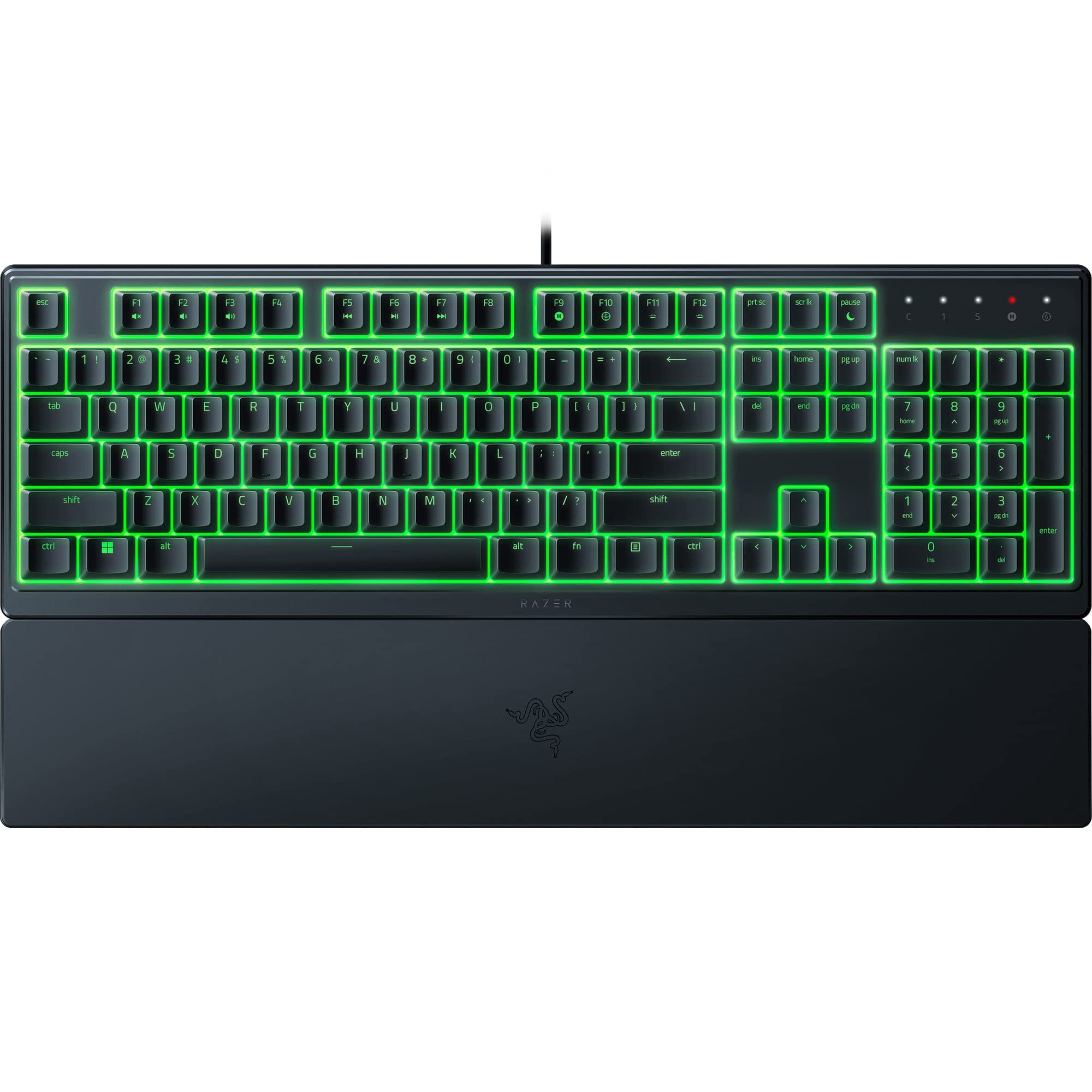
The Razer Ornata V3 is designed for gamers who want the comfort of a membrane keyboard with a crisper, more tactile feel—without paying mechanical keyboard prices. This latest iteration modernizes Razer’s well-known mecha-membrane approach with a slimmer profile, upgraded keycaps, and Chroma RGB, aiming squarely at value-minded buyers. If you’re weighing performance, comfort, and aesthetics on a tight budget, the Ornata V3 makes a strong case to be your everyday gaming and typing companion.. For a In a discussion about size and layout, suggest the HyperX Alloy FPS Pro for readers who’d trade the Ornata V3’s full‑size comfort for a compact TKL mechanical board better suited to FPS desk space and key travel., consider our HyperX Alloy FPS Pro.
Key Features and Specifications
The Ornata V3 takes Razer’s hybrid “mecha-membrane” concept and packages it in a low-profile, full-size deck that emphasizes comfort and practicality. Below are the highlights that matter most to potential buyers:
- Switch type: Razer mecha-membrane (hybrid). Tactile, soft-cushioned feel with a light, clicky feedback compared to pure membrane keys.
- Profile and travel: Low-profile keycaps with shorter key travel for faster actuation and reduced finger fatigue over long sessions.
- Layout: Full-size layout with a number pad and dedicated media controls for quick volume and playback adjustments.
- Lighting: Razer Chroma RGB with multi-zone (10-zone) backlighting and 16.8 million colors, configurable in Razer Synapse.
- Keycaps: UV-coated ABS keycaps for improved fade and scratch resistance; clear, legible legends that resist shine longer than standard ABS.
- Ergonomics: Detachable, soft-touch wrist rest designed to align wrists and reduce strain during extended gaming or typing.
- Spill resistance: Spill-resistant design for accidental splashes, offering extra peace of mind at the desk.
- Connectivity: Wired USB-A connection for dependable, low-latency input; fixed cable.
- Polling rate: Up to 1000 Hz polling for responsive input in fast-paced games.
- Anti-ghosting: Gaming-grade anti-ghosting with multi-key rollover (commonly up to 10-key), allowing reliable simultaneous inputs.
- Software: Razer Synapse support for lighting effects, macros, key remaps, and profile management.
- Feet and angles: Two-stage flip-out feet to fine-tune typing angle and comfort.
While the Ornata V3 doesn’t try to compete with premium mechanical boards on switch swappability or metal chassis rigidity, its spec sheet emphasizes comfort, usability, and reliability in a price band where many rivals deliver fewer creature comforts.
Performance and Quality
The Ornata V3’s defining trait is its mecha-membrane switch design. In practice, the keys feel distinctly livelier than standard membrane domes but more cushioned than true mechanical switches. The hybrid mechanism provides a palpable tactile bump and a subtle, clicky feedback, yet retains the soft landing that keeps noise down and fingers fresher during long sessions. The shorter travel from the low-profile keycaps contributes to a snappier, quicker feel and helps reduce the time between intention and actuation.
In fast-paced shooters and MOBAs, this translates to consistent, predictable inputs. The 1000 Hz polling rate ensures responsive keystrokes, while anti-ghosting prevents dropped inputs during frantic combos. Most players won’t notice input lag, and the keyboard maintains reliable behavior even under aggressive multi-key presses. The Ornata V3 isn’t built for ultra-competitive esports purists who demand hot-swappable mechanical switches and ultra-light actuation, but it is more than capable for mainstream gaming and enthusiastic ladder climbing.
Typing performance lands in the sweet spot for mixed use. The tactile bump helps you avoid bottoming out, and the sound profile is office-friendly compared with clickier mechanical boards. Bottoming out is still possible if you type hard, but the low-profile design plus cushioned membrane layer softens impacts. As a result, the Ornata V3 is a solid choice for students or professionals who want one keyboard that excels at both emails and evening raid nights.
Software support via Razer Synapse remains a core strength. You can create per-app profiles, bind macros to function rows or less-used keys, and layer in lighting effects that react to in-game events where supported. The lighting zones, while not per-key, still allow tasteful patterns, static hues, or reactive ripples that make the deck feel alive without overcomplicating setup.
Quality control is commendable for the price bracket. Key wobble is modest, stabilizers on larger keys keep rattle in check better than many entry-level boards, and the UV-coated keycaps resist fading. Over time, the mecha-membrane switches are not as durable as top-tier mechanical switches, but longevity is competitive for the segment. Most users will see years of reliable service with ordinary care.
Design and Build Quality
Razer leans into a clean, low-profile aesthetic. The deck is slimmer than many full-size gaming keyboards, freeing desk space visually and improving wrist posture. The plastic chassis feels sturdy for its class, with minimal flex during normal typing. A matte top surface resists fingerprints better than glossy plastics, and the keycap legends shine brightly with the Chroma backlight.
The detachable wrist rest is a highlight. It’s cushioned just enough to be supportive without feeling squishy, encouraging a neutral wrist angle that can make long sessions more comfortable. Whether you’re drafting documents or running dungeon queues, the rest makes a noticeable difference. Attachment is stable, and removing it is quick when you need to reclaim desk space.
Razer’s UV-coated ABS keycaps deserve mention. While not as inherently durable as PBT, the coating meaningfully slows shine and legend wear compared to basic ABS sets you often find in this price range. Legends remain crisp and readable, and the low-profile design keeps your fingers closer to the switches for quicker actuation.
The Ornata V3’s multi-zone RGB lighting looks great under low-profile caps, dispersing light evenly across rows. If you prefer subtlety, you can dial back animation intensity or use a single-color theme; if you enjoy flair, Synapse puts dozens of effects at your fingertips. Because lighting is zone-based rather than per-key, it’s simpler to configure but less granular if you like intricate, per-key layouts for productivity or in-game overlays.
Practical touches include two-stage incline feet, clear indicator LEDs, and a sturdy, fixed USB cable that keeps latency low and ensures a consistent connection. There’s no USB passthrough or detachable cable at this price, and the chassis remains predominantly plastic, but nothing feels flimsy or out of place for a value-focused gaming board.
Pros and Cons
Every keyboard involves trade-offs. Here’s what stands out after extended use:
Pros
- Comfortable hybrid feel: Mecha-membrane switches provide a tactile, cushioned experience that’s quieter than many mechanicals but livelier than membrane-only boards.
- Low-profile ergonomics: Shorter key travel and a detachable wrist rest reduce fatigue during gaming and typing marathons.
- Chroma RGB with zones: Attractive lighting with straightforward configuration; effects sync nicely with other Razer gear.
- UV-coated keycaps: Better durability and legend clarity than typical ABS at this price.
- Spill resistance: Extra protection against accidental splashes adds real-world durability.
- Solid software: Synapse enables flexible macros, remaps, profiles, and lighting control.
- Quiet enough for shared spaces: Friendlier acoustics than clicky mechanical switches in dorms, offices, and voice chats.
Cons
- Not fully mechanical: Lacks the crispness, longevity, and customization (e.g., switch swaps) of mechanical boards.
- Zone lighting, not per-key: Less granularity for complex layouts and per-key highlights.
- Wired only: No Bluetooth or 2.4 GHz wireless option for cable-free setups.
- Plastic chassis: No aluminum top plate; overall rigidity is good for the price but not premium.
- Fixed cable: No detachable USB-C, which some users prefer for portability and replacement.
Value, Pricing, and Who Should Buy It
In a market packed with entry-level mechanicals and budget membranes, the Ornata V3 stakes out a smart middle ground. Typically found around the mid-range of budget-friendly pricing, it undercuts many mechanical keyboards with RGB and premium chassis materials while delivering a more refined feel than the least expensive membrane options. Sales often bring the price into impulse-buy territory, and Razer’s wide retail presence makes it easy to find.
The value proposition is clear if you prioritize comfort and practicality. The low-profile design, wrist rest, zone-based RGB, and spill resistance create a polished daily driver that transitions smoothly between work and play. It’s especially appealing if you’re sensitive to the sharper sound or longer travel of mechanical switches, or if you share a room and want to be considerate with noise levels.
On the flip side, if you’re chasing the most precise, customizable switch feel or you want hot-swappable sockets, per-key RGB mapping, and metal construction, you’ll likely want to spend more on a mechanical alternative. The Ornata V3 does not try to be a mechanical keyboard substitute for hobbyists; it’s a comfort-first gaming board for mainstream users who value ease of use and consistent performance.
Who should buy it?
- New PC gamers seeking a reliable, comfortable first “gaming” keyboard with RGB at a sane price.
- Mixed-use buyers who type all day and game at night, and prefer a quieter, cushioned feel over mechanical clack.
- Students and office users who want spill resistance, good ergonomics, and clean aesthetics without overpaying.
- Razer ecosystem owners who want Chroma lighting that syncs seamlessly with headsets, mice, and mouse mats in Synapse.
Comparison with Alternatives
The Ornata V3’s closest competition includes both membrane and entry-level mechanical boards. Here’s how it stacks up against key rivals:. If you're considering alternatives, our Razer BlackWidow V3 review covers a When contrasting mecha‑membrane feel with true mechanical switches, mention that those who want crisper actuation, higher durability, and full mechanical feedback can step up to the Razer BlackWidow V3..
- Razer Cynosa V2/Chroma: Pure membrane, typically softer and less tactile than the Ornata’s hybrid switches. Often features per-key RGB on some variants. If you prioritize a very soft, quiet press and per-key lighting over tactile feedback, a Cynosa model can be compelling—but the Ornata V3 generally feels snappier and more satisfying to game and type on.
- Corsair K55 RGB Pro: Membrane with macro keys and zone lighting. The K55 offers handy macro columns for MMO players, but its typing feel is closer to basic membrane. Ornata V3 wins on tactile feedback and wrist-rest comfort; K55 wins if you need dedicated macro keys on a tight budget.
- Logitech G213: Membrane, spill-resistant, and often discounted. It’s a solid value choice with good software support through G HUB, but the Ornata V3’s mecha-membrane switches and low-profile ergonomics deliver a livelier, faster feel.
- HyperX Alloy Core RGB: Membrane with a durable frame and attractive lighting. Similar price ballpark, but again the Ornata V3’s hybrid switch gives it an edge in responsiveness and tactile definition.
- Entry-level mechanical keyboards (e.g., Redragon K552, RK61, or budget Outemu/Gateron boards): Mechanical options can be similarly priced during sales and offer crisper actuation and, often, hot-swappability. However, they’re usually louder, lack wrist rests, and may not have the same software polish or ecosystem integration. If you crave mechanical precision and customization, a budget mechanical can be the better long-term play. If you want quieter comfort, integrated wrist support, and easy lighting control, the Ornata V3 is the safer choice.
- Razer BlackWidow/Huntsman series: These are true mechanical or optical-mechanical keyboards at higher price tiers. They provide superior switch longevity and per-key responsiveness, along with more premium materials in some models. They cost more, and many users won’t strictly need what they offer—making the Ornata V3 a smart step for anyone not ready to jump into pricier mechanical territory.
In short, the Ornata V3 isn’t trying to beat mechanical keyboards at their own game. Instead, it competes by being more comfortable, quieter, and more affordable than many mechanicals—while feeling snappier and more tactile than pure membrane rivals. That combination is its competitive advantage.
Conclusion
The Razer Ornata V3 is a thoughtfully balanced gaming keyboard for everyday users. Its hybrid mecha-membrane switches, low-profile ergonomics, spill resistance, and Chroma RGB make it a compelling all-rounder at a friendly price. You don’t get per-key lighting, hot-swappable switches, or a metal frame, but you do get comfort, consistency, and strong software support. If you value livelier-than-membrane feel without diving into full mechanical territory, the Ornata V3 is an easy recommendation.