
Razer Naga Pro Wireless Gaming Mouse Review: Modular MMO Mastery With True Wireless Freedom
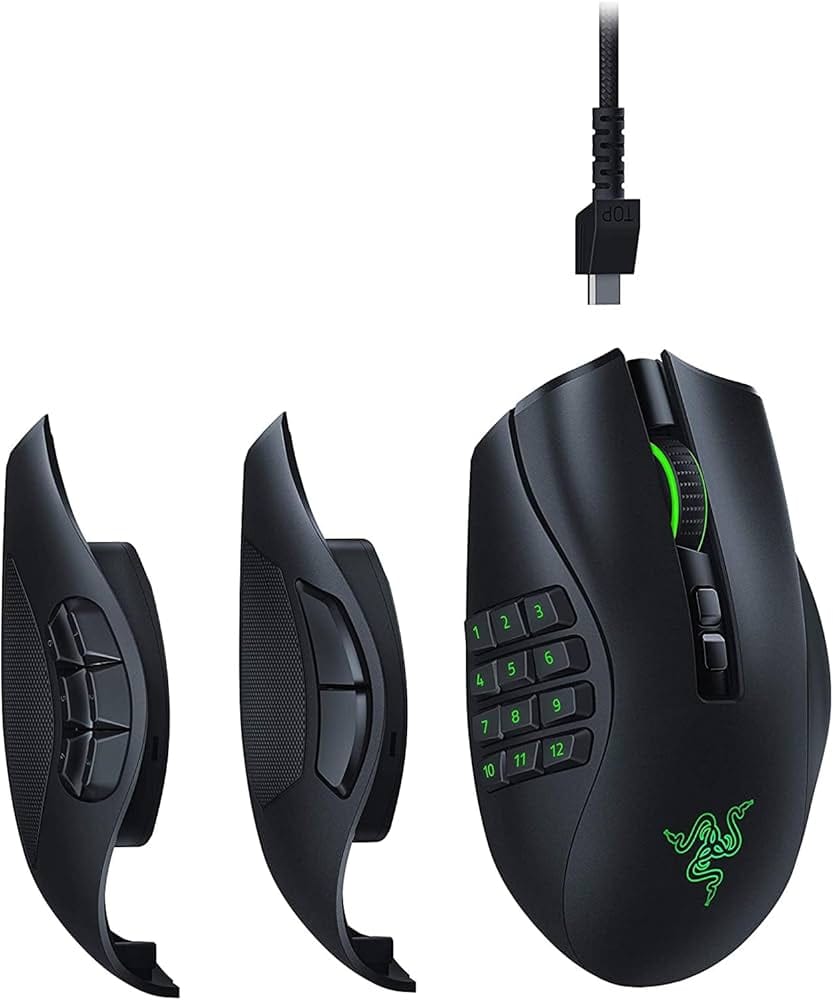
Introduction
The Razer Naga Pro Wireless Gaming Mouse is a modular, high-end option designed for MMO, MOBA, and multi-genre gamers who crave flexibility without sacrificing precision. With swappable side plates, low-latency HyperSpeed wireless, and Razer’s Focus+ 20K sensor, it aims to be a do-it-all powerhouse for complex keybinds and productivity macros. This review covers its features, performance, ergonomics, pros and cons, value, and how it stacks up against alternatives to help you decide if it belongs on your desk.
Key features and specifications
The headline appeal of the Razer Naga Pro is versatility. Three magnetic side plates let you switch layouts in seconds to match the game you’re playing—and it all happens on a proven wireless platform with strong battery life and mature software. Below are the core specs and capabilities buyers should know.
- Modular side plates: 2-button (FPS), 6-button (MOBA), and 12-button (MMO) plates included; tool-less, magnetic attachment.
- Sensor: Razer Focus+ 20,000 DPI optical sensor with on-the-fly sensitivity adjustment, lift-off/landing distance tuning, and asymmetric cut-off.
- Wireless: Razer HyperSpeed 2.4 GHz (low-latency) and Bluetooth; wired mode via Razer Speedflex cable (for charging and play).
- Battery life: Up to approximately 100 hours on HyperSpeed and about 150 hours on Bluetooth (lighting off; actual battery life varies with usage and RGB).
- Polling rate: Up to 1000 Hz in wireless and wired modes.
- Switches: Razer Optical Mouse Switches (generation used in Naga Pro) rated for long durability and near-zero debounce delay.
- Programmable controls: Up to 20 programmable inputs (with the 12-button plate), including Hypershift secondary layer.
- Onboard memory: Store up to 5 profiles for DPI stages, lighting, and keymaps (profile-dependent; advanced features may require software).
- Lighting: Razer Chroma RGB with per-zone customization (logo, scroll wheel, plate illumination where applicable).
- Feet and glide: 100% PTFE feet for smooth, consistent glide.
- Build and size: Right-handed ergonomic shell; approximately 119 x 74 x 43 mm, around 117 g (without cable; side plate influences weight slightly).
- Connectivity niceties: USB wireless dongle with onboard storage, Bluetooth pairing switch, and profile/DPI cycling buttons.
- Software: Razer Synapse (Windows/macOS) for keybinds, macros, DPI, LOD, and lighting.
- Charging: Compatible with Razer Mouse Dock Chroma (sold separately); charges via included cable.
- Warranty: Typically 2-year limited warranty from Razer (region-dependent).
In short, the Naga Pro packages a familiar, full-size Naga shape with a modern sensor, reliable wireless, and a side-plate system that meaningfully changes how the mouse behaves from game to game.
Performance and quality
In moment-to-moment gameplay, the Naga Pro delivers the responsiveness you would expect from a premium wireless mouse. Razer’s HyperSpeed connection feels snappy and stable, with latency comparable to good wired mice in our experience. For MMO rotations and complex MOBA inputs, that stability matters; it keeps ability activations consistent even when you’re spamming sequences across the 6-button and 12-button plates.
The Focus+ 20K optical sensor remains a top-tier performer. Tracking is crisp across mousepads with excellent micro-aim control. Lift-off distance is adjustable and well-implemented, and the asymmetric cut-off helps avoid cursor drift during lift-and-place movements. If you play at low sensitivities, you’ll appreciate the predictable re-engagement behavior. For FPS, the 2-button plate keeps thumb interactions simple, so you can focus on raw aim and movement without accidental inputs.
Switch feel is sharp and light, thanks to Razer’s optical switches. They register quickly and avoid the double-click issues that can occur over time with some mechanical switch designs. The scroll wheel is defined and tactile without being overly stiff, making weapon swaps and inventory management reliable. Button pre-travel is low on the main clicks, and side-button actuation on the MMO and MOBA plates has a clear, discernible press that’s neither mushy nor overly stiff.
Battery performance is strong for a feature-rich RGB mouse. Using HyperSpeed with subdued lighting, many users can go several days to a week between charges. On Bluetooth, which is best reserved for productivity, battery life stretches further but latency increases, so it’s not ideal for competitive play. Charging via the included cable is quick enough for top-ups, and the mouse is usable in wired mode while charging. If you have Razer’s Mouse Dock Chroma, drop-in charging is convenient, though it’s an optional accessory.
Software polish is mature. Synapse offers advanced mapping, macros, DPI stage tuning, surface calibration, and lighting control. The Hypershift layer doubles your available commands, which is especially useful when mapping complex rotations or utility abilities. While Synapse is heavier than some competitors’ software and requires running in the background for certain features, profile storage on-board helps when you’re moving between PCs or prefer to close the app after setup.
Overall quality control is solid. The side plates lock in with consistent alignment, there’s minimal creak or flex in the shell under normal grip pressure, and glide is smooth thanks to large PTFE feet. The Naga Pro isn’t a featherweight, but its mass is evenly distributed, and that stability is welcome in MMO contexts where precision and repeatability matter more than pure flick speed.
Design and build quality
The Naga Pro is unmistakably a Naga: a tall, supportive right-handed shape that favors palm and relaxed claw grips. The back hump fills the hand and guides your palm into a neutral, comfortable posture during long raids or grind sessions. The rubberized side textures and gently flared right side help with control when lifting for repositioning. For medium to large hands, the fit is excellent; very small hands may find reaching the furthest rows on the 12-button plate a stretch.
The modular side plates are the star. They attach magnetically with a precise fit, and swap in seconds without tools. The 12-button plate is arranged in a grid with slight sculpting, so you can identify rows by feel. The 6-button plate uses a circular layout; it’s superb for MOBAs, action RPGs, and shooters where you want more than two buttons without overcrowding your thumb. The 2-button plate is clean and low-profile, maximizing grip consistency and minimizing accidental presses during FPS play.
Build materials are premium. The matte plastic shell resists fingerprints reasonably well, and the seams are tight. The scroll wheel has distinct steps and rubber tread for grip, and the wheel-click is balanced—not too stiff, not too light. Underneath, large PTFE feet ensure smooth glide on cloth and hybrid pads. The included Speedflex cable is supple compared to older braided cables, so if you do play while charging, the cable won’t fight you.
At roughly 117 g, the mouse is significantly heavier than today’s ultralight FPS mice, but that’s a trade-off for modularity, a bigger battery, and the dense button arrays. In practice, for MMOs and MOBAs, the weight feels more like an anchor for consistent inputs than a hindrance. Still, if you’re used to sub-70 g mice, be prepared for an adjustment period.
Practical touches include onboard dongle storage, a profile/DPI button on the bottom to prevent accidental changes mid-match, and clean underside routing so nothing scrapes during fast swipes. The charging port is recessed, which keeps the connection secure but uses a Micro‑USB style connector on this model rather than modern USB‑C—a minor annoyance in 2025 if you’ve standardized on USB‑C cables.
Pros and cons
- Pros: Modular side plates provide genuine multi-genre flexibility; you essentially get three mice in one.
- Pros: Focus+ 20K sensor and HyperSpeed wireless feel fast, accurate, and dependable.
- Pros: Up to 20 programmable inputs with Hypershift layer unlock deep MMO/MOBA customization and productivity macros.
- Pros: Comfortable, supportive shape for long sessions; excellent for palm or relaxed claw grips.
- Pros: Strong battery life for a feature-rich RGB mouse; usable while charging.
- Pros: Robust build quality with tight plate fitment and smooth PTFE feet.
- Cons: Heavier than many modern gaming mice; not ideal for ultra-low-latency flick-centric FPS purists.
- Cons: Uses a recessed Micro‑USB charging port instead of USB‑C.
- Cons: Razer Synapse is powerful but resource-heavier than some competing software; certain advanced features require it to run.
- Cons: Right-handed only; very small hands may struggle with the far rows on the 12-button plate.
- Cons: Premium price, especially if you add the optional charging dock.
Value proposition and pricing
At launch, the Razer Naga Pro carried a premium MSRP around the top of the market for wireless MMO mice. With newer models available, street pricing often fluctuates—sales can drop it meaningfully below the original MSRP. Even at full price, its value case rests on two pillars: genuine versatility and long-term durability. If you play multiple genres or switch between gaming and productivity frequently, the three side plates can consolidate what might otherwise be two or three separate mice into one device.
Battery longevity and optical switches also support long-term value. Optical switches mitigate common double-click failure modes found in some mechanical designs, potentially extending the functional lifespan. PTFE feet are replaceable, and the shell has proven wear resistance in daily use. While you don’t get a charging dock in the box, the mouse is compatible with Razer’s dock if you want a convenient, always-ready setup later on.
Razer typically includes a 2-year limited warranty. Factoring in the warranty, mature software, and a feature set that remains competitive years after release, the Naga Pro continues to represent strong value for MMO and MOBA players—especially when discounted. If budget is tight and you don’t need wireless or modularity, you can save significantly with wired alternatives; but if you want wireless freedom plus true button flexibility, the Naga Pro’s proposition is compelling.
Comparison with alternatives
The MMO/MOBA mouse market has expanded, but the Naga Pro still holds a distinct niche thanks to its modularity and reliable wireless. Here’s how it compares to popular options.. If you're considering alternatives, our Corsair Scimitar RGB Elite review review covers a When comparing MMO options, mention it as a fixed 12‑button grid alternative if you don’t need modular plates or wireless..
- Razer Naga V2 Pro: The successor brings newer internals (including a more advanced sensor, improved switches, and additional wheel features) and refined battery/polling options. If you want the latest tech and don’t mind paying more, the V2 Pro is the most feature-rich Naga. If you can find the Naga Pro at a good discount, performance for most users remains extremely close in real-world play, making the older model a better value.
- SteelSeries Aerox 9 Wireless: A lightweight wireless MMO mouse with a honeycomb shell and a 12-button side panel. It’s noticeably lighter than the Naga Pro and great for players who want MMO buttons without the heft. However, it lacks the Naga’s modular side plates and the ergonomic breadth they afford across genres.
- Logitech G604 Lightspeed: Excellent battery life, ergonomic right-handed shape, and a cluster of thumb buttons (not a 12-button grid). It’s fantastic for MOBAs, battle royales, and productivity, but it isn’t a full MMO grid solution. The Naga Pro’s 12-button plate gives it the edge for MMORPG keybind-heavy rotations.
- Corsair Scimitar RGB Elite (wired): A classic 12-button grid with a sliding macro keypad for thumb reach customization. While it’s competitively priced and comfortable, it lacks wireless freedom and the Naga Pro’s plate modularity.
- Logitech G600 (wired): A budget-friendly MMO option with a 12-button grid and a third-click “G-Shift” button for layers. It’s a strong value if you don’t need wireless. The Naga Pro delivers better wireless performance, more refined software layering (Hypershift), and modular plates for non-MMO use.
In essence, if you exclusively play MMOs and always want a 12-button grid, a dedicated MMO mouse (wired or wireless) can be cheaper or lighter. If you move between genres, the Naga Pro’s plate system gives it a flexibility advantage few rivals match.
Who should buy this product
The Razer Naga Pro is ideal for gamers who alternate between MMOs, MOBAs, ARPGs, and shooters and want one mouse that adapts to the game at hand. Its 12-button plate lets you bind rotations, consumables, and utility without reaching for the keyboard, while the 6-button plate shines in games with a mix of skills and quick items. For FPS, the 2-button plate keeps the thumb area clean, ensuring consistent grip and minimal misclicks.
It also suits power users and creators. If you spend time in productivity apps, editing suites, or creative software, the button arrays are fantastic for macro workflows. Hypershift can effectively double your commands per plate, and onboard memory lets you carry those mappings between PCs with minimal friction. In terms of hand size and grip, medium to large hands using palm or relaxed claw will get the most ergonomic benefit, while very small hands should test reach on the 12-button grid before committing.
If you prioritize ultralight weight, need ambidextrous shaping, or require USB‑C charging above all else, you may be happier with other mice. But for players who value modularity, wireless reliability, and deep customization, the Naga Pro remains one of the most adaptable premium mice you can buy.
Conclusion
The Razer Naga Pro Wireless Gaming Mouse delivers on its promise of modular versatility, pairing a top-tier sensor and dependable HyperSpeed wireless with three genuinely useful side plates. It’s comfortable for long sessions, offers deep customization through Synapse, and provides enough battery life for multi-day play. While it’s heavier than ultralight competitors and sticks with Micro‑USB, its strengths in MMO/MOBA flexibility and all-around polish make it an easy recommendation—especially when you can catch it at a discount.. For those interested in Suggest as a lightweight, ambidextrous wireless choice for FPS‑focused players who don’t need an MMO side panel., check out our Razer Viper Ultimate.