
Razer Huntsman Elite Review: Optical Speed Meets Chroma Flair for Serious PC Gamers
Introduction
The Razer Huntsman Elite has been a fixture in the premium gaming keyboard space thanks to its optical switches, vibrant Chroma RGB, and distinctive media dial. Positioned as a flagship full-size board, it aims to deliver tournament-grade speed while doubling as a desk centerpiece. In this review, we dig into its key features, day-to-day performance, build quality, and overall value. Whether you’re upgrading an aging board or comparing high-end alternatives, here’s what to expect.
Key Features and Specifications
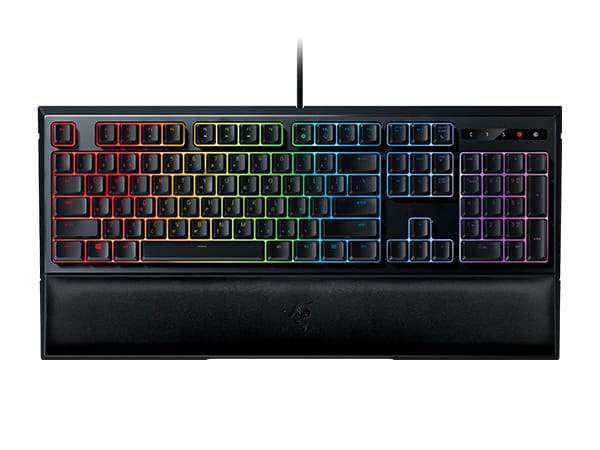
Razer designed the Huntsman Elite to showcase its optical switch technology while wrapping it in a feature-rich chassis. The result is a keyboard that combines speed, durability, and extensive customization with a strong focus on RGB presentation.
Headline Features:
- Razer Optical Switches: Available in Clicky (Purple) and Linear (Red) variants. Both use light-based actuation for ultra-fast response and reduced debounce delay compared with traditional mechanical switches.
- Full-size layout: Standard ANSI layout with function row, dedicated arrow keys, and a numeric keypad for productivity.
- Dedicated media controls: Three media buttons plus a multi-function digital dial for volume, backlight, app control, and custom bindings via Razer Synapse.
- Per-key RGB + underglow: Razer Chroma RGB with 16.8 million colors, per-key lighting, and a four-edge underglow effect including illumination on the magnetic wrist rest.
- Magnetic leatherette wrist rest: Plush, comfortable, and powered lighting zones that extend the keyboard’s underglow.
- Durability: Aluminum top plate and optical switches rated up to 100 million keystrokes.
- Onboard memory + cloud: Save multiple profiles on the keyboard and sync unlimited profiles via Razer Synapse.
- N-Key rollover (NKRO) with anti-ghosting: Reliable registration for rapid, simultaneous keypresses.
- 1000 Hz polling rate: Standard for wired esports keyboards; low input latency when paired with optical actuation.
- Razer Hypershift: Assign a secondary function layer to any key for expanded shortcuts and macros.
- Connectivity: Wired USB with a thick braided cable.
- Software: Configurable through Razer Synapse 3 on Windows; lighting and basic usage work on other platforms, but software features may be limited on macOS.
What’s in the box: Huntsman Elite keyboard, magnetic wrist rest, and quick start guide.
Notes on variants: The original Huntsman Elite is distinct from the standard Huntsman (no underglow/wrist-rest lighting and fewer premium touches) and from the newer Huntsman V2 generation (acoustically tuned, higher polling options, and other refinements). This review focuses on the Huntsman Elite model known for its prominent underglow and media dial.
Performance and Quality
The core of the Huntsman Elite’s appeal is its optical switch technology. Instead of relying on metal contact leaves, each key triggers a light beam when actuated. This design greatly reduces debounce delay and offers near-instantaneous key registration. In fast-paced titles like competitive FPS or MOBAs, the board feels snappy and consistent. Rapid key repeats, strafing corrections, and double-taps register predictably, helping you keep pace with high APM moments.
The Clicky (Purple) optical switches deliver a crisp click and tactile bump. They’re satisfying for those who enjoy auditory feedback, but they are loud—closer to traditional “blue” switch noise than to office-friendly tones. The Linear (Red) optical switches are smoother and quieter, making them better for late-night sessions or shared spaces. Both variants feel light and quick, with short travel and responsive reset. Actuation is effortless, which can reduce finger fatigue during long sessions, although users transitioning from heavier switches may need a brief adjustment period to prevent accidental presses.
Latency is excellent for a wired board with a 1000 Hz polling rate. While some newer flagships advertise higher polling (e.g., 4000 Hz or 8000 Hz), the practical benefit is modest for most players. In everyday gameplay, the Huntsman Elite subjectively feels as responsive as you’d expect from a top-tier esports keyboard—especially when paired with the inherent speed of optical actuation.
Stabilizers on large keys like the spacebar, Enter, and Shift are decent. They’re stable under typical use with minimal wobble, but you may hear some rattle if you bottom out forcefully—common in many mass-market gaming boards. Out of the box, the acoustic profile is more “gamer” than “custom”: higher-pitched on clicky switches and a bit hollow on linear switches due to the case design. If quiet acoustics are your priority, consider the linear variant and moderate your typing force, or explore the newer V2 line, which aims for dampened sound.
Razer Synapse is integral to unlocking the Huntsman Elite’s full capabilities. You can remap keys, create macros, adjust lighting per key or by zone, and set game-specific profiles that auto-switch when a title launches. Hypershift is particularly useful, effectively doubling available shortcuts for stream controls, Discord push-to-talk alternatives, or in-game actions. The profile system ties it together well: store essential layouts onboard and keep a deeper library in the cloud if you bounce between PCs.
Overall reliability has been strong over time. Optical switches avoid contact wear that can lead to chatter on traditional mechanical switches, and Razer rates them for up to 100 million keystrokes. The braided cable, while not detachable, resists kinks and fraying. RGB brightness is even, and the underglow remains vivid with long-term use. As with most ABS keycaps, shine can develop after months of heavy use, so some users eventually migrate to aftermarket PBT sets if texture retention matters.
Design and Build Quality
The Huntsman Elite is meant to look and feel premium. Its aluminum top plate gives the deck a sleek, modern aesthetic and adds torsional rigidity. The rest of the chassis is robust plastic, which keeps weight manageable without compromising durability. Fit and finish are tidy, with clean seams and consistent keycap legends that glow evenly under the backlight.
The magnetic leatherette wrist rest is a standout. It’s plush, supportive, and easy to attach or remove. Metal contacts along the front edge let the rest draw power from the keyboard, extending the underglow so lighting arcs elegantly around your desk perimeter. The look is undeniably striking—especially if you enjoy synchronized RGB with other Razer Chroma devices, Philips Hue, or supported smart lighting ecosystems.
Dedicated media keys and the multi-function dial are practical and well-placed. The dial’s default behavior is volume control with a click-to-mute action, but it can be remapped in Synapse for tasks like app switching, lighting brightness, or zoom controls in creative software. The tactile detents make adjustments feel deliberate, and the three media buttons work reliably for play/pause and track navigation.
On the underside, large rubber feet and adjustable tilt legs provide two incline options, helping you dial in a comfortable angle. Keycaps are a standard profile and feel familiar to most users. While the stock caps are serviceable, they’re ABS, which can develop a glossy shine over time; enthusiasts who prefer a textured, long-lasting finish may opt to replace them with doubleshot PBT sets.
Ergonomically, the keyboard’s footprint is sizable, particularly with the wrist rest attached. Ensure you have desk depth to accommodate both the board and your mouse movement. The cable is a thick, braided lead routed from the center; it’s durable but non-detachable, which limits portability and makes clean cable management a bit more involved than with detachable USB-C designs.
In short, the Huntsman Elite looks the part of a flagship: premium materials where they matter, a signature lighting presentation, and thoughtful physical controls. If you’re a minimalist, the RGB-forward design may feel bold, but for users building a cohesive Chroma setup, it doubles as functional decor.
Pros and Cons
- Pros
- Lightning-fast optical switches with consistent actuation and reset.
- Eye-catching per-key RGB plus underglow that extends to the wrist rest.
- Dedicated media keys and a versatile multi-function dial.
- Comfortable magnetic wrist rest that’s easy to attach/detach.
- Solid aluminum top plate and generally sturdy construction.
- Robust software customization via Razer Synapse and Hypershift.
- Onboard profile storage for travel or tournament use.
- NKRO with anti-ghosting for reliable multi-key input.
- Cons
- Loud on the clicky switch variant; linear is quieter but still not “silent.”
- Non-detachable braided cable; bulkier footprint with the wrist rest.
- ABS keycaps can shine with long-term use; PBT would have been better at this price.
- Heavy reliance on Razer Synapse; macOS support is limited compared to Windows.
- No USB passthrough, despite a premium price point.
- Acoustics aren’t as dampened as some newer flagships.
Value Proposition and Pricing
When it launched, the Huntsman Elite carried a premium MSRP that reflected its flagship status and feature set. Today, pricing varies widely depending on availability and regional promotions. It often sits below its original launch price, which improves its value proposition substantially.
At its heart, this is a high-speed, high-style keyboard. The value is clearest if you care about both performance and presentation: optical switches for responsiveness, robust media controls, and the distinctive underglow with a powered wrist rest. If you’re indifferent to lighting or you rarely use dedicated media buttons, you can save money with more understated boards that prioritize acoustics or hot-swappability instead.
Compared to modern premium rivals that climb even higher in price, the Huntsman Elite holds its own on responsiveness and overall feature breadth. Where it trails is in cutting-edge extras like ultra-high polling rates, foam-dampened acoustics, or modular switch sockets. If those are must-haves, you may find better fit in newer releases—though often at a higher cost.
Bottom line: if you can find the Huntsman Elite at a competitive street price, it’s a compelling buy for gamers who prize speed, RGB personality, and strong software control. If you’ll pay full flagship pricing, weigh whether newer alternatives deliver specific benefits you’ll actually use.
Comparison with Alternatives
The high-end keyboard market is crowded, and the right choice depends on your priorities. Here’s how the Huntsman Elite stacks up against notable rivals and adjacent Razer models:
- Razer Huntsman V2 (and V2 Analog): The V2 line refines the formula with improved acoustics, faster polling options on some variants, and updated stabilizers. If you want a quieter, more modern Razer experience with top-tier performance, the V2 series is the natural upgrade. However, the Elite’s signature underglow and powered wrist rest remain unique calling cards—if that desk aesthetic matters to you, the Elite still wins on flair.
- Razer Huntsman (standard): The non-Elite Huntsman delivers the same optical switch speed with a simpler chassis. You lose the expansive underglow, magnetic powered wrist rest, and dedicated dial, but you keep the essential typing and gaming performance at a lower cost.
- SteelSeries Apex Pro: Known for its adjustable actuation (OmniPoint switches), the Apex Pro lets you fine-tune sensitivity per key for both gaming and typing. It also features an OLED display for quick tweaks. It’s an outstanding alternative if you want granular control and modern software, though it sacrifices the Huntsman Elite’s wrist-rest lighting drama.
- Corsair K100 RGB: A powerhouse with AXON processing for high polling and responsive feel. It offers dedicated macro keys, a control wheel, and deep iCUE integration. It’s bulkier and can be pricier, but it competes hard on features. If macro rows and extreme polling are more important than a powered wrist rest, the K100 is a strong contender.
- Logitech G915 (and G915 TKL): A different animal—wireless, low-profile mechanical switches, and a slim aesthetic with excellent build quality. Latency is impressively low for wireless, but not optical-fast in the strictest sense. If you crave a clean, cable-free desk and premium materials, the G915 is compelling; if raw wired speed and optical feel are priorities, the Huntsman Elite has the edge.
- Custom and hot-swappable boards: Enthusiast keyboards with hot-swappable sockets and foam-dampened cases are now common. They typically sound and feel more refined out of the box and allow switch experimentation. However, few match the Huntsman Elite’s plug-and-play RGB integration and media dial convenience.
Ultimately, the Huntsman Elite stands out for its combination of optical speed, software polish, and distinctive desk presence. Alternatives may outclass it in specific niches (acoustics, hot-swap flexibility, wireless freedom), but few offer its particular blend of performance and spectacle.
Who Should Buy This Product
The Huntsman Elite is best suited for gamers and power users who want a fast, full-featured keyboard with strong visual impact. Consider it if the following statements resonate:
- You want competitive responsiveness without fussing over complex settings. Optical switches are fast and consistent, and 1000 Hz polling is more than adequate for most players.
- You love RGB and ecosystem integration. If you already own Razer mice, headsets, or ambient lighting, the Huntsman Elite’s per-key and underglow effects complete the look.
- You value dedicated media controls. The multi-function dial and media keys streamline everyday use, whether you’re gaming, streaming, or working.
- You appreciate a comfortable wrist rest. The magnetic leatherette rest is plush and practical for long sessions, and the lighting integration is a unique bonus.
On the other hand, you might look elsewhere if:
- Quiet acoustics are a top priority. The clicky optical variant is loud, and even linear switches won’t be library-silent. Newer acoustically tuned boards may suit you better.
- You prefer modularity or hot-swappability. The Huntsman Elite’s switches aren’t hot-swappable; enthusiasts who like to tinker may want a different platform.
- You need portable or minimalist setups. The large footprint and non-detachable cable aren’t ideal for travel or compact desks.
- You avoid heavy software. While the keyboard works without Synapse, the best experience relies on it, and full macOS support is more limited than on Windows.
In short, buy the Huntsman Elite if you want a responsive, feature-rich, and visually striking centerpiece for a Windows gaming setup. Skip it if your priorities are whisper-quiet sound, switch experimentation, or ultra-compact layouts.
Conclusion
The Razer Huntsman Elite remains a compelling flagship for gamers who value optical speed, bold RGB, and everyday usability via media controls and a great wrist rest. Its clicky and linear optical switches feel fast and consistent, Synapse delivers deep customization, and the underglow is still a showstopper. It’s not the quietest or the most modular board, and its footprint is sizable, but if you want a high-performance keyboard that looks as good as it plays, the Huntsman Elite delivers.