
Razer DeathAdder V2 Review: Iconic Ergonomics, 20K DPI Precision, and Speedflex Control
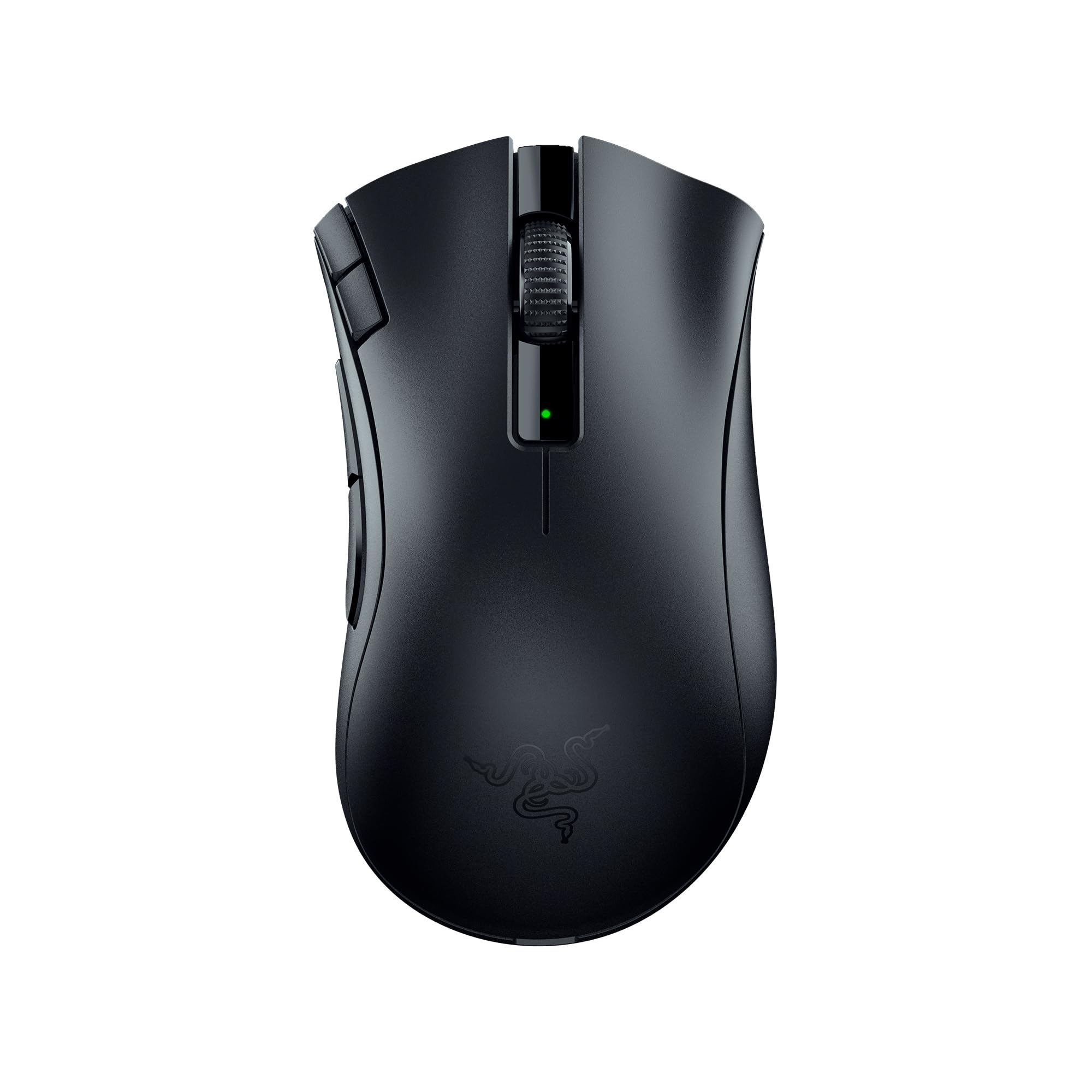
Introduction
The Razer DeathAdder V2 is the latest evolution of one of the most beloved gaming mouse lines ever made. Designed for right-handed gamers who value comfort, speed, and precision, it pairs Razer’s Focus+ 20K optical sensor with ultra-lightweight handling and optical switches for crisp, reliable clicks. In this in-depth review, we dig into its features, real-world performance, build quality, value, and how it stacks up against top alternatives, so you can decide if this iconic ergonomic mouse still deserves a spot on your desk.
Key Features and Specifications
The DeathAdder name is synonymous with comfortable ergonomics and dependable performance. The V2 iteration refines that formula with a modern sensor, lighter body, and more flexible cabling. Here are the headline details and why they matter to gamers and power users alike.
- Sensor: Razer Focus+ optical sensor with up to 20,000 DPI, 650 IPS tracking, and 50G acceleration
- Switches: Razer Optical Mouse Switches (infrared actuation) rated up to 70 million clicks
- Weight: Approximately 82 g (without cable)
- Buttons: 8 programmable inputs via Razer Synapse (including 2 side buttons and dedicated DPI buttons)
- Polling rate: Up to 1000 Hz (1 ms)
- Cable: Razer Speedflex braided cable for reduced drag and kink resistance
- Feet: 100% PTFE mouse feet for smooth, consistent glide
- Onboard memory: Store up to 5 profiles for driver-free use
- Lighting: Razer Chroma RGB with 2 zones (logo and scroll wheel)
- Form factor: Right-handed ergonomic shape with textured rubber side grips
- Lift-off distance: Adjustable via Asymmetric Cut-Off
- Software: Razer Synapse 3 for DPI stages, macros, key mapping, lighting, and Hypershift secondary layers
- Dimensions (approx.): 127.0 mm (L) x 61.7 mm (W at grip) x 42.7 mm (H)
Focus+ Optical Sensor and Smart Tracking: The Focus+ sensor is purpose-built for esports-grade precision. Beyond headline DPI numbers, it shines in micro-adjustments and consistent tracking across cloth and hard pads. Smart Tracking maintains a uniform lift-off distance, while Motion Sync helps align sensor updates with the PC’s polling, improving the feel of cursor movement in flicks and micro-corrections.
Optical Switches and Zero Debounce: Instead of metal contacts, the DeathAdder V2’s main buttons use an infrared light beam to register clicks. This design removes the need for traditional debounce delay, reducing latency and minimizing double-click issues that can plague mechanical switches over time. The result is crisp, fast actuation with a clean, tactile response.
Speedflex Cable and PTFE Feet: The Speedflex cable is light and pliable, drastically cutting down on desk drag compared to older braided cords. Paired with 100% PTFE feet, the mouse glides effortlessly on a wide range of pads, helping maintain control during fast swipes and fine aim adjustments.
Ergonomics and Programmability: The DeathAdder silhouette is famous for its palm-conforming curves and accessible side buttons. With 8 programmable buttons and Razer’s Hypershift feature, you can assign a secondary layer of commands to any button, effectively doubling inputs without adding clutter.
Performance and Quality
The DeathAdder V2 delivers performance that feels effortless whether you’re clutching through a tense aim duel in an FPS or spamming abilities in a MOBA. Its true strength is reliable, reproducible control: movements feel linear and predictable, and clicks register immediately.
Tracking and Aim Consistency: In FPS titles, the sensor keeps up with rapid flicks, quick-scopes, and long tracking engagements. Cursor motion remains smooth even at high sensitivities, with no acceleration anomalies. Lift-off distance, which you can fine-tune in Synapse, prevents the crosshair from drifting when you reposition the mouse during fast-paced play.
Click Response and Stability: The optical switches provide fast, consistent actuation without post-travel mushiness. The left and right clicks are well-tensioned, avoiding accidental presses while still feeling light enough for quick tapping. Side buttons have a defined, snappy response with minimal pre-travel, and the scroll wheel features distinct steps for weapon swapping and inventory navigation.
Glide and Cable Feel: The combination of large PTFE feet and the Speedflex cable results in a controlled glide that suits both low-sens and high-sens playstyles. The cable is among the least intrusive braided options available; on a bungee, it feels almost wireless.
Software Reliability: Razer Synapse 3 is feature-rich, letting you assign per-game profiles, calibrate surfaces, create macros, and set DPI stages with fine increments. Crucially, the DeathAdder V2 can store up to five profiles onboard, so once configured you can take your settings to another PC without installing software. Lighting effects are subtle and can be switched off to reduce distraction.
Longevity: The build feels robust for daily gaming. The optical switches are rated for up to 70 million clicks, and the shell resists creaks under normal grip pressure. Over months of use, the Speedflex cable maintains flexibility and shows less fraying than older braided designs.
Design and Build Quality
Razer’s design brief for the DeathAdder V2 is clear: refine comfort and remove friction. The chassis is sculpted to support the palm and relax the ring and pinky fingers, making long sessions easier on the hand and wrist.
Ergonomic Shape: The right-handed form has a higher back hump and gentle slope into the primary buttons, guiding your hand into a natural palm or relaxed claw grip. The thumb groove aligns you with the side buttons, which sit at a comfortable height to avoid accidental presses.
Materials and Coating: The matte finish resists fingerprints and provides a secure feel without feeling rubbery. Textured rubber grips on both sides anchor the thumb and fingers during high-speed swipes and micro-corrections.
Weight and Balance: At around 82 g, the DeathAdder V2 is significantly lighter than many classic ergonomic mice, improving fatigue resistance and control in flicks. Weight distribution is well-centered, contributing to a predictable glide and easy lift.
Buttons and Scroll Wheel: Main clicks are crisp and evenly tensioned. The scroll wheel has defined steps and a grippy rubber texture, aiding precise weapon or item selection. The two dedicated DPI buttons are positioned behind the wheel for quick sensitivity adjustments, and there’s an onboard profile switch to cycle stored layouts.
Feet and Cable: The full-coverage PTFE feet ensure low-friction movement with stable stopping power, and they wear in smoothly. The Speedflex cable’s softness prevents snagging against desk edges and reduces the need for cable management.
Dimensions and Hand Size Guidance: With an approximate length of 127 mm and a peak height of about 42.7 mm, the DeathAdder V2 best suits medium to large hands. Palm and relaxed claw users will get the most out of its shape; fingertip-only users or very small hands may prefer lighter, narrower designs.
Pros and Cons
- Pros:
- Class-leading right-handed ergonomics with excellent palm support
- Focus+ 20K sensor delivers precise, consistent tracking
- Optical switches offer fast actuation and reduced double-click risk
- Lightweight for an ergonomic design (around 82 g)
- Speedflex cable feels unobtrusive, especially with a bungee
- 8 programmable buttons and Hypershift expand functionality
- Onboard memory for up to 5 profiles enables driver-free portability
- PTFE feet provide smooth glide out of the box
- Cons:
- Wired-only; competitive wireless alternatives exist
- Shape favors medium–large right-handed users; not ambidextrous
- Scroll wheel lacks free-spin mode for productivity users
- Not the lightest option compared to ultralight honeycomb mice
- Synapse 3 is powerful but may feel heavy if you only need basics
Value Proposition and Pricing
The DeathAdder V2 launched with a mid-range MSRP that undercuts many premium esports mice while offering comparable core performance. It is often discounted during major sales, making it an exceptional value for shoppers who want an elite sensor, comfortable ergonomics, and durable switches without paying flagship prices.
What You’re Paying For: The price reflects a mature design with widely appreciated comfort, a top-tier optical sensor, and quality-of-life upgrades like the Speedflex cable, onboard memory, and PTFE feet. For players who game daily, these details translate directly into better consistency and less fatigue.
Longevity and Cost of Ownership: The optical switches’ resistance to double-click issues can reduce the likelihood of early replacement. Combined with the sturdy shell and cable, you’re likely to get years of reliable use, pushing down the effective cost per year compared to cheaper mice that feel outdated or deteriorate quickly.
Street Price and Deals: While pricing varies by region and retailer, the DeathAdder V2 commonly appears in the mid-range bracket and frequently sees sale pricing that makes it a standout value. If you watch for seasonal discounts, it can deliver best-in-class comfort and performance at a budget-friendly cost.
Comparison with Alternatives
Choosing a gaming mouse is deeply personal, and shape, weight, and features all matter. Here’s how the DeathAdder V2 stacks up against popular alternatives.
Razer DeathAdder V2 vs. Logitech G502 HERO: The G502 HERO offers more buttons, a sniper paddle, and a scroll wheel with a free-spin mode, which productivity users love. However, it’s significantly heavier and can feel bulky during fast FPS play. The DeathAdder V2 is lighter with a cleaner, more streamlined layout. For pure gaming performance and comfort over long sessions, the V2 generally feels faster and less tiring; for macro-heavy workflows, the G502’s versatility wins.
Razer DeathAdder V2 vs. Razer Viper 8KHz: The Viper 8KHz pushes polling to 8000 Hz and has an ambidextrous, lower-profile shell that favors fingertip and claw grips. It’s lighter and can feel snappier for ultra-competitive FPS players with high-end rigs. The DeathAdder V2, by contrast, offers a fuller palm support and a more relaxed, ergonomic curve, which many find superior for comfort and consistency. If you aim for maximum competitive edge and like low-profile shapes, Viper; if you prefer comfort-forward ergonomics, DeathAdder V2.
Razer DeathAdder V2 vs. Glorious Model O: The Model O is an ultralight honeycomb design with excellent glide and a very low weight. It’s great for fast, low-friction movement, but the shell is flatter and can feel less supportive for palm users. The DeathAdder V2 provides a more substantial grip and long-session comfort, with a more traditional, solid shell. If lightweight speed is your priority, Model O; if ergonomic shape and classic build are more important, DeathAdder V2.
Razer DeathAdder V2 vs. Logitech G403/G703: Logitech’s G403 (wired) and G703 (wireless) share an ergonomic right-handed shape with excellent click feel. The G703’s wireless convenience and Hero sensor are compelling, but it’s heavier and often more expensive. The DeathAdder V2 gives you a lighter wired solution with robust software and optical switch benefits at a lower cost.
Razer DeathAdder V2 vs. Razer DeathAdder V3/V3 Pro: The V3 line pushes further into competitive territory with a lighter weight and a newer sensor. If you want the cutting edge and don’t mind a higher price (especially for the wireless V3 Pro), they’re outstanding. However, the DeathAdder V2 remains the value pick, offering the signature shape, excellent performance, and a considerably lower entry cost.
Razer DeathAdder V2 vs. DeathAdder Essential: The Essential variant is cheaper but uses older components and a simpler cable/feet setup. It’s fine for casual use, but serious gamers will appreciate the V2’s superior sensor, switches, and overall refinement.
Who Should Buy This Product
The DeathAdder V2 is purpose-built for gamers and power users who value comfort without compromising speed. Consider it if the following points describe your needs:
- You prefer a right-handed ergonomic shape: Palm and relaxed claw grip users with medium to large hands will feel right at home with its supportive curves.
- You want top-tier wired performance: The Focus+ sensor and optical switches provide esports-grade precision and responsiveness.
- You appreciate lightweight control, not ultralight extremes: Around 82 g delivers agility while retaining a solid, reassuring feel.
- You need reliable buttons for years of play: Optical switches are built to last and mitigate double-click risks common in mechanical designs.
- You like customizable workflows: With 8 programmable buttons, Hypershift, and onboard profiles, you can tailor inputs for each game or productivity task.
Who Might Look Elsewhere: If you require a true ambidextrous shell, wireless freedom, or the absolute lightest possible mouse, consider the Razer Viper line, Logitech’s Superlight options, or ultralight honeycomb designs. If you need a productivity-first mouse with a free-spin wheel and many macros, the Logitech G502 HERO is a better fit.
Conclusion
The Razer DeathAdder V2 delivers a refined blend of comfort, precision, and reliability that honors its legendary lineage. With the Focus+ sensor, optical switches, Speedflex cable, and PTFE feet, it feels fast and frictionless, while its ergonomic shape supports long sessions without fatigue. It’s not the flashiest or the lightest mouse on the market, but for the price, it’s one of the most balanced choices you can make—especially if you value comfort and consistency above all else.