
Razer BlackWidow V3 Review: A Durable, RGB‑Rich Mechanical Gaming Keyboard for Competitive Play
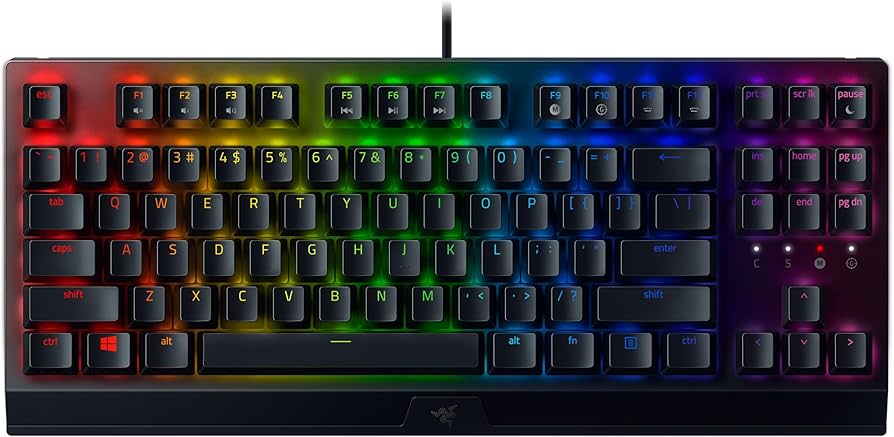
Razer BlackWidow V3 Review: A Durable, RGB‑Rich Mechanical Gaming Keyboard for Competitive Play
The Razer BlackWidow V3 is a full-size mechanical gaming keyboard designed for players who want crisp switches, striking Chroma RGB lighting, and dependable wired performance. Available with Razer Green (tactile and clicky) or Razer Yellow (linear and quiet) switches, it blends gamer-centric features like a multi-function media roller, per-key lighting, and hybrid onboard profiles with a sturdy aluminum top plate. This review breaks down its features, performance, build, value, and how it stacks up against strong competitors.
Key Features and Specifications
The BlackWidow line is one of Razer’s flagship keyboard families, and the BlackWidow V3 continues that legacy with a refined design and gamer-first functionality. At its core, the V3 focuses on reliable wired performance and robust mechanical switches while adding quality-of-life upgrades that make everyday gaming and typing more enjoyable.
- Switch options: Razer Green (tactile, clicky, ~50 g actuation, pronounced bump and audible click) or Razer Yellow (linear, quiet, ~45 g actuation, sound-dampened with shorter actuation distance). Both are rated for long-term durability and consistent feel.
- Form factor: Full-size layout with dedicated function row, arrow cluster, and number pad; a Tenkeyless (TKL) variant is also available for users who want a smaller footprint.
- Lighting: Per-key Razer Chroma RGB with 16.8 million colors, effects via Razer Synapse, and game integrations for popular titles.
- Build: Thick aluminum top plate over a solid chassis for added rigidity; transparent switch housings enhance RGB diffusion; doubleshot ABS keycaps with crisp, shine-through legends.
- Controls: A multi-function digital roller and media key for quick volume/brightness and playback controls; extensive shortcuts via function layer.
- Performance: N-key rollover with anti-ghosting; stable wired USB connection; macro recording and key remapping through Razer Synapse (with Hypershift for secondary layers).
- Profiles: Hybrid onboard memory with multiple profile slots (and cloud storage) so you can carry lighting and keybinds between PCs.
- Comfort: Detachable ergonomic wrist rest designed to support long sessions.
- Cable and routing: Durable braided cable with underside routing channels to direct the cord left, right, or center.
- Durability: Long switch lifespan and robust plate minimize flex and preserve a consistent typing feel over years of use.
Razer’s approach with the BlackWidow V3 is to offer a strong baseline for competitive gaming while still feeling at home in productivity. Its defining traits—distinct switch choices, bold RGB, and practical media controls—lend it versatility without complicated setup.
Performance and Quality
In real-world play, the Razer BlackWidow V3 delivers the reliability gamers expect from a wired mechanical keyboard. The wired connection keeps latency low and consistent, avoiding the variability found in some wireless setups. Whether you favor fast-paced shooters or macro-heavy MMOs, it remains responsive and predictable.
Switch feel and responsiveness: The two switch options meaningfully change the experience. Razer Green switches provide a tactile bump and audible click that many typists and strategy gamers love for precise feedback. The actuation force is moderate, making it easy to find the point of activation without bottoming out. Razer Yellow switches are linear and smoother, optimized for gaming where rapid key presses and low sound output are priorities. Their shorter actuation helps with quick inputs and double-taps, and built-in dampening reduces noise compared to typical linears.
Gaming execution: N-key rollover with anti-ghosting ensures simultaneous key presses register accurately, which matters during complex key combinations or frantic inputs. Macros can be recorded on-the-fly or in Synapse and bound to any key, while Hypershift assigns a secondary layer so you can access additional functions without sacrificing your main layout. The result is a confident, custom-tailored control scheme for everything from battle royale keybinds to MOBA item activations.
Typing and everyday use: While built for gaming, the BlackWidow V3 is surprisingly comfortable for extended typing. The stabilized longer keys (space, shift, enter) help reduce wobble and maintain consistency across the board. Greens will be too loud for some open offices or shared spaces, but they reward with tactile clarity. Yellows are the more neighbor-friendly option, with a softer sound signature and smoother travel.
Software and profiles: Razer Synapse remains one of the most comprehensive suites for keyboard customization. You can remap keys, set per-key lighting, import/export profiles, and sync effects with other Razer gear. The hybrid onboard memory means your essential profiles can move with you to machines that don’t have Synapse installed. Advanced users can dive into Chroma Studio to craft layered, reactive effects tied to keypresses and game events.
Reliability over time: The aluminum-topped chassis prevents flex during aggressive use, and the switches are rated for a long service life. Doubleshot ABS legends won’t fade, maintaining clarity even under heavy use. Over months of play, the feel remains consistent; if you’re used to budget boards developing mushy or inconsistent keys, the V3’s steadiness is a welcome upgrade.
Design and Build Quality
The Razer BlackWidow V3 looks and feels premium without unnecessary flash. It trades gimmicks for tangible improvements in stability, visibility, and usability.
Materials and construction: The anodized aluminum top plate adds rigidity and a cool-to-the-touch surface, while the underlying frame keeps weight substantial enough to prevent sliding. Transparent switch housings amplify Chroma’s glow, producing evenly lit legends and attractive side illumination.
Keycaps and acoustics: The doubleshot ABS keycaps have sharply defined legends that won’t wear off. ABS is smooth and comfortable, though it can develop shine over time. The sound profile varies by switch: Greens give you that classic, high-pitched click; Yellows are quieter and more muted thanks to sound damping. Stabilizers are well-tuned for the category, minimizing rattle on larger keys, though enthusiasts may still hear a touch of noise on the spacebar at high speeds.
Ergonomics and wrist rest: The included wrist rest is a practical addition, providing a gentle slope that reduces wrist extension during long sessions. It’s comfortable for marathon gaming or writing sprints and detaches when you want a more compact footprint.
Controls and layout: The multi-function digital roller pairs with a media key for instant adjustments. By default, the roller handles volume, but you can customize it in Synapse to control brightness or scroll. The full-size layout ensures no compromises for work and play—function row macros, number pad calculations, and game shortcuts are all within reach.
Cable management and desk setup: The braided cable feels durable, and the underside channels let you route the cord toward the left, right, or center, helping reduce clutter and friction with your mouse cable. While the cable isn’t detachable, the routing options make setup cleaner on most desks.
Lighting and visibility: Per-key Chroma lighting is bright and even, with good diffusion through the transparent switch housings. Legends are easy to read in low light, and you can blend functional color coding (e.g., highlighting WASD, abilities, or macros) with ambient effects for a cockpit-like look.
Pros and Cons
Like any keyboard, the BlackWidow V3 isn’t perfect for every user. Here’s a clear snapshot of where it shines and where it compromises.
- Pros
- Distinct switch options: tactile/clicky Greens or smooth, quiet Yellows
- Rigid aluminum top plate and solid chassis feel built to last
- Bright, per-key Chroma RGB with deep Synapse customization
- Multi-function digital roller and media key are genuinely useful
- N-key rollover with anti-ghosting supports complex inputs
- Hybrid onboard memory carries profiles when you switch PCs
- Detachable wrist rest adds comfort for long sessions
- Transparent switch housings improve RGB diffusion and legend clarity
- Cons
- Razer Green switches are loud—less ideal for shared spaces
- Non-detachable cable; no hot-swappable switch sockets
- Doubleshot ABS is durable but can develop shine over time
- Razer Synapse is powerful but resource-heavy for some systems
- No USB passthrough on the standard V3 model
- Wrist rest is supportive but basic compared to premium, cushioned designs
Value Proposition and Pricing
The Razer BlackWidow V3 positions itself as a premium wired mechanical gaming keyboard without crossing into ultra-luxury territory. You’re paying for reliable switches, a rigid build, great RGB, and meaningful features like the media roller and mature software.
Pricing: Street prices can vary by region, retailer, and switch choice, but the BlackWidow V3 typically sits in the mid-to-upper tier of wired gaming keyboards. The full-size model often retails higher than the TKL variant, with periodic sales bringing strong value. If you’re budget-conscious, watch for seasonal discounts.
What you’re getting for the money: Compared with entry-level mechanical boards, the V3 adds a more robust chassis, brighter per-key lighting, longer-rated switches, profile portability, and a better typing feel. It’s a substantial step up from budget options that cut corners on plates, stabilizers, or software.
Warranty and support: Razer’s keyboard warranty and broad retail presence are practical advantages. Replacement parts like keycap sets and wrist rests are easy to find, and Synapse’s popularity means you’ll find plenty of community-made profiles and lighting themes.
In short, the BlackWidow V3 delivers a polished, dependable experience that justifies its positioning. If you don’t need wireless and appreciate premium touches, it lands in a sweet spot for many gamers and mixed-use buyers.
Comparison with Alternatives
The mechanical keyboard market is competitive, and several models are worth considering alongside the Razer BlackWidow V3. Here’s how it stacks up against common alternatives and adjacent options.
- Razer BlackWidow V3 Pro: The Pro version adds wireless connectivity (Razer HyperSpeed, Bluetooth) and a detachable cable but at a higher price. If you need wireless freedom, the Pro is the natural step up. If you prefer the simplest, lowest-latency wired setup, the standard V3 is the better value.
- Corsair K70 RGB (various models): Often comparable in price, the K70 line offers excellent build quality, dedicated media keys, and robust iCUE software. Many K70 variants ship with durable PBT double-shot keycaps and sometimes include a USB polling advantage or extra tournament features. The BlackWidow V3 counters with its media roller simplicity, Chroma ecosystem, and Razer switch options.
- Logitech G Pro X (and Pro X 2 variants): A TKL board known for hot-swappable switches (on supported versions), making it attractive to enthusiasts who want to change switch types without soldering. It lacks a numpad and dedicated roller, so if you need full-size convenience and a media dial, the V3 has the edge. If hot-swapping is your priority, the Logitech wins.
- SteelSeries Apex 7 / Apex Pro: SteelSeries brings an OLED screen, premium build, and, on the Pro, adjustable actuation (OmniPoint) for per-key sensitivity. Those features are compelling for tuners and tinkerers. The BlackWidow V3 typically comes in at a more approachable price, with simpler, proven mechanics and very strong RGB.
- Keychron K-series (e.g., K8 Pro, K10 Pro): These offer hot-swappable switches, wireless modes, and often PBT caps at very competitive prices. They target a slightly different audience: productivity-minded users who dabble in gaming. Razer’s V3 still wins for polished gaming software, deep Chroma integrations, and the out-of-box gaming focus.
- Razer Huntsman line (V2, etc.): If you want the lowest possible latency and a different switch tech, Razer’s optical switches on the Huntsman boards are worth a look. The BlackWidow V3 remains the better pick if you prefer traditional mechanical switch feel and a more familiar sound profile.
Bottom line: choose the BlackWidow V3 if you value a full-size layout, classic mechanical switches, rich RGB, and a handy media roller at a grounded price. Pick an alternative if you specifically need wireless, hot-swappable sockets, or ultra-low-latency optical switches.
Who Should Buy This Product
The Razer BlackWidow V3 serves a wide slice of gamers and power users, but it isn’t a one-size-fits-all solution. Consider it if the following points resonate with your needs and setup.
- Ideal for:
- Competitive and casual gamers who want dependable wired performance and low-latency input
- Users who appreciate strong per-key RGB with deep software customization and game integrations
- Buyers deciding between tactile/clicky feedback (Razer Green) and smooth, quieter linear action (Razer Yellow)
- Anyone who values a full-size layout with a number pad and a convenient media roller
- Mixed-use owners who game at night and type by day—especially those who want robust build quality
- Think twice if:
- You need wireless connectivity—consider the BlackWidow V3 Pro instead
- You want hot-swappable switches for easy experimentation
- You work in a quiet, shared space and prefer silent typing—Razer Yellow is better than Green, but a silent board may be wiser
- You require premium PBT keycaps out of the box and a detachable cable
- You specifically need features like an OLED display, USB passthrough, or onboard volume/mic jacks
Conclusion
The Razer BlackWidow V3 is a confident, well-rounded mechanical gaming keyboard that delivers where it matters: switch feel, structural rigidity, rich per-key RGB, and reliable wired responsiveness. With Green or Yellow switches, a practical media roller, and hybrid profiles, it’s easy to tailor for both gaming and productivity. While the non-detachable cable, ABS shine potential, and lack of hot-swap may deter some, the overall execution and value make it a compelling choice for most gamers.