
Logitech G815 Lightsync RGB Mechanical Gaming Keyboard Review: Ultra‑Thin, Macro‑Ready, and Brilliantly Lit
Introduction
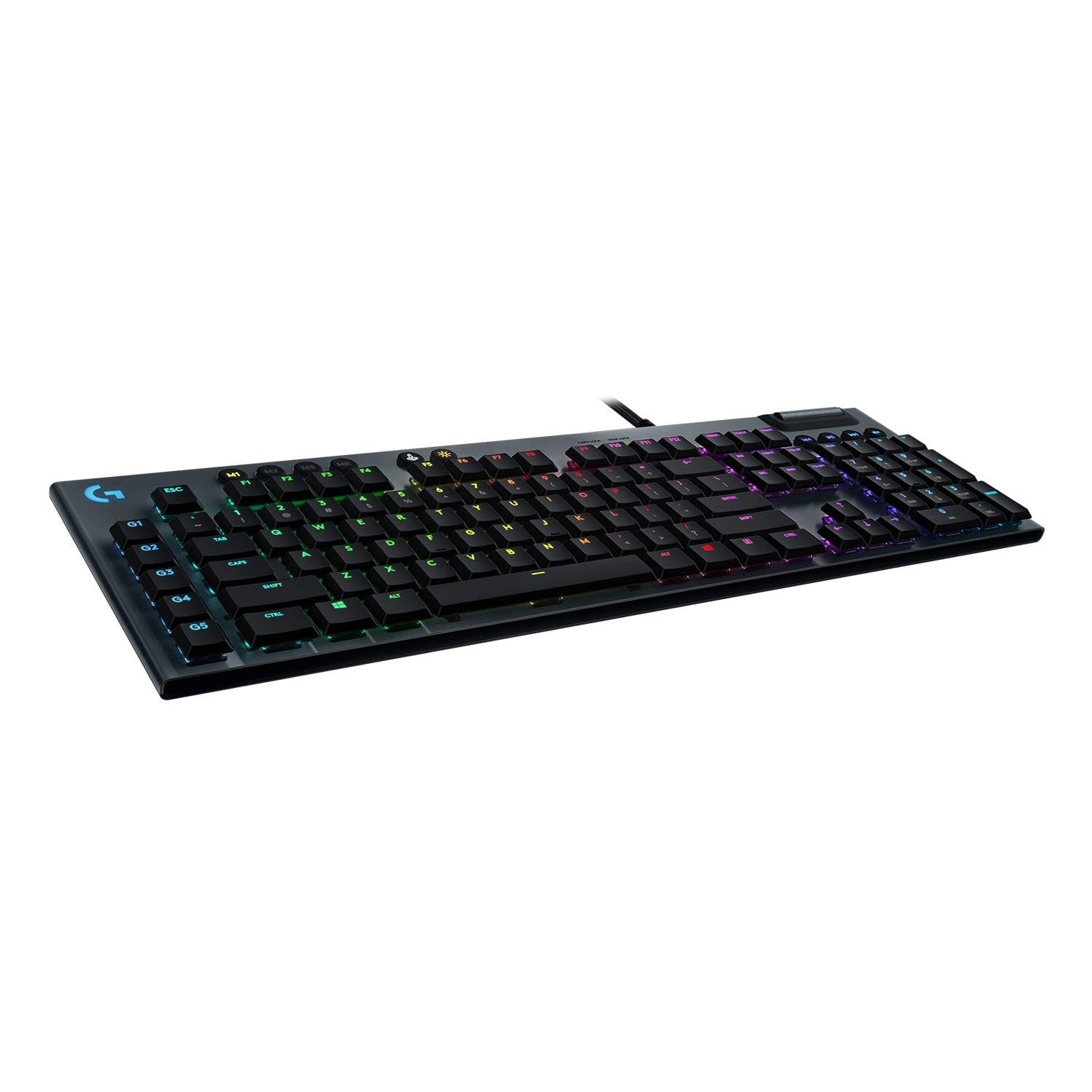
The Logitech G815 Lightsync RGB Mechanical Gaming Keyboard aims to deliver premium performance in an ultra-thin form factor. With low-profile mechanical switches, per-key Lightsync RGB, dedicated media controls, and five programmable macro keys, it targets competitive gamers and power users who demand responsiveness without bulky desk real estate. This review dives into features, performance, design, value, and how the G815 stacks up against top alternatives to help you decide if it’s the best wired gaming keyboard for your setup.
Key Features and Specifications
The G815 sits at the high end of Logitech’s wired lineup, marrying a sleek, low-profile chassis with enthusiast-grade functionality. Here are the highlights you should know before buying:. For a While discussing build quality, lighting, and media controls, note that users who prefer a traditional-height deck with per-key RGB and a rigid aluminum frame should look at the Corsair K70 RGB., consider our Corsair K70 RGB mechanical keyboard.
- Low-profile GL mechanical switches: Choose from GL Clicky (crisp and audible), GL Tactile (subtle bump), or GL Linear (smooth and quiet). Each variant is designed for fast actuation at a shorter travel distance than traditional mechanical switches.
- Actuation and travel: GL switches typically feature an actuation distance around 1.5 mm with a total travel of approximately 2.7 mm, enabling quicker key presses and faster reset—ideal for competitive gaming.
- Lightsync RGB: Per-key RGB lighting with 16.8 million colors, advanced effects, and real-time game or audio responsiveness via Logitech G HUB software. Profiles can be saved and synced across compatible Logitech G devices.
- Five dedicated G-keys (G1–G5): Place programmable macros or complex multi-key actions on the left-side column for one-tap execution—excellent for MMOs, MOBAs, creative apps, and streaming workflows.
- Dedicated media controls: A premium aluminum volume wheel and discrete media keys provide quick access to playback, mute, and volume adjustments without alt-tabbing.
- USB pass-through: A convenient top-edge USB 2.0 pass-through port for connecting a mouse, storage drive, or headset receiver. Note: it requires the keyboard’s second USB plug on your PC.
- Build materials: A brushed 5052 aluminum-magnesium alloy top plate over a solid chassis creates a rigid, premium feel while keeping the keyboard remarkably thin.
- Ultra-thin design: At roughly 22 mm tall, the G815 reduces wrist extension compared to many full-height mechanical boards—useful for comfort during long sessions.
- Full-size layout: Standard 104/105-key layout with a numpad, plus left-side G-keys, dedicated media cluster, and profile controls.
- Polling and rollover: A 1,000 Hz (1 ms) report rate and robust anti-ghosting ensure your inputs register accurately during high APM gameplay.
- Onboard memory: Store lighting and macro profiles on the keyboard for use across machines without reconfiguring every time.
- Game Mode: Disable specific keys (e.g., Windows) to prevent accidental interruptions mid-match.
- Cable and connectivity: A braided, non-detachable USB cable with dual USB-A connectors powers both the keyboard and the pass-through port.
- Software: Logitech G HUB for Windows and macOS handles per-key lighting, animations, macro programming, profile switching, application detection, and device syncing.
- Compatibility: Works with Windows and macOS; certain advanced functions and macros may vary by application and OS permissions.
Together, these features position the Logitech G815 as a feature-complete, low-profile mechanical board for gamers who prefer a wired connection and deep customization.
Performance and Typing/Gaming Quality
On the desk, the G815’s performance is defined by its low-profile GL switches and 1,000 Hz polling rate. The shorter actuation distance makes a tangible difference in games that reward fast inputs and quick resets. Whether you’re bunny hopping in an FPS, cycling abilities in an MMO, or micro-managing units in an RTS, keystrokes register with reliable precision and minimal latency.
Switch feel and sound vary by your chosen variant:
- GL Linear: The smoothest option with the least tactile feedback. It’s an excellent pick for fast-paced shooters where accidental resistance can slow double-tapping or strafing. It’s also the quietest of the three.
- GL Tactile: Offers a gentle bump at actuation. It’s a versatile choice for mixed gaming and typing, giving you confirmation of a press without the noise of a clicky switch.
- GL Clicky: Satisfying, audible click with crisp tactility, but loud for shared spaces. Great if you love classic mechanical feedback and don’t mind the noise.
In extended play, the macro-friendly layout stands out. The five G-keys positioned along the left edge are easy to reach without shifting your hand too far from WASD. Once you’ve assigned macros via G HUB—be it weapon swap sequences, building rotations, skill combos, or even OBS controls—you’ll likely wonder how you lived without them. The dedicated media controls are similarly convenient; the notched volume wheel is smooth and precise, making mid-game volume tweaks effortless.
Anti-ghosting and rollover performance is dependable. Rapid multi-key inputs, such as sprint-jump-crouch or complex MMO rotations, register cleanly with no odd dropouts in testing. Logitech’s firmware has matured over multiple generations, and the G815 benefits from that stability.
As a typing keyboard, the G815 does well for a low-profile mechanical. The stabilizers on larger keys (space, enter, shift) feel secure with minimal rattle for this class. If you opt for GL Tactile, the light bump makes touch typing easier, while GL Linear offers the smoothest feel at the cost of feedback. GL Clicky is the most satisfying for pure typing enthusiasts but is significantly louder—keep that in mind if you work in a shared office or during late-night sessions.
The Lightsync RGB experience is excellent. Per-key customization and layered effects let you build clean color-coded layouts (e.g., highlighting skills, weapon keys, or editing shortcuts). Audio visualization and game integrations add flair without distracting from play, and profile auto-switching when specific games or apps launch is a small but meaningful quality-of-life feature.
Two areas to consider: First, because this is a fixed wired keyboard with a non-detachable cable and dual USB plugs, cable management is a bit more involved, especially if your PC’s USB ports are limited. Second, while the low-profile design can be more comfortable than taller boards, the G815 ships without a wrist rest. Many users will be comfortable without one due to the board’s slimness, but marathon typists and gamers may prefer adding a third-party low-profile rest.
Design and Build Quality
The G815’s industrial design is a major selling point. The 5052 aluminum-magnesium alloy top plate presents a premium, brushed finish that resists flex and gives the board a clean, modern look. Despite the metal construction, the keyboard remains relatively light and ultra-thin, giving you a taller-than-laptop but lower-than-standard-mechanical typing plane. This helps reduce wrist extension and places your hands in a more neutral posture.
Layout and ergonomics are thoughtfully executed. The left-side G-keys are separated enough to avoid accidental presses for most users, while a slight sculpt to the low-profile keycaps aids finger placement. Adjustable rear feet offer multiple tilt options so you can find a comfortable angle. Bezels are tight and purposeful, with the media cluster at the top-right providing immediate access to volume and playback without crowding the main deck.
The keycaps are low-profile and shine-through to maximize RGB clarity. They are ABS rather than PBT, which is typical for many RGB-focused gaming keyboards. ABS can develop shine over time with heavy use. If you prefer a textured, longer-wearing surface, note that low-profile PBT aftermarket options are limited due to stem and profile compatibility, so future keycap customization is more constrained than on standard-height mechanical boards.
USB pass-through is located on the top edge, keeping dongles and flash drives out of your way. It’s convenient for connecting a mouse, microphone receiver, or quick file transfers, though bandwidth is USB 2.0. The braided cable is durable but non-detachable, which affects portability and makes replacement trickier if the cable ever gets damaged. In exchange, the fixed cable contributes to a clean aesthetic and ensures maximum signal integrity.
Overall durability is excellent. The chassis feels rigid with negligible flex, stabilizers are well-tuned for a low-profile design, and the finish resists fingerprints reasonably well. Daily wear should be minimal if you keep the keyboard clean and avoid harsh cleaners on the metal top plate.
Pros and Cons
- Pros
- Ultra-thin, premium design with a rigid aluminum-magnesium top plate
- Choice of GL low-profile switches (Clicky, Tactile, Linear) for tailored feel
- Lightsync per-key RGB with excellent G HUB customization and app/game integrations
- Five dedicated macro keys plus profile switching for powerful workflows
- Dedicated media controls and an elegant aluminum volume wheel
- USB pass-through for convenient peripheral or storage connection
- 1,000 Hz polling and reliable anti-ghosting for competitive play
- Onboard memory to carry lighting and macros between systems
- Cons
- Premium price compared to many wired mechanical keyboards
- ABS low-profile keycaps; limited aftermarket keycap options
- Non-detachable braided cable and dual USB plugs for pass-through
- No included wrist rest
- USB pass-through is USB 2.0 (not 3.0)
- GL Clicky can be loud for shared spaces
Value, Pricing, and Who Should Buy It
The Logitech G815 launched at a premium MSRP, reflecting its materials, engineering, and feature set. Street pricing often fluctuates, and sales are common—so it’s worth watching for discounts. Even at full price, you’re paying for a unique blend of low-profile mechanical performance, macro flexibility, and refined industrial design that few wired boards match in one package.
In terms of value, consider how you’ll use the G815:
- Competitive and enthusiast gamers: The fast actuation, strong firmware, and macro keys provide a genuine edge in complex titles. If you play MMOs, MOBAs, or battle royales, or you stream and manage overlays, the left-side G-keys and profile switching are particularly valuable.
- Creators and power users: Map macros to video editing timelines, color grading tools, DAW controls, or coding snippets. The per-app profile switching in G HUB means the keyboard adapts to your workflow automatically.
- Desk aesthetics: If you care about a clean, modern setup, the G815’s ultra-thin form and restrained lines fit neatly under monitors while providing dramatic, controllable lighting.
Conversely, the G815 may be overkill if you don’t need RGB, macros, or low-profile switches. Budget mechanical keyboards offer solid typing and gaming performance for far less, though they typically lack the G815’s premium build, lighting ecosystem, and macro feature set.
Who should buy the Logitech G815?
- Gamers wanting a wired, low-profile mechanical with top-tier RGB and robust macro support
- Streamers and creators seeking dedicated G-keys and per-app profiles for faster workflows
- Users who appreciate premium materials and a slim, modern footprint
Who should consider alternatives?
- Anyone needing wireless freedom (look at the Logitech G915)
- Mechanical keyboard enthusiasts who prioritize hot-swappable sockets or PBT keycaps
- Shoppers on a strict budget who don’t need macro keys or RGB granularity
Comparison with Alternatives
While the G815 is a strong standalone pick, it’s helpful to see how it compares to other premium keyboards to ensure you’re getting the right fit.. If you're considering alternatives, our SteelSeries Apex Pro Mechanical Gaming Keyboard review covers a When comparing switch technology and responsiveness, suggest that readers who prioritize adjustable actuation and rapid trigger over a low-profile chassis consider the SteelSeries Apex Pro..
- Logitech G915 Lightspeed (wireless sibling)
- Why pick G915: Wireless Lightspeed connectivity plus Bluetooth, a near-identical low-profile feel, and the same macro and RGB feature set. Perfect if you want a clean, cable-free desk or need to switch between multiple devices.
- Why pick G815: Wired reliability with no battery management, lower cost than the wireless model, and USB pass-through (G915 lacks pass-through).
- Corsair K70 RGB (various generations) / K70 RGB Pro
- Why pick K70: Traditional-height mechanical layout, often with double-shot PBT keycaps, strong iCUE lighting, and tournament switch options. Excellent for those who prefer full-height switches and broader keycap customization.
- Why pick G815: A sleeker, thinner profile with low-profile GL switches, dedicated macro column, and per-app profile magic via G HUB.
- SteelSeries Apex Pro / Apex Pro TKL
- Why pick Apex Pro: OmniPoint adjustable actuation (on supported keys) allows you to set ultra-light or deeper activation per key. It’s a tinkerer's dream and a versatile competitive option.
- Why pick G815: Comparable premium build with a simpler setup, macro column, and low-profile feel that some users find more comfortable for long sessions.
- Razer Huntsman V2
- Why pick Huntsman V2: Razer Optical switches deliver ultra-fast actuation with excellent latency numbers; some models feature sound-dampening foam and PBT keycaps.
- Why pick G815: Dedicated left-side G-keys, lower-profile ergonomics, and USB pass-through—features the Huntsman V2 may not match in one package.
- Logitech G513
- Why pick G513: A more affordable Logitech mechanical with high build quality, traditional-height switches, and good RGB—ideal if you don’t need macro keys or ultra-thin design.
- Why pick G815: Adds low-profile switches, a dedicated macro column, and a more advanced media cluster for a sleeker, more feature-rich experience.
Ultimately, the G815’s biggest differentiators are its low-profile mechanical feel, five dedicated macro keys, and polished Lightsync implementation. If those attributes matter to you, the G815 asserts a clear identity against the competition.
Conclusion
The Logitech G815 Lightsync RGB Mechanical Gaming Keyboard blends a premium, ultra-thin design with responsive low-profile GL switches, superb RGB control, and rare conveniences like a macro column, onboard memory, media keys, and USB pass-through. It’s not the cheapest wired board, and the non-detachable cable and ABS keycaps won’t suit every purist, but the overall experience is cohesive and polished. If you want a wired, macro-ready, low-profile flagship, the G815 is easy to recommend.