
Logitech G502 HERO Review: The Iconic Wired Gaming Mouse Still Worth Buying in 2025
Introduction
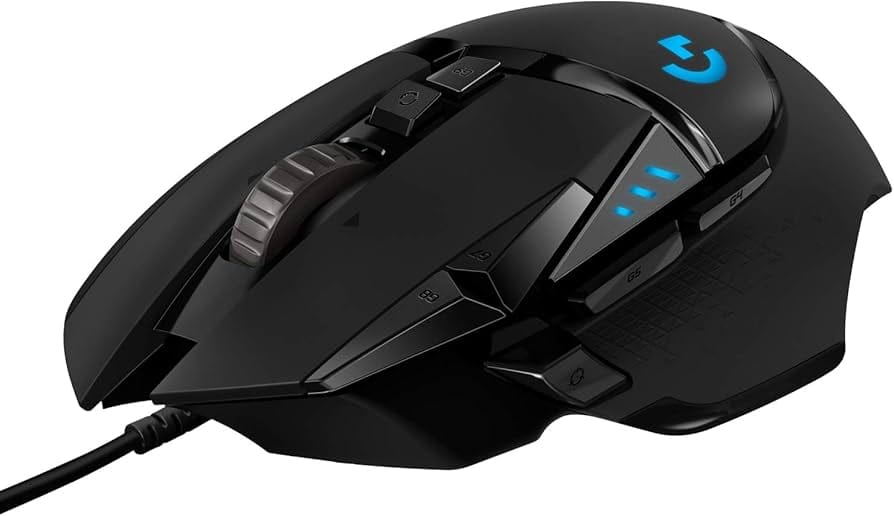
The Logitech G502 HERO High Performance Wired Gaming Mouse is a fixture in PC gaming setups for good reason. It pairs Logitech’s precise HERO 25K sensor with 11 programmable inputs, a dual‑mode hyper‑fast scroll wheel, and tunable weights, all wrapped in an ergonomic shell tailored for right‑handed users. In this review, we take an in‑depth, up‑to‑date look at the G502 HERO’s features, performance, build quality, and value to determine if this classic still deserves a place on your desk in 2025.
Key Features and Specifications
The G502 HERO is famous for blending a premium sensor with productivity‑friendly controls and gamer‑centric customization. Here are the details that matter:
- Sensor: Logitech HERO 25K (software‑updated to 25,600 DPI), true 1:1 tracking, no smoothing/acceleration, up to 400+ IPS and 40G acceleration.
- DPI Range: 100–25,600 DPI in fine increments; on‑the‑fly DPI switching with dedicated buttons.
- Polling Rate: Up to 1,000 Hz (1 ms) with options for 125/250/500/1,000 Hz in Logitech G HUB.
- Buttons: 11 programmable inputs including left/right click, clickable and tilting scroll wheel (L/R), DPI up/down, profile/DPI cycle, and three thumb buttons (Back/Forward and a Sniper/DPI‑shift).
- Scroll Wheel: Metal, dual‑mode (ratcheted for precision or free‑spin for fast scrolling), with tilt‑left/tilt‑right.
- Weight: Approx. 121 g (mouse only). Includes five removable 3.6 g weights (up to 18 g additional) for tuning balance and heft.
- Dimensions: ~132 mm (L) × 75 mm (W) × 40 mm (H); right‑handed ergonomic shape with thumb rest.
- Cable: Braided ~2.1 m USB cable; plug‑and‑play with Logitech G HUB software support.
- Feet: Low‑friction PTFE feet for smooth glide on most cloth and hard pads.
- Lighting: LIGHTSYNC RGB logo lighting with basic effects; DPI status LEDs near the left click for quick visual reference.
- Onboard Memory: Store multiple profiles and DPI steps directly on the mouse for software‑free use once configured.
- Switch Durability: Primary clicks rated for up to 50 million actuations.
- Software: Logitech G HUB for button remaps, macros, DPI steps, surface tuning, polling rate, and onboard memory management.
- Compatibility: Windows and macOS. Works in BIOS/UEFI and consoles for basic input (button remaps/macros require G HUB on PC).
In short, the G502 HERO combines a class‑leading sensor with a rich control scheme. It’s one of the few mainstream mice that offers a complete control toolkit—sniper button, tilt wheel, macro library, on‑mouse profile switching, and weight tuning—without breaking the bank.
Performance and Quality
At the heart of the G502 HERO is Logitech’s HERO 25K sensor, which remains excellent for competitive and casual play. Tracking is precise, consistent, and free of unwanted acceleration or jitter when paired with a decent mouse pad. Whether you play tactical shooters at low sensitivity or RTS/MOBA titles at high sensitivity, the HERO 25K delivers reliable 1:1 input. The sensor’s ability to maintain control at high speeds (400+ IPS) means rapid flicks don’t cause spin‑outs or skipped input.
Click feel on the primary buttons is crisp and tactile with a medium‑light actuation force, making rapid taps and burst firing convenient without being hair‑trigger sensitive. The secondary inputs are thoughtfully placed: the sniper button lowers DPI while held—great for long‑range shots—and the DPI up/down buttons let you step through profiles without diving into software. The tilt scroll wheel is a standout; being able to map L/R tilts for leaning in shooters, weapon cycling, or horizontal timeline scrubbing is a quality‑of‑life upgrade.
Logitech’s dual‑mode scroll wheel deserves special mention. In ratcheted mode, the steps are well defined for selecting weapons or menu items. Flip the toggle and you enter free‑spin mode, where the metal wheel glides with inertia—brilliant for quickly scrolling through long documents, inventories, or spreadsheets. It’s a productivity boon and a defining trait of the G502 family.
Input delay is competitive for a wired mouse, with a 1,000 Hz polling rate and responsive clicks. While some ultralight esports‑focused models can post marginally lower click latency in lab tests, in practical gameplay the G502 HERO feels immediate and dependable. Lift‑off distance is low and can be tuned in G HUB, helping maintain consistent aim when repositioning the mouse.
Quality control has been solid across recent production runs. As with many mass‑market mice, isolated reports of double‑clicking can occur over long‑term use, but Logitech’s current switches and warranty support are generally reassuring. The body exhibits minimal flex, the side panels feel secure, and the scroll mechanism has a premium, all‑metal character. Overall, the performance‑to‑price ratio remains one of the best in the wired category.
Design and Build Quality
The G502 HERO’s design is iconic: angular lines, a sculpted thumb rest, and a right‑handed silhouette that favors palm and claw grips. Users with medium to large hands will likely find it most comfortable; those with very small hands or a pure fingertip grip may feel the shape is too tall and heavy. The top shell is a matte plastic that resists fingerprints, while the side panels use textured rubber for stability during fast swipes.
At roughly 121 g before adding optional weights, the G502 HERO is not chasing the ultralight trend. Instead, it embraces a balanced heft that many users find steady and precise, especially for tracking and controlled micro‑adjustments. The included weights let you add up to 18 g and shift balance toward the front, rear, or sides. Competitive FPS players who prefer featherweight mice will likely see the mass as a downside; MMO, MOBA, and general productivity users often appreciate the stability.
The metal scroll wheel anchors the premium feel. Its free‑spin mode is smooth and, while audible, not distractingly so in most environments. The ratcheted steps are tactile and reliable. Logitech’s implementation remains one of the best for users who divide time between gaming and productivity. The wheel also supports tilt left/right—two extra inputs that many competing models lack.
Cable quality is good: a braided 2.1 m line that is durable and flexible enough for most setups. Out of the box it has more drag than the ultra‑flex “paracord‑style” cables found on some newer esports mice, but pairing it with a mouse bungee reduces perceived resistance substantially. The PTFE feet glide smoothly; while not as large as the premium skates on some enthusiast mice, their performance is consistent across common cloth and hard pads and can be upgraded with third‑party feet if desired.
Build tolerances are tight—no significant creaking or side‑panel flex under normal use. Primary buttons are well separated to avoid accidental actuations, and the thumb cluster is positioned so the sniper button is reachable without being too easy to press by mistake (grip style and hand size will vary this experience). The bottom door for the weight system uses a secure latch, and the internal weight slots fit precisely.
Pros and Cons
Here’s the short list to help you gauge fit at a glance.
- Pros
- Class‑leading HERO 25K sensor with accurate, consistent tracking.
- 11 programmable inputs including tilt‑wheel and a dedicated sniper button.
- Dual‑mode metal scroll wheel excels for both gaming and productivity.
- Tunable weight system to adjust heft and balance to taste.
- Onboard memory for profiles and DPI steps—use your settings anywhere.
- Solid build quality and durable materials for the price.
- Great value thanks to frequent discounts well below original MSRP.
- Software (G HUB) offers deep macro and remapping options without steep learning curve.
- Cons
- Heavier than modern ultralight esports mice; not ideal for fingertip grip.
- Braided cable has more drag than newer paracord‑style cords.
- Right‑handed only; not suitable for left‑handed users.
- Isolated long‑term reports of double‑click issues, as with many mass‑market mice.
- RGB is minimal (single main zone) compared with flashier rivals.
Value, Pricing, and Who Should Buy It
When the G502 HERO launched, its feature set commanded a premium. Today, it’s routinely discounted, often landing in the mid‑budget range. While MSRPs can vary by region and time, it frequently sells for significantly less than flagship mice, making it a compelling value for the amount of functionality you get: an elite sensor, a bevy of inputs, weight tuning, and a dual‑mode scroll wheel. Few mice at this price offer this many practical features with mature software and proven ergonomics.
The mouse’s value is amplified if you also use your PC for work or content creation. The tilt wheel, free‑spin scrolling, and macro support translate directly into faster navigation through timelines, code, spreadsheets, and documents. In other words, you’re not just buying a gaming mouse—you’re getting a versatile controller that improves everyday computing.
Who should buy it?
- FPS and tactical shooter players who prefer a moderately heavy mouse for steadiness, and who will use the sniper button for precision shots.
- MOBA/MMO/ARPG players who benefit from 11 programmable inputs for abilities, items, or complex macros.
- Creators and power users who want a dual‑purpose mouse with rapid scrolling, tilt inputs, and extensive remapping for productivity apps.
- Gamers on a budget looking for a premium sensor and robust build quality without paying flagship prices.
On the other hand, if you are a competitive FPS player focused on the lightest possible setup and the lowest click latency, a sub‑60 g ultralight might suit you better. Left‑handed users should also look elsewhere due to the right‑handed shape and thumb cluster.
Comparison With Alternatives
The G502 HERO sits in a crowded field. Here’s how it compares to popular options:
- Logitech G502 X (wired) / G502 X Lightspeed (wireless)
- What’s different: The G502 X refines the shell with a lighter build, updates the switches to LIGHTFORCE hybrid optical‑mechanical, and modernizes the cable (on the wired model). The Lightspeed variant adds low‑latency wireless and battery life.
- Why pick G502 HERO: Lower price, very similar shape and control layout, and the same general “feel” if you’re used to the classic design.
- Why pick G502 X/X Lightspeed: Newer switches reduce the risk of double‑clicks, lighter weight and cable, and wireless convenience on the Lightspeed. If budget allows and you want the latest iteration, the X line is a smart upgrade.
- Razer Basilisk V3
- What’s similar: Comparable right‑handed shape with thumb rest, multi‑button layout, and a free‑spin scroll mode (Smart Reel).
- What’s different: Razer’s brighter RGB implementation, optical switches, and slick software effects. Weight is similar; cable is quite flexible.
- Pick Basilisk V3 if: You prioritize RGB aesthetics, Razer Synapse integration, and optical switch longevity.
- Pick G502 HERO if: You want better value pricing, prefer Logitech’s G HUB, or rely on the specific G502 button placement.
- SteelSeries Rival 5
- What’s similar: Right‑handed design with multiple side buttons aimed at versatility.
- What’s different: The Rival 5 is lighter out of the box, with a simpler scroll wheel and fewer total inputs.
- Choose Rival 5 if: You want a lighter, simpler multi‑genre mouse.
- Choose G502 HERO if: You want tilt‑wheel, weight tuning, and the signature dual‑mode scroll performance.
- Logitech G403/G703
- What’s similar: HERO sensors, Logitech build quality, and familiar G HUB features.
- What’s different: Simpler, lighter shells with fewer buttons; the G703 offers wireless.
- Pick G403/G703 if: You prefer a lighter, classic shape for FPS and don’t need extra buttons or a tilt‑wheel.
- Pick G502 HERO if: You want maximum programmability and the dual‑mode scroll wheel.
- Razer DeathAdder V3 (wired) / DeathAdder V3 Pro (wireless)
- What’s similar: Top‑tier sensors, right‑handed ergonomics optimized for performance.
- What’s different: Significantly lighter weight, minimalist buttons, and an esports‑first design philosophy.
- Pick DeathAdder V3 if: You want low weight and top‑end performance for competitive FPS.
- Pick G502 HERO if: You need more buttons, a tilt‑wheel, and better productivity crossover.
- Corsair M65 (Elite/Ultra)
- What’s similar: Sniper button, weight tuning, and a premium build.
- What’s different: The M65 has an aluminum frame and a more compact, low‑profile shape.
- Pick M65 if: You want a smaller, sturdy body with a distinct low‑slung feel.
- Pick G502 HERO if: You prefer a fuller palm support and tilt‑wheel capability.
In essence, the G502 HERO competes best on feature density per dollar. If you prioritize lightness above all, there are better options. If you want a mouse that covers gaming and productivity with equal poise, few rivals feel as complete—especially at its frequent sale prices.
Conclusion
The Logitech G502 HERO endures because it nails the fundamentals and layers on useful extras: a superb sensor, 11 programmable controls, weight tuning, and an exceptional dual‑mode scroll wheel. It’s not the lightest or flashiest mouse, but it remains a fantastic all‑rounder—particularly for gamers who split time with productivity tasks. If you value capability and comfort over chasing grams, and you want strong performance at a friendly price, the G502 HERO is still an easy recommendation.