
Logitech G305 LIGHTSPEED Review: The Budget Wireless Gaming Mouse That Punches Above Its Weight
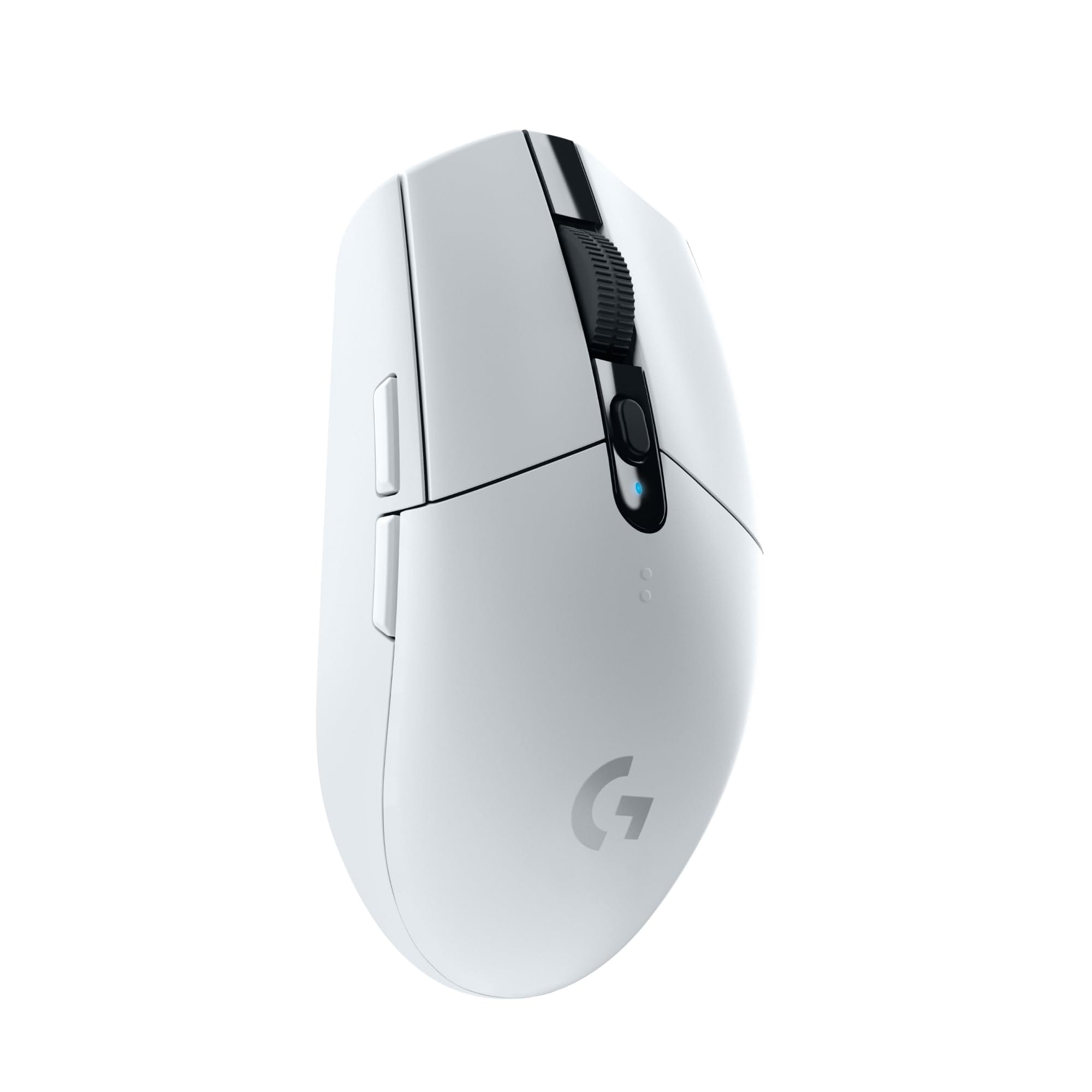
Introduction: The Logitech G305 LIGHTSPEED wireless gaming mouse has earned a reputation for delivering top-tier performance at an accessible price. Powered by Logitech’s HERO sensor and its proprietary LIGHTSPEED 2.4 GHz wireless tech, the G305 targets gamers who want wired-like responsiveness without the cable—or the premium price tag. In this review, we dig into features, real-world performance, design, value, and alternatives to help you decide if the G305 is the right fit for your setup.
Key Features and Specifications
The Logitech G305 LIGHTSPEED is designed to distill the essentials of competitive gaming performance into a compact, reliable package. Here are the headline features and core specs that matter most to buyers:. For a If you want something lighter than the G305 while keeping low‑latency wireless, the SteelSeries Aerox 3 Wireless is a strong ultralight alternative., consider our SteelSeries Aerox 3 Wireless.
- Sensor: Logitech HERO optical sensor
- DPI Range: 200–12,000 DPI (adjustable in Logitech G HUB, onboard DPI cycling)
- Tracking: Up to 400 IPS, 40G acceleration
- Wireless Tech: Logitech LIGHTSPEED 2.4 GHz with 1ms report rate
- Battery: 1x AA battery (included), up to ~250 hours in Performance mode; extended life in Endurance mode
- Weight: Approx. 99 g with AA battery (varies slightly by battery)
- Buttons: 6 programmable (L/R, clickable scroll wheel, two side buttons, DPI cycle)
- Onboard Memory: Save profiles and DPI steps directly on the mouse
- Feet: PTFE glide feet
- Dimensions: ~116.6 x 62.15 x 38.2 mm (L x W x H)
- Shape: Compact, symmetrical shell with side buttons on the left (optimized for right-handed use)
- Connectivity: USB receiver (no Bluetooth); receiver storage inside mouse
- Software: Logitech G HUB for button mapping, DPI tuning, profiles, and power modes
- Lighting: None (no RGB)
- Compatibility: Windows, macOS, and ChromeOS via USB receiver
This spec sheet frames the G305 as a purpose-built wireless performer. It forgoes frills like RGB and built-in recharging in favor of long battery life, low latency, and dependable tracking—all at a price usually seen on wired mice.
Performance and Quality
The G305’s appeal starts with its performance. Logitech’s LIGHTSPEED wireless connection is genuinely low-latency and stable, delivering a responsive feel that’s difficult to distinguish from a high-quality wired mouse. In fast-paced FPS titles, micro-corrections feel crisp and predictable, and flicks land as expected. There’s no perceptible jitter or acceleration under normal use; the HERO sensor’s tracking remains consistent across mousepads and desk surfaces, though a proper gaming pad still provides the best glide and control.
The 200–12,000 DPI range is plenty for most sensitivity preferences, and you can configure multiple DPI steps and a DPI shift action in G HUB. Polling rates of 125/250/500/1000 Hz are supported, and the 1000 Hz setting feels snappy without noticeably hurting battery life in Performance mode. Sensor behavior is clean across common DPI levels, with no angle snapping or smoothing that would compromise competitive play.
Battery performance is a standout. With a single AA cell, Logitech rates the G305 at up to ~250 hours of continuous use in Performance mode (1ms report rate). In practice, that often translates to weeks or months for mixed gaming and productivity. Endurance mode raises the report interval to conserve power and can stretch runtime dramatically for everyday office tasks. When the battery finally runs low, swapping in a fresh AA takes seconds, and there’s no downtime waiting for a charge. For gamers who dislike cables and charging cradles, the convenience is real.
Click feel is solid and consistent. Primary buttons use mechanical tensioning for a crisp actuation and quick return, helping with rapid tapping in shooters and MOBAs. Side buttons are positioned within easy reach for most hand sizes and provide a tactile click without wobble. The scroll wheel is lightly notched—good for weapon cycling without overscrolling—and the middle click requires a moderate press that avoids accidental activation. Overall, the G305 feels reliable and predictable, which is precisely what you want under pressure.
On the software front, Logitech G HUB is straightforward. You can remap any of the six buttons, create application-specific profiles, adjust DPI steps, set polling rate, and toggle Performance/Endurance modes. Onboard memory lets you save a profile that travels with the mouse, particularly handy for tournaments, LANs, or switching PCs without reinstalling software.
Design and Build Quality
The G305 adheres to a minimalist, purpose-first design. The compact, slightly raised back and symmetrical shell lend themselves to claw and fingertip grips, while smaller hands may find palm grip comfortable as well. Larger hands can still use the mouse effectively, but palm grippers might wish for a higher, longer shell. The weight sits around 99 grams with a typical AA battery, which isn’t ultralight by today’s standards but remains manageable and well-balanced. Swapping to a lighter lithium AA or using an AAA with an adapter (a common user mod) can trim a noticeable few grams if you’re chasing faster, snappier flicks.
Build quality is robust for the price. The shell resists creaks and flex, the buttons have minimal lateral play, and the scroll wheel tracks consistently. PTFE feet provide smooth glide; upgrading to aftermarket feet is an easy tweak if you prefer thicker skates or a particular glide profile. The top shell pops off to reveal the AA battery bay and a discreet slot for the USB receiver—excellent for travel or switching venues.
Despite its symmetrical shape, the G305 is functionally right-handed due to the left-side buttons. Left-handed players can use it, but they’ll miss out on convenient side-button access. The matte coating does a nice job resisting fingerprints, though oil buildup is inevitable over long sessions; a quick wipe restores the finish. The lack of RGB is intentional: it saves power and reinforces the G305’s role as a performance-first device.
One important design note is power and charging. The G305 does not have an internal rechargeable battery or a wired mode; it’s strictly AA-powered. For many, that’s a plus—no cables, no charge cycles, no battery wear over time. For others, especially those who prefer a single, USB-C–charged ecosystem, it’s a trade-off. Fortunately, battery life is strong enough that replacements are rare, and a spare AA in your desk drawer or backpack is an easy failsafe.
Pros and Cons
- Pros
- Excellent wireless performance: LIGHTSPEED delivers a stable, 1ms connection that feels wired-fast.
- Accurate sensor: The HERO sensor tracks cleanly, with no acceleration or jitter under normal use.
- Outstanding battery life: Up to ~250 hours in Performance mode; Endurance mode extends it further.
- Great value: Frequently discounted, it brings competitive-grade performance to a budget-friendly price.
- Onboard memory and G HUB: Easy customization and portable profiles.
- Reliable build: Solid shell, crisp clicks, and smooth PTFE feet.
- Travel-friendly: Internal receiver storage; quick AA swap means zero downtime.
- Cons
- No Bluetooth: USB receiver only; not ideal for tablets or quick laptop swaps without the dongle.
- Not ultralight: ~99 g with AA is heavier than modern lightweight wireless mice.
- No rechargeable battery or wired mode: Some users prefer built-in USB-C charging.
- Shape fit is specific: Best for claw/fingertip; large-hand palm grippers may want a bigger shell.
- Right-handed bias: Side buttons only on the left side limit left-handed usability.
- No RGB: A non-issue for many, but some buyers may miss lighting customization.
Value Proposition and Pricing + Who Should Buy It
Value and Pricing: The Logitech G305 LIGHTSPEED is one of the best values in wireless gaming mice. With an MSRP typically around the budget-to-midrange mark and frequent sales bringing it even lower, it competes with wired mice on price while outperforming many of them on convenience. Crucially, Logitech did not compromise on the fundamentals: latency, sensor fidelity, click feel, and build quality are all strong. The trade-offs—no Bluetooth, no RGB, AA power—are sensible omissions that keep costs down and battery life high.
Viewed across a multi-year horizon, the cost of AA batteries is rarely a burden, especially if you opt for long-lasting lithium or use quality rechargeables with a charger. Because the mouse isn’t tied to a sealed internal battery, longevity can actually be a plus: years down the line, you can still power it with a fresh AA rather than replacing the entire device or the internal cell.
Who Should Buy It:
- Competitive and casual FPS/MOBA players who prioritize low latency and reliable tracking without spending premium mouse money.
- Students and professionals seeking a single mouse for work and play, with long battery life and a compact, travel-friendly design.
- Claw and fingertip grip users with small to medium hands who will find the shape particularly comfortable and controllable.
- Minimalists who don’t need RGB or extra buttons and value a clean, straightforward aesthetic.
- Multi-PC users who appreciate onboard memory and quick, dongle-based switching.
Who Might Look Elsewhere:
- Gamers who want an ultralight shell (sub-70 g) for maximum speed and minimal fatigue.
- Those who prefer Bluetooth or dual-mode connectivity for easy tablet or laptop pairing without a dongle.
- Users who want an internal rechargeable battery with USB-C and/or a wired fallback mode.
- Large-hand palm grip users who may prefer a longer, taller mouse.
Comparison with Alternatives
The G305 occupies a sweet spot where performance, price, and battery life intersect. Here’s how it stacks up against several popular alternatives:. If you're considering alternatives, our Razer Viper Ultimate review covers a For a pricier step‑up with an ultralight shell, optical switches, and a charging dock, consider the Razer Viper Ultimate as a premium alternative..
Logitech G Pro X Superlight: If you love Logitech’s ecosystem but want peak competitive performance, the G Pro X Superlight is a flagship choice with a dramatically lower weight and a more premium shell, feet, and cable/charging setup. It’s superb for FPS esports, but it costs several times more than a discounted G305. If you’re budget-conscious or just getting into competitive play, the G305 delivers much of the responsiveness at a fraction of the price.
Razer Orochi V2: A direct competitor with a similarly compact shape and AA/AAA flexibility, the Orochi V2 adds dual-mode connectivity (2.4 GHz + Bluetooth) and slightly lower weight, making it more convenient for travel and multi-device use. Razer’s pricing is often higher, however, and the overall click feel and scroll implementation come down to preference. Battery life is in the same league, and both are great portable options.
Razer DeathAdder V2 X HyperSpeed: A comfortable, larger ergonomic shape with dual-mode connectivity and long battery life. It’s better for large-hand palm grip users and those who value Bluetooth. The trade-off is size and weight—less portable, and not as compact on small desks. Sensor performance is competitive, but shape preference should drive your decision here.
Logitech G502 LIGHTSPEED: Feature-packed with extra buttons, a larger ergonomic shell, and a higher-end sensor and scroll wheel mechanism. It’s heavier and much more expensive, but if you rely on many side buttons or macros, the G502 series is legendary. For streamlined FPS play, the G305’s simplicity and lighter weight may still win out.
Corsair Harpoon RGB Wireless / SteelSeries Rival 3 Wireless: Both are value-focused wireless options with strong battery life. The Harpoon brings a larger, grippier shell and RGB; the Rival 3 Wireless offers dual AAA power. Logitech’s LIGHTSPEED connection and HERO sensor give the G305 an edge in click latency and tracking consistency, but pricing and grip comfort can tilt the choice in either direction depending on your hand and budget.
In short, the G305 holds its own remarkably well. If you need Bluetooth or an ultralight shell, alternatives exist; if you want the best raw wireless gaming performance per dollar, the G305 remains a top contender.
Conclusion
The Logitech G305 LIGHTSPEED distills what matters most in a gaming mouse: accurate tracking, low latency, dependable clicks, and long battery life—without inflating the price. Its compact, no-nonsense design favors claw and fingertip grips, and LIGHTSPEED wireless makes it feel wired-fast. While it lacks Bluetooth, RGB, and built-in charging, those omissions help deliver exceptional value. For gamers seeking a reliable, affordable wireless mouse that performs above its price class, the G305 is an easy recommendation.