
Logitech G240 Cloth Gaming Mouse Pad Review: Consistent Control, Slim Profile, and Great Value
Introduction
The Logitech G240 Cloth Gaming Mouse Pad aims to deliver consistent tracking and dependable control in a slim, travel‑friendly package. Designed with a finely textured cloth surface and a non-slip rubber base, it targets gamers who value precision at lower DPI settings and want a pad that stays put without adding bulk. In this review, we explore the G240’s features, performance, build quality, value, and how it stacks up against popular alternatives to help you decide if it belongs on your desk.
Key Features and Specifications
The Logitech G240 focuses on delivering a stable, consistent surface for precise aiming while staying ultra-thin and portable. Below are the key features and specifications that define its character:
- Surface type: Cloth with a micro-textured weave optimized for control and consistent sensor tracking.
- Friction profile: Moderate surface friction that aids in stopping power and micro-adjustments, ideal for low-DPI gaming.
- Dimensions: Approximately 340 mm (W) × 280 mm (H) × 1 mm (T). The footprint suits compact to mid-sized desks while leaving room for keyboard placement.
- Thickness: Ultra-thin 1 mm profile for a closer-to-desk feel and easy portability.
- Base material: Textured rubber base designed to prevent slipping even during rapid flicks and long sessions.
- Edge finish: Traditional cut edges (not stitched), keeping the pad featherlight but potentially more prone to fraying over time.
- Sensor compatibility: Tuned for optical sensors (including Logitech HERO) and works reliably with most mainstream PixArt-based sensors.
- Build: Flexible, rollable cloth pad that packs easily for LANs or travel.
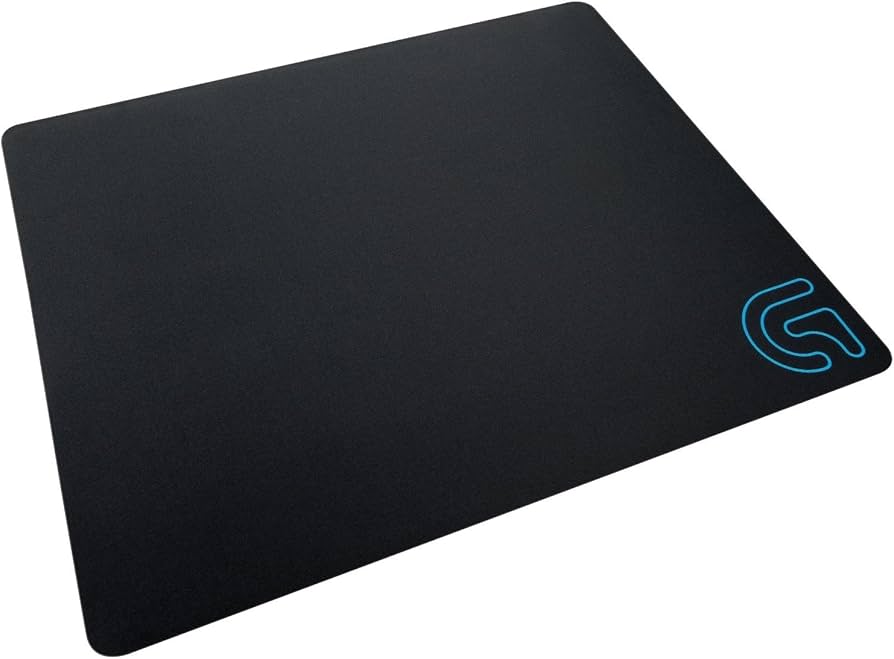
- Aesthetics: Minimalist black surface with a small Logitech G logo in one corner—discreet and streamer-friendly.
- Typical pricing: Often seen around $14–$20 USD, with an MSRP commonly near $19.99 (varies by region and retailer).
- Warranty: Limited hardware warranty (duration may vary by region).
Taken together, these elements frame the G240 as a no-nonsense, control-leaning pad that favors consistent glide and sensor accuracy over flashy aesthetics or thick cushioning.
Performance and Quality
At the heart of any mouse pad review is how it performs under real-world gaming conditions. The G240’s micro-textured cloth creates a surface that is distinctly control-focused. Glide is smooth but measured, with a bit of resistance that helps you stop exactly where you intend—particularly useful in tactical shooters and precision-heavy aim training. Players running low DPI (400–800) will appreciate the way the pad damps overcorrection while still allowing swift directional changes.
Sensor consistency is a standout strength. Logitech tunes this surface so that high-performance sensors—like the HERO series or popular PixArt 33xx/33xx derivatives—receive a uniform texture across the entire pad. This uniformity reduces micro-jitter and lends predictability to flicks and tracking, which is especially noticeable when you move beyond the center of the pad into corners during intense firefights. Cursor motion remains even, with no dead zones or unexpectedly slick patches out of the box.
In terms of speed, the G240 sits on the control side of balanced. It’s not a “muddy” slow pad; rather, it has enough initial and dynamic friction to enhance stopping power without feeling draggy. Rapid angle shifts and quick 180s are achievable, but this isn’t the pad for speed-pad purists who prefer almost frictionless glide. If you favor lightweight mice and feather-touch aim, the G240 provides the counterbalance that can make your inputs feel “anchored” and confident.
Quality-wise, batch consistency is generally good. The weave is even, and the rubber base grips well on standard desk surfaces from laminate to wood and common desk mats. Because it’s only 1 mm thick, you’ll feel more of the desk underneath compared to thicker pads—this enhances tactile feedback for some, while others may miss the cushioned comfort and micro-elevation that a 3–4 mm pad provides.
One performance consideration is humidity. Like most cloth pads, the G240 can feel a touch slower in humid environments or during very long sessions as moisture interacts with the fabric. It doesn’t become unusably sluggish, but glide can tighten slightly. Conversely, in very dry conditions, it may feel a hair faster. This sensitivity is typical of cloth pads and not specific to the G240 alone.
Noise is minimal; the glide produces a soft, low rustle. Lift-off distance (LOD) behavior depends on your mouse, but the pad’s consistent texture often pairs well with sensors that prefer reliable surface feedback, helping to keep LOD predictable when you pick up and reposition your mouse.
Design and Build Quality
The G240’s design is intentionally understated. The matte-black cloth looks clean on camera and in person, with a small corner logo that’s easy to hide under the keyboard if you want an entirely blank surface. The microtexture is fine enough that you won’t see large weave patterns, reducing the risk of inconsistent tracking.
The ultra-thin 1 mm profile is both a benefit and a trade-off. On the plus side, it’s unobtrusive, lies close to the desk for a stable feel, and is exceptionally portable—you can roll it up and drop it into a backpack without much bulk. On the minus side, thin pads are more susceptible to minor waves if stored rolled too tightly or exposed to heat; laying the pad flat under some weight typically resolves this. If you prefer the pillow-like comfort of thicker pads, the G240 will feel stark by comparison.
The rubber base features a textured pattern that grips well. Even during high-intensity flicks or heavy mouse pressure, the pad resists shifting. This reliable grip is key to maintaining muscle-memory, especially when you brace on the pad’s edges.
Edges are not stitched. Functionally, this helps the pad stay extremely thin and light, and it ensures the edges feel flush—nothing to catch on your wrist. However, the trade-off is durability: frequent arm movement, friction from long sleeves, or aggressive cleaning can lead to edge fray over time. Many users report months to years of usable life depending on care, but if you want a pad that looks pristine for the long haul, stitched alternatives may be better.
Cleaning and maintenance are straightforward. A lint roller or soft brush removes dust and pet hair. Spot-clean with mild soap and water for spills; avoid soaking, and let it air-dry fully on a flat surface. As with most cloth pads, heavy washing can slightly change feel until the fabric breaks in again.
Overall build quality is solid at its price: consistent cloth surface, steady base adhesion, and clean manufacturing. The lack of fray-resistant stitching is the primary compromise in exchange for the G240’s ultrathin, minimalist profile.
Pros and Cons
- Pros
- Excellent surface consistency for optical sensors; predictable tracking across the entire pad.
- Control-oriented glide that enhances stopping power and micro-corrections—great for low-DPI FPS play.
- Ultra-thin (1 mm) profile provides stable, desk-like feel and easy portability.
- Secure rubber base resists shifting during aggressive movements.
- Minimalist design suits clean setups and on-camera use.
- Affordable pricing, often under $20 USD.
- Cons
- No stitched edges; edges may fray with heavy use or rough cleaning.
- Thin pad means less wrist cushioning and more desk feel; not ideal if you prefer plush mats.
- Moderate friction won’t suit players who want a fast, low-resistance glide.
- Like most cloth pads, glide can be humidity-sensitive.
- Single size; those wanting oversized desk coverage may need to look elsewhere.
Value Proposition and Pricing
Value is where the Logitech G240 shines. With a typical street price around $14–$20 USD, it undercuts many premium cloth pads while delivering excellent tracking consistency and a refined control surface. For players who want a serious gaming mat without spending much, the G240’s proposition is compelling.
At this price tier, competitors often offer either thicker builds with stitched edges or similar thin profiles with less sensor-tuned texture. Logitech’s advantage is its sensor expertise; the brand designs pads with mouse sensor behavior in mind, which helps ensure dependable performance across a range of DPI settings and mouse models.
Durability, given the unstitched edges, is the main caveat relative to some competitors. If you amortize the cost over a year or two of frequent use, the G240 still represents solid value. Users who want multi-year longevity with pristine edges should consider pricier stitched-edge alternatives. But if your priority is performance-per-dollar in a compact footprint, the G240 is easy to recommend.
Comparison with Alternatives
Here’s how the G240 stacks up against some popular options:
- Logitech G640: Think of the G640 as the G240’s bigger, thicker sibling. It offers a larger surface area (commonly around 460 × 400 mm) and a thicker 3 mm cushion, which adds comfort and slightly alters glide feel. The G640’s surface is also tuned for consistency, with a control-leaning balance similar to the G240 but more room for broad arm movement. Choose the G640 if you want the Logitech feel in a larger, more cushioned format.
- Logitech G440 (Hard Pad): A hard plastic pad that delivers very low friction and a fast glide. Great for those who prefer speed and quick flicks with minimal resistance. It’s louder, less forgiving on wrists, and more sensitive to debris than cloth pads. Pick this if you’re a hard-pad fan or want to experiment with the opposite end of the glide spectrum from the G240.
- SteelSeries QcK: A classic cloth pad known for its reliable, medium-speed glide and multiple size options. Typically thicker than the G240 and often more comfortable for extended wrist contact, with some versions offering stitched edges. The G240 may feel slightly more controlled and closer to the desk; the QcK wins on variety and cushioned comfort for a similar price bracket.
- Razer Gigantus V2: Available in many sizes with a thicker foam base and stitched edges. Glide is balanced-to-control depending on batch and size. If you want a stitched-edge pad with more desk coverage and a premium look, the Gigantus V2 is a strong alternative; it typically costs more than the G240 but brings extra comfort and longevity.
- HyperX Fury S: Another value-friendly cloth pad that usually includes stitched edges and a thicker base. Glide is control-leaning with solid durability. If fray resistance is a must and you don’t mind extra thickness, the Fury S can be more robust long-term, though it may not match the G240’s ultrathin, nimble feel.
- Glorious (Element/Stealth/Standard) and XL/3XL Pads: Glorious offers a wide range of sizes with varying glide profiles, typically at competitive prices. Many models feature stitched edges and larger formats. These excel if you want expansive desk coverage or a particular glide feel; however, the G240 keeps an edge on sensor-tuned consistency and compact portability.
- Artisan (Zero, Hien, etc.): Premium Japanese pads prized for exceptional consistency and unique weaves. They’re considerably more expensive and come in multiple firmness levels and sizes. If you’re willing to invest in top-tier performance with carefully engineered surfaces and stitched edges, Artisan pads are outstanding. For budget-conscious buyers, the G240 remains the better value.
In summary, the G240 is the right choice if you want Logitech’s control-focused, consistent texture in a compact, ultra-thin form at an affordable price. If you need more space, plush comfort, or stitched edges, the alternatives above may suit you better.
Who Should Buy This Product
The Logitech G240 is a smart fit for specific players and setups:
- Low-DPI FPS and tactical shooter players who prioritize stopping power and precision over maximum glide speed.
- Gamers who prefer a desk-like feel with minimal cushioning for steady wrist placement and predictable control.
- Travelers and LAN party attendees needing an ultra-thin, rollable pad that packs down with little bulk.
- Small-to-medium desk setups where a compact footprint is preferable to oversized desk mats.
- Budget-conscious buyers who want consistent sensor performance without premium pricing.
- Streamers and minimalists who like clean aesthetics and a discreet logo.
You might want to look elsewhere if you require stitched edges for maximum durability, prefer a fast/speed pad, or want a thicker cushion for wrist comfort and a softer hand feel over long sessions.
Conclusion
The Logitech G240 Cloth Gaming Mouse Pad delivers exactly what it promises: a consistently textured, control-leaning surface in an ultra-thin, affordable package. Its reliable tracking, stable base, and minimalist design make it an easy recommendation for low-DPI players and anyone who values precision over raw speed. While the lack of stitched edges and the 1 mm profile won’t suit everyone, the G240’s performance-per-dollar is outstanding. If you want a light, portable, and predictable gaming surface, the G240 is a strong buy.