
HyperX Alloy FPS Pro Review: A No‑Nonsense TKL Mechanical Keyboard for FPS Gamers
Introduction
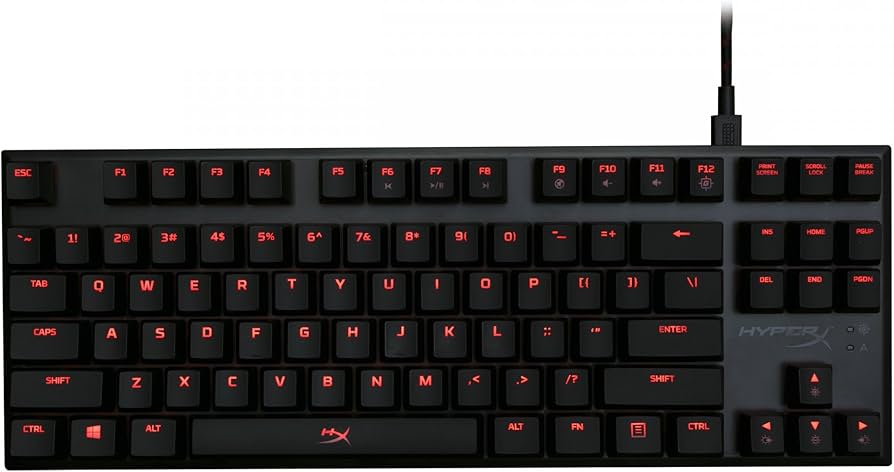
The HyperX Alloy FPS Pro is a compact tenkeyless mechanical gaming keyboard designed for players who value precision, portability, and durability over flashy extras. With authentic Cherry MX switch options, a solid steel top plate, and red LED backlighting, it zeroes in on the essentials that matter for competitive play. In this review, we break down its features, performance, and build quality, compare it to popular alternatives, and help you decide whether it’s the right fit for your desk and your budget.
Key Features and Specifications
The Alloy FPS Pro is built as a purpose-driven keyboard for FPS and competitive gaming. Rather than piling on features you might never use, it focuses on reliable switches, a sturdy frame, and a space-saving layout that frees up mouse room. Here are the highlights and specs that define the experience:
- Form factor: Tenkeyless (87-key) layout for a smaller footprint and more mousing space
- Switches: Cherry MX (commonly Red or Blue; availability varies by region). No hot-swap.
- Backlighting: Single-color red LED with multiple brightness levels and built-in lighting effects
- Construction: Solid steel top plate with a robust plastic base for exceptional rigidity
- Keycaps: OEM-profile ABS keycaps; standard ANSI layout; compatible with most aftermarket sets
- Rollover: 100% anti-ghosting with full N-key rollover (NKRO) over USB
- Polling rate: 1000 Hz for responsive input
- Cable: Detachable braided USB cable (micro‑USB on keyboard side)
- Media controls: Secondary (Fn-layer) media keys; Game Mode to disable Windows key
- Software: None required; lighting controls via onboard shortcuts
- Dimensions (approx.): 360 × 130 × 34 mm (14.2 × 5.1 × 1.3 inches)
- Weight (approx.): ~900 g (2.0 lbs)
- Layout options: Primarily ANSI US; regional variants may exist
- Passthrough: None (no USB passthrough port)
- Accessories: Keycap puller and optional textured WASD caps may be included in some bundles (varies by retailer/region)
- Warranty: Typically 2 years (check local policy)
At a glance, the Alloy FPS Pro’s value proposition is clear: authentic Cherry switches, a compact and rigid chassis, and driverless operation. You won’t find RGB, macros, or software integrations here—and that’s by design. It’s a tool for players who want consistency and reliability without distraction.
Performance and Quality
In-game performance is where the HyperX Alloy FPS Pro shines. The combination of Cherry MX switches and a rigid steel top plate delivers stable, predictable keypresses that are easy to control under pressure. If you opt for Cherry MX Red, you’ll get a light, linear feel with a 45 g actuation force and smooth travel—ideal for rapid strafing, bunny-hopping, and quick tap firing in shooters. Cherry MX Blue brings a tactile bump and an audible click, favored by typists who want clear feedback. For shared spaces or voice chat, note that Blue switches are significantly louder.
From a speed perspective, the keyboard’s 1000 Hz polling and NKRO ensure your inputs are captured accurately—even during frantic moments when you’re holding multiple keys. Ghosting wasn’t an issue in testing. The Game Mode toggle effectively disables the Windows key, preventing accidental desktop trips mid-match, and the Fn-based media controls mean you can adjust volume without leaving a game.
Typing quality is solid for a gaming-first board. The plate-mounted design minimizes flex, giving each keystroke a crisp, confident bottom-out. Stabilizers are Cherry-style and reasonably tuned; the spacebar and larger keys have a hint of rattle compared to enthusiast boards with hand-lubed stabilizers, but it’s not excessive. Sound profile is moderately clacky due to the steel plate, with Reds sounding cleaner and lower in pitch than Blues. There’s minimal ping or resonance under normal use.
Lighting is straightforward: red LEDs with multiple brightness steps and a handful of preset effects (e.g., breathing, wave, reactive). Brightness is ample, and legends are legible in both bright rooms and dark setups. While you don’t get per-key customization or RGB layers, the trade-off is simplicity—no software to update, fewer potential conflicts, and consistent behavior across machines.
Long-term durability is a strong suit. Cherry switches are rated for up to 50 million actuations, and the steel top plate keeps the deck aligned and wobble-free over time. The ABS keycaps will eventually exhibit shine with heavy use; that’s typical at this price. If that bothers you, the standard layout makes aftermarket PBT replacements easy. The detachable braided cable is convenient for transport and helps avoid stress on the connector during storage.
In competitive shooters like CS2, Valorant, Apex Legends, and Overwatch, the Alloy FPS Pro’s compact footprint translates into more mouse mat real estate for low-DPI swipes. That ergonomic advantage—plus the reliable actuation of Cherry switches—can make a practical difference in tracking and flick consistency.
Design and Build Quality
The Alloy FPS Pro embraces minimalism. Its tenkeyless shape eliminates the numpad, shaving off width and keeping your shoulders square. The steel top plate gives it a premium, weighty feel that stays planted even during intense sessions, aided by grippy rubber feet. The chassis has very little flex, and the finish resists fingerprints well. Branding is tasteful, with a compact HyperX logo and unobtrusive legends.
Flip-out feet provide two typing angles. The default incline is comfortable, and the stepped feet feel sturdy with no wobble. The detachable braided micro‑USB cable routes from the top edge; while micro‑USB is dated compared to USB‑C, it’s firmly seated and easy to replace if lost or damaged. Port placement is centered for clean cable management.
Keycaps are ABS with clear legends for backlight transmission. Legend sharpness is good for the class. If you prefer a different feel or want better wear resistance, the standard stem and layout mean you can swap to PBT sets with minimal fuss. The function row doubles as media and lighting controls via the Fn layer; the shortcuts are intuitive and don’t require software.
As a compact board, portability is excellent. It slides easily into a backpack or a gear bag for LANs and tournaments, and the detachable cable reduces strain on the connector during travel. There’s no wrist rest in the box, which aligns with the lean approach—keep the footprint tight and the essentials strong.
Overall, the design philosophy is consistent: prioritize structural integrity and reliable mechanics, and leave the frills behind. If you want per-key RGB, macro layers, or a volume wheel, you’ll need to look elsewhere. If you want a keyboard that feels unshakeable and focused, the Alloy FPS Pro nails the brief.
Pros and Cons
- Pros
- Genuine Cherry MX switches (Red or Blue in most regions) deliver consistent, proven performance
- Solid steel top plate provides excellent rigidity and a premium, stable feel
- Tenkeyless layout frees mouse space and encourages better arm/shoulder posture
- Full NKRO with 1000 Hz polling ensures accurate input registration
- Detachable braided cable improves portability and longevity
- Clean, minimal aesthetic; easy to drop into any setup
- No software required; onboard lighting and Game Mode are simple and reliable
- Standard layout enables easy keycap customization
- Cons
- No RGB or per-key lighting; only single-color red backlight
- No hot-swappable switches; you’re committed to your chosen switch type
- No dedicated media keys or volume wheel (media on Fn layer only)
- ABS keycaps will develop shine with heavy use
- Micro‑USB instead of modern USB‑C
- Stabilizers are decent but not enthusiast-grade; slight rattle on larger keys
- No USB passthrough; no included wrist rest
Value Proposition, Pricing, and Comparisons
In an era where gaming keyboards can creep well past the $100 mark, the HyperX Alloy FPS Pro still represents strong value because it focuses on fundamentals. Street prices vary by region and availability, but it’s commonly found in the $50–$80 USD range, occasionally higher or lower during sales or limited stock. At that price, you’re paying for switch quality, frame rigidity, and a compact form factor—not for software ecosystems or lighting theatrics.
That value proposition is especially compelling for competitive gamers: fewer points of failure, simpler setup across multiple PCs, and reliable feel. If you’re shopping in this bracket, here’s how the Alloy FPS Pro stacks up against notable alternatives:
- HyperX Alloy Origins Core (TKL): A natural step up within HyperX’s own lineup. It offers an aluminum body, RGB lighting, and HyperX’s in-house switches (e.g., HyperX Red/Aqua) with NGenuity software for customization. It’s pricier but more feature-rich. Choose the Origins Core if you want RGB and software; choose the FPS Pro if you want driverless simplicity and Cherry switches.
- Logitech G Pro X: A tournament-grade TKL with hot-swappable GX switches (and support for a range of switch types). It’s significantly more expensive but excels for users who like experimenting with switches. If hot-swap matters to you, the G Pro X is attractive; if not, the Alloy FPS Pro’s cost savings are meaningful.
- SteelSeries Apex 7 TKL: Premium build, per-key RGB, OLED display, and software control via SteelSeries GG. It’s feature-rich and usually sits in a higher price tier. Great for users who want deep customization and integrated ecosystem features; overkill if you prefer a simpler board.
- Corsair K63 (and K65 variants): The K63 offers red-only backlighting like the FPS Pro, with Cherry MX Red switches and wireless options on specific models. The K65 adds aluminum construction and RGB in some variants, at a higher price. If wireless is a priority, K63 Wireless is a direct competitor; if you want wired and sturdy with a lower price, the FPS Pro competes well.
- Razer Huntsman Tournament Edition: A TKL with Razer’s optical linear switches, PBT keycaps, and USB‑C. It’s usually pricier but offers ultrafast actuation and excellent stock keycaps. If you value the latest switch tech and PBT out of the box, this is a strong alternative.
- Ducky One 2 TKL / Ducky One 3 TKL: Ducky caters to enthusiasts with excellent typing feel, PBT keycaps, and robust build. Pricing is generally higher than the FPS Pro, but you’re paying for elevated stock keycaps and refined acoustics. For pure value on switch quality and rigidity, the FPS Pro remains competitive.
Where the Alloy FPS Pro carves out its niche is its balance of price, Cherry switch authenticity, and tank-like rigidity. If your must-haves are dependable switches, a compact footprint, and no-hassle operation, it’s hard to beat at its street price. If you want RGB, macros, or hot-swap, the above alternatives will suit you better—just be ready to pay more.
Who Should Buy This Product
The HyperX Alloy FPS Pro is purpose-built, and it’s an especially good fit for the following users:
- Competitive FPS players: The TKL layout creates more room for low-sensitivity mouse movements, and Cherry switches provide familiar, predictable actuation. Game Mode and NKRO support clutch performance.
- Minimalists and no-software purists: If you prefer a plug-and-play keyboard that behaves the same on every machine without drivers, this is an excellent choice.
- LAN/Tournament participants and students: The detachable cable and compact form make it easy to pack and carry. Its weight helps it feel stable on wobbly tables.
- Office and mixed-use typists: Red switches are relatively quiet for mechanicals and comfortable for long typing sessions. Blue switches are satisfying for solo work but can be loud in shared spaces.
- Value-focused builders: If you want a solid entry into mechanical keyboards with proven parts and a standard layout for future customization, the Alloy FPS Pro is a smart, budget-conscious pick.
You should consider other options if you require RGB, advanced macro programming, hot-swappable switches, USB passthrough, or a modern USB‑C port. Those features are available in pricier TKLs, but they’re outside this board’s mission.
Conclusion
The HyperX Alloy FPS Pro is a focused, durable tenkeyless keyboard that emphasizes performance over pageantry. With real Cherry MX switches, a rigid steel top plate, and driverless operation, it delivers the essentials competitive players care about at a compelling price. You give up RGB, software customization, and dedicated media controls, but in return you get reliability, portability, and a clean, compact footprint. For FPS gamers and minimalists seeking no-nonsense quality, it’s an easy recommendation.