
Corsair K70 RGB Review: Premium Mechanical Gaming Keyboard with Blazing Speed, Aluminum Build, and Vibrant Per‑Key Lighting
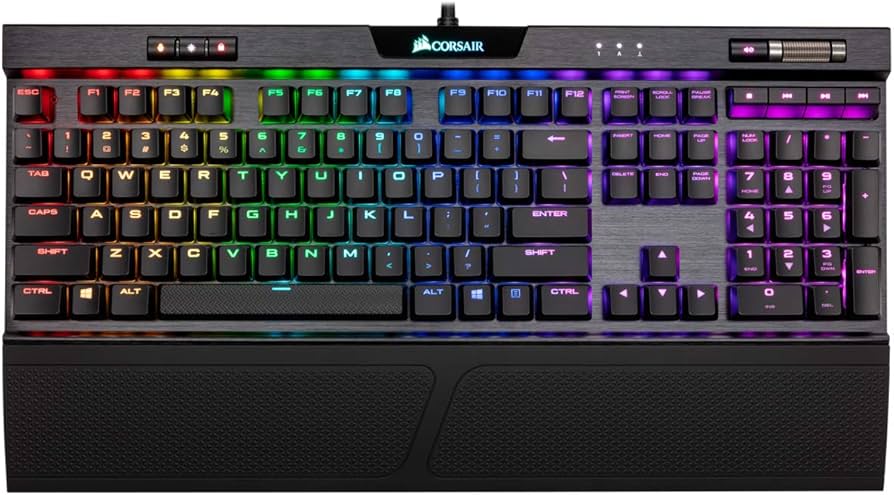
Note: This review covers the Corsair K70 RGB family as a whole (e.g., K70 RGB, K70 RGB MK.2, K70 RGB PRO, K70 MAX, and TKL variants). Features can vary by model and region; check the exact SKU for specifics like polling rate, keycaps, and USB passthrough.
Introduction
The Corsair K70 RGB is one of the most recognizable mechanical gaming keyboards on the market, renowned for its sturdy aluminum frame, crisp per-key RGB lighting, and tournament-ready performance. Across multiple revisions, Corsair has refined the K70 into a dependable, enthusiast-friendly deck that balances style and substance. Whether you’re chasing frame-perfect inputs or a premium typing experience, the K70 RGB series offers versatile switch options, dedicated media controls, and deep iCUE customization with strong software and hardware integration.
Key Features and Specifications
The K70 RGB line has evolved through several generations, but it consistently delivers a premium set of gaming and productivity features. Below is a consolidated look at core capabilities you can expect, with notes on model-dependent differences.
- Switch options: Primarily genuine Cherry MX (Red, Silent Red, Brown, Blue, Speed Silver) on many K70 RGB and K70 RGB PRO models; some variants like the K70 MAX use magnetic Hall effect switches with adjustable actuation. Feel, noise, and actuation force vary by switch.
- Form factors: Full-size (with numpad) and TKL (tenkeyless) versions. Full-size maximizes media controls; TKL is lighter and more portable for esports.
- Materials and build: Brushed, anodized aircraft-grade aluminum top plate with a steel or reinforced chassis beneath, delivering excellent rigidity and long-term durability.
- Lighting: Per-key RGB with vivid diffusion and dynamic effects. Layers, brightness, and effects are configurable via Corsair iCUE; many models support hardware playback of lighting on-board.
- Polling rate and processor: Up to 8,000 Hz (0.125 ms theoretical response) on AXON-powered boards like the K70 RGB PRO; older K70 RGB models typically run at 1,000 Hz. Adjustable in iCUE.
- On-board profiles: Store lighting, macros, and key remaps directly on the keyboard (number of profiles varies by model). Handy for using the board without iCUE running.
- Anti-ghosting and rollover: Full N-key rollover and 100% anti-ghosting for reliable simultaneous keypresses.
- Media controls: Dedicated media keys plus a textured volume roller. Layout and button style can differ by revision, but functionality is consistent and convenient.
- USB passthrough: Available on select older K70 RGB models; not present on many newer K70 RGB PRO/TKL iterations. Check your exact SKU if this is essential.
- Keycaps: Depending on model, either double-shot PBT (more durable, crisper legends) or ABS (smoother feel, may develop shine over time). Legends use Corsair’s gaming font for high visibility.
- Wrist rest: Most full-size K70 RGB models include a detachable, textured wrist rest; feel and attachment mechanism vary by generation.
- Cable: Typically a thick, durable cable; older models often have non-detachable braided cables, while some recent TKL variants may have detachable USB-C for portability.
- Software: Corsair iCUE on Windows and macOS supports lighting, macros, remaps, polling rate, and performance tuning. Multiple device sync across Corsair ecosystem.
- Compatibility: Windows and macOS (feature parity can vary), plus basic functionality on Linux and consoles for standard input and lighting playback.
- Tournament switch/lock: Certain models include a physical switch that disables macros and sets a distraction-free lighting profile for competitive play.
- Dimensions and weight: Full-size K70 models are substantial, providing desk stability; TKL is lighter for travel and smaller desks. Expect a pronounced footprint due to media keys and wrist rest.
- Warranty: Typically two years, varying by region.
In short, the K70 RGB family is defined by a premium, long-lasting chassis; strong typing and gaming performance; rich software features; and reliable per-key illumination. The model you choose will determine the exact polling rate, switch technology, keycap material, and connection style.
Performance and Quality
Across generations, the Corsair K70 RGB has remained a performance showcase. On AXON-equipped boards like the K70 RGB PRO, the 8,000 Hz polling rate reduces input latency to the absolute minimum your system can meaningfully utilize. Even if you dial it back to 1,000–2,000 Hz for system efficiency, keypress registration remains immediate and consistent. Older K70 RGB models with 1,000 Hz polling still feel snappy for competitive play and general productivity.
Switch performance is excellent thanks to Cherry’s reputation for longevity and consistency, as well as the newer magnetic switches on the K70 MAX, which enable adjustable actuation points and advanced behaviors like dual-stage actuation (press once to walk, deeper press to run). For mainstream Cherry options, MX Red and MX Speed Silver are gamer favorites due to their linear feel and light actuation, while MX Brown offers light tactility for mixed use. If you require quiet operation, MX Silent Red is a smart choice, dampening bottom-out noise without sacrificing responsiveness.
Key rollover and anti-ghosting are effectively flawless, so you can spam abilities, strafe, and hit modifiers simultaneously without dropped inputs. Stabilized keys (spacebar, enter, shift) feel secure, with a predictable downstroke that’s improved with each generation. Out of the box, stabilizer sound ranges from reasonably quiet to a gentle rattle depending on the exact model and switch; enthusiasts can reduce noise further with simple mods and alternative keycaps if desired.
Lighting fidelity is a highlight. The K70’s north-facing LEDs produce bright, uniform effects with excellent per-key definition. Effects like ripple, reactive, and wave look clean and can be layered with static zones or tied to application profiles. With hardware profiles stored on-board, you can keep core animations and remaps without running iCUE, which is particularly useful on macOS, Linux, or locked-down systems.
Over long sessions, the K70 RGB maintains performance stability. The aluminum top plate keeps the board rigid during intense gameplay and energetic typing, while the non-slip feet and included wrist rest on many models reduce fatigue. The overall quality control of the K70 line is a strong point; it’s a keyboard you can confidently use for years, even under heavy daily workloads.
Design and Build Quality
The Corsair K70 RGB is iconic for its floating keycap design over a brushed, anodized aluminum top plate. The aesthetic is equal parts modern and industrial, with sharply defined edges, a chamfered volume roller, and clearly labeled media controls. That aluminum isn’t just for looks: it’s the reason the K70 feels rigid when you pick it up and why it resists flex during intense WASD or spacebar presses.
Attention to usability is apparent. The dedicated media keys—play/pause, skip, stop—and the textured volume roller make day-to-day use genuinely better than relying on function-layer shortcuts. The roller is smooth, precise, and easy to locate by feel. The top-right corner typically houses profile switching and lighting brightness buttons, keeping essential functions within reach without cluttering the main typing area.
Keycap quality varies by SKU. Double-shot PBT sets are crisp, durable, and resistant to shine; they also provide a slightly textured top surface that improves finger grip. Some earlier or more budget-oriented K70 variants ship with ABS keycaps. These feel smoother and can develop shine over time, though they keep RGB very bright. The standard OEM profile is comfortable for long sessions, and Corsair’s enlarged legends maximize LED diffusion for high-contrast lighting.
Ergonomically, the detachable wrist rest (on most full-size models) is a welcome addition. It’s lightweight, ventilated, and easy to remove when you want more desk space. The incline feet provide two typing angles, and rubber pads keep the board securely planted. Cable design is robust; older K70 boards often feature thick, braided cables with optional USB passthrough connectors, while some newer TKL/PRO variants move to USB-C for practical portability and cable swaps.
Maintenance is straightforward. The floating key design makes it easy to brush out dust and crumbs, and standard MX stems support a wide range of aftermarket keycaps for personalization. The chassis tolerances are tight, the finish resists fingerprints, and the overall construction feels purpose-built for years of heavy use.
Pros and Cons
- Pros
- Premium, rigid aluminum top plate with excellent long-term durability.
- Fast, consistent input with up to 8,000 Hz polling on newer PRO models; strong performance even at 1,000 Hz.
- Genuine Cherry MX or advanced magnetic switch options to suit gaming and typing preferences.
- Per-key RGB with bright, clean diffusion and robust on-board profile storage.
- Dedicated media keys and a smooth, tactile volume roller significantly improve everyday usability.
- Full N-key rollover and 100% anti-ghosting ensure reliable simultaneous inputs.
- Strong ecosystem integration via Corsair iCUE for lighting, macros, and multi-device sync.
- Available in full-size and TKL formats to fit different desk setups and competitive needs.
- Generally excellent build quality with stable feet, secure stabilizers, and a comfortable wrist rest on many models.
- Cons
- iCUE can be resource-heavy and has a learning curve for new users.
- Not all SKUs include PBT keycaps; some ship with ABS that can shine over time.
- Many newer PRO models omit USB passthrough, which some users still value.
- No dedicated macro column; macros rely on remapping or function layers.
- Some variants have non-detachable cables, reducing portability and ease of replacement.
- With clicky or fast linear switches, the board can be noisy for shared workspaces.
- North-facing LEDs may limit optimal fitment for certain Cherry-profile aftermarket keycaps.
Value Proposition, Pricing, and Who Should Buy
The K70 RGB series is positioned as a premium gaming keyboard line, and pricing reflects that. Exact cost depends on switch type, generation, and region, but you can use these ballpark ranges as a guide:
- K70 RGB (earlier generations/MK.2): Often in the mid range for premium boards, depending on availability and sales.
- K70 RGB PRO/TKL: Typically priced in the upper mid-to-premium bracket thanks to AXON processing, higher polling rates, and refined design touches.
- K70 MAX: Usually carries a higher price due to magnetic Hall effect switches and adjustable actuation features.
While not the cheapest, the K70 earns its price through long-term durability, stable firmware, and strong day-to-day usability—especially if you value dedicated media controls, per-key RGB, and on-board profiles. If you can wait for seasonal sales, Corsair gear regularly sees competitive discounts that improve the value proposition significantly.
Consider this keyboard if you are one of the following:
- Competitive gamers who want minimal latency and crucial quality-of-life features like TKL portability (if desired), tournament mode, and predictable key feel.
- RGB and ecosystem enthusiasts who already own Corsair components or peripherals and want synchronized lighting, app profiles, and shared macros through iCUE.
- Heavy typists and creators who appreciate a rigid chassis, consistent switches, on-the-fly volume control, and multiple saved profiles for work apps and games.
- Streamers who will benefit from dedicated media keys, quick profile switching, and lighting cues tied to streaming software.
On the other hand, you might look elsewhere if you want hot-swappable switches for easy experimentation, require a dedicated macro column, or prefer ultra-quiet boards without any switch noise. Likewise, if USB passthrough is a must-have, double-check the specific K70 revision before you buy.
Comparison with Alternatives
The premium mechanical space is competitive. Here’s how the K70 RGB stacks up against popular alternatives:
- SteelSeries Apex Pro (OmniPoint): The Apex Pro’s hallmark is adjustable actuation with magnetic switches and per-key tuning in software. It rivals or surpasses the K70 MAX’s flexibility, but often costs more. SteelSeries Engine is clean and capable, though Corsair’s iCUE can offer richer multi-device integration if you’re already in the Corsair ecosystem. Build quality is strong on both; the K70’s media controls and volume roller feel a bit more substantial.
- Razer Huntsman V2: Uses optical switches with very low latency and a soft, damped feel (on the Analog or Linear versions). Razer Synapse is powerful but can be heavy on resources—similar to iCUE in that regard. The K70’s aluminum top plate usually feels more rigid, and Corsair’s on-board profile storage is excellent for cross-system portability.
- Logitech G Pro X (hot-swappable): Offers hot-swappable switches, making experimentation easy without soldering—an advantage over most K70 variants. Logitech’s Lightsync lighting looks great and G HUB is user-friendly, but the Pro X lacks dedicated media controls and a volume roller, which many users love on the K70.
- HyperX Alloy Origins: Competitive pricing with a compact, solid aluminum body and HyperX’s own linear/tactile switches. Lighting is vivid and software is lighter-weight than iCUE, but on-board profile depth and media control convenience are more limited. The K70 provides a richer feature set at a higher price.
- Ducky One 3: Beloved by enthusiasts for excellent stock stabilizers, hot-swap sockets (on many models), and a superb typing feel. However, Ducky’s software is minimal to non-existent; you program via onboard shortcuts. If you want synchronized RGB across components and deep software, the K70 is the better fit; if you want hot-swap and great acoustics out of the box, Ducky is compelling.
- Keychron V and Q Series: These deliver fantastic value with hot-swap sockets, customizable layouts, and VIA/QMK programmability. For power users who prioritize open firmware and switch experimentation, Keychron can be a better value. For plug-and-play gaming polish, media controls, and broader RGB software, the K70 still shines.
In short, the K70 RGB remains the more turnkey, polished solution for gamers who prioritize ready-to-go performance, elegant lighting control, and a premium chassis, while hot-swap and open-firmware alternatives can be better for tinkerers on a budget.
Conclusion
The Corsair K70 RGB series earns its reputation through a blend of rock-solid build, low-latency performance, and thoughtful conveniences like dedicated media keys and on-board profiles. It’s not the cheapest, and some SKUs lack hot-swap or USB passthrough, but the overall experience is cohesive and premium. If you want a dependable, visually striking mechanical keyboard that’s equally at home in esports and everyday work, the K70 RGB remains an outstanding, time-tested choice.