
Corsair Ironclaw RGB Wireless Gaming Mouse Review: Comfort-First Shape, Slipstream Speed, and Reliable Battery Life
Introduction
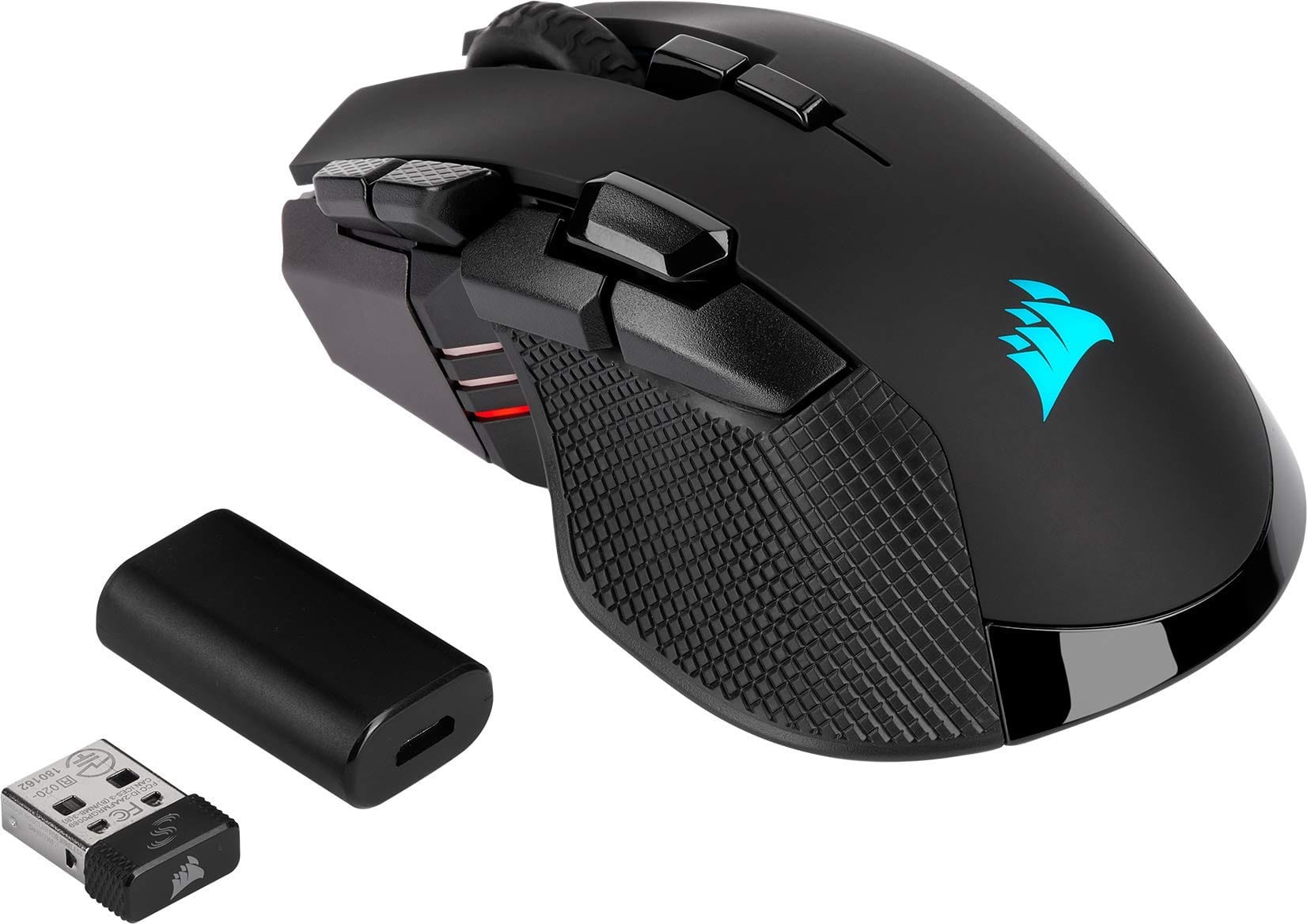
The Corsair Ironclaw RGB Wireless Gaming Mouse targets gamers who prioritize comfort, reliability, and fuss-free wireless performance. With an ergonomic, palm-grip-friendly shell designed for larger hands, tri-mode connectivity (Slipstream 2.4 GHz, Bluetooth, and USB wired), and a proven high-end optical sensor, it aims to be a do-it-all daily driver. In this review, we dive into its features, real-world performance, build quality, and value to help you decide whether it should anchor your gaming setup.
Key Features and Specifications
The Ironclaw RGB Wireless is built around a comfort-first philosophy while preserving competitive-grade tracking. Below are the highlights that matter most:
- Sensor: PixArt 3391-class optical sensor (up to 18,000 DPI, adjustable in 1-DPI increments)
- Connectivity: Tri-mode — Corsair Slipstream 2.4 GHz (sub-1 ms), Bluetooth LE, and USB wired
- Battery life: Up to roughly 50 hours with lighting disabled; around the mid-20s per charge with RGB active on 2.4 GHz (actual life varies by use, brightness, and polling rate)
- Polling rate: Up to 1000 Hz (2.4 GHz and wired); 125 Hz typical over Bluetooth
- Buttons: Multiple programmable inputs (up to 10 on the Wireless variant) including primary L/R, clickable scroll, DPI switches, and a multi-button side cluster
- Onboard memory: Hardware profiles let you store DPI steps, lighting, and assignments for use without software
- Lighting: 3-zone RGB
- Switches: Durable mechanical main switches (Omron-rated up to 50 million clicks)
- Dimensions and weight: Approximately 130 × 80 × 45 mm; ~130 g (wireless model)
- Grip style and hand size: Best for palm grip and large hands; also workable for relaxed claw grip
- Feet: Low-friction PTFE glide skates
- Cable and charging: Detachable micro-USB cable for wired use and charging
- Software: Corsair iCUE for Windows and macOS (DPI tuning, surface calibration, macros, lighting)
- Compatibility: PC; macOS support via iCUE; Bluetooth enables tablet/phone pairing for general use
- Warranty: Typically 2 years (varies by region)
Note: Specifications can vary slightly by batch and region. Check Corsair’s product page for the most current details.
Performance and Quality
The Ironclaw RGB Wireless delivers dependable performance across fast-paced shooters, MOBAs, and everyday productivity. Its PixArt 3391-class sensor offers excellent tracking fidelity with no acceleration or smoothing across the usable DPI range. Being able to tune DPI in 1-DPI steps and set multiple stages is genuinely helpful if you switch between tasks or game genres that demand different sensitivities.
Wireless latency over Slipstream 2.4 GHz is consistently excellent, feeling indistinguishable from wired in practice. Corsair’s Slipstream tech targets sub-1 ms responsiveness, and it shows: micro-adjustments feel crisp, flicks are predictable, and there’s no perceptible jitter on a decent mousing surface. Bluetooth is perfectly fine for laptops and general productivity, but like most Bluetooth implementations, its lower polling rate and higher latency make it less ideal for competitive play.
Battery life is competitive in its class. With RGB off and sane polling settings, lasting up to ~50 hours is realistic. On Slipstream with animated lighting, you can expect a bit over a day of heavy, continuous play before needing a top-up, which aligns with the mid-20-hour ballpark. iCUE’s power-saving settings (like idle dimming and sleep timers) help stretch runtime if you’re juggling work and play throughout the day.
Lift-off distance can be tuned within iCUE, and the mouse supports surface calibration. On cloth pads, tracking remains consistent during low-lift repositioning, and on hard pads, micro-corrections remain steady without unwanted cursor drift.
The primary clicks feel decisive with a clean, tactile break and minimal post-travel. The scroll wheel has a defined, medium-weight step and a firm middle click that avoids accidental presses while weapon switching. Side buttons are well-defined, though users with smaller thumbs may find the rear-most side button slightly farther away due to the chunky shell. Overall click latency feels snappy, and we didn’t encounter double-click issues in testing windows or rapid-fire game scenarios.
Glide is smooth out of the box thanks to its PTFE feet, and the weight distribution favors a stable, planted feel—useful for precision tracking. That said, at ~130 grams, the Ironclaw RGB Wireless is not chasing the ultra-light trend. If you’re accustomed to sub-70 g shells, expect a short adjustment period. Once acclimated, most users will appreciate the confidence-inspiring control rather than overly snappy acceleration.
Design and Build Quality
The Ironclaw’s shape is its signature advantage. This is a right-handed ergonomic mouse with a high back hump and generous palm support. The broad body and pronounced thumb rest are purpose-built for large hands and palm grip players who like the mouse to “fill the hand.” Claw grippers can also make it work, but fingertip users and those with small hands will likely prefer something narrower and lighter.
The textured side grips are grippy without feeling abrasive, and the top shell’s matte finish resists smudges well. Panel fitment is solid: there’s minimal creaking even under firm squeeze tests, and lateral flex is well controlled. The scroll wheel’s rubberized tread adds traction without feeling gummy.
Button layout strikes a good balance between gaming utility and everyday productivity. You get the usual primary buttons, a clickable wheel, DPI toggles, and a multi-button side cluster for actions like melee, push-to-talk, or macros. The 3-zone RGB lighting is tasteful—an illuminated logo, wheel, and light bar accents—and it syncs with other Corsair peripherals via iCUE if you like coordinated setups.
Connectivity is straightforward. The mouse pairs to the included 2.4 GHz USB receiver for Slipstream, supports Bluetooth LE for multi-device workflows, and also works wired while charging via micro-USB. While micro-USB is dated compared to USB-C, the port is sturdy and the included cable is flexible enough to avoid drag during wired sessions.
As for durability, Corsair’s long-standing use of quality switches and solid plastics applies here. The main buttons are rated for up to 50 million clicks, and our sample showed no signs of rattle in the wheel or side buttons after repeated use. The PTFE feet wore evenly and can be replaced if you’re a heavy user.
Pros and Cons
- Pros
- Superb comfort for large hands; ergonomic shape favors palm grip
- Reliable tri-mode connectivity: Slipstream 2.4 GHz, Bluetooth, and wired
- Proven PixArt 3391-class sensor with 1-DPI step tuning and surface calibration
- Consistent, wired-like latency over Slipstream; stable wireless performance
- Solid battery life with practical power-saving controls in iCUE
- Durable build, grippy sides, and smooth PTFE feet
- Onboard memory for DPI, lighting, and macros
- Three-zone RGB that’s tasteful and easy to sync
- Cons
- Heavy by modern standards at ~130 g; not ideal for ultra-low-sens, rapid flick playstyles
- Micro-USB charging instead of USB-C
- Side button reach may be a stretch for smaller hands
- Bluetooth’s lower polling rate is fine for work, not for competitive gaming
- RGB is limited to three zones for users who want more elaborate lighting
Value Proposition and Pricing
The Corsair Ironclaw RGB Wireless sits in the mid-range wireless price tier. Street prices tend to fluctuate, but you’ll commonly find it in the $60–$80 USD bracket depending on sales and region. Considering the ergonomics, tri-mode connectivity, reliable sensor, and software support, the value proposition is strong for gamers who prioritize comfort and stability over ultra-light weight.
In the box, you typically get the mouse, a 2.4 GHz USB receiver, a micro-USB charging/data cable, and basic documentation. Corsair’s 2-year warranty adds peace of mind. iCUE continues to be one of the most comprehensive peripheral suites for DPI tuning, macros, profile management, and lighting. For users already invested in Corsair keyboards, headsets, or cases, unified control and synchronized lighting enhance the ecosystem value.
Where the math becomes less favorable is if you’re on a strict budget or if competitive FPS performance means “as light as possible.” In those cases, similarly priced ultra-light wired mice or slightly pricier lightweight wireless options might be more appealing. But if you want a comfortable, full-size wireless mouse that simply works, the Ironclaw RGB Wireless is a strong buy—especially at the lower end of its street price range.
Comparison with Alternatives
There’s no shortage of good wireless gaming mice. Here’s how the Ironclaw RGB Wireless stacks up against popular rivals:. If you're considering alternatives, our Corsair Dark Core RGB Pro Wireless review covers a When comparing Corsair’s ergonomic wireless options, mention that those wanting a slightly different shape and button layout can consider the Corsair Dark Core RGB Pro Wireless, which also uses Slipstream for low-latency performance..
- Logitech G502 X Lightspeed
- Why consider it: Lighter than legacy G502 models, premium switches, strong wireless performance, and a similar multi-button approach.
- Ironclaw advantage: A more spacious, high-back shape that many palm grippers find more supportive; typically more affordable when discounted.
- G502 advantage: Lighter chassis, refined scroll wheel options on some variants, and a deeper ecosystem with Logitech G Hub if you prefer it.
- Logitech G604 Lightspeed
- Why consider it: MMO/MOBA-friendly with a six-button side cluster, AA battery power for long life.
- Ironclaw advantage: Rechargeable internal battery with wired mode, RGB lighting, and a more classic shooter-friendly shape.
- G604 advantage: More side buttons for macros and commands; great for productivity and strategy titles.
- Razer Basilisk lineup (e.g., Basilisk X HyperSpeed, Basilisk V3 Pro)
- Why consider it: Similar right-handed ergonomic shape, excellent sensors, and speedy low-latency wireless on higher-end models.
- Ironclaw advantage: Competitive pricing and a wider shell that can feel more stable for large hands.
- Razer advantage: The latest Basilisk models offer cutting-edge sensors, optical switches, and in some cases lighter weights (at higher prices).
- SteelSeries Rival 650 Wireless / Aerox 5 Wireless
- Why consider it: Rival 650 offers fast charging and dual sensors for lift-off tracking; Aerox 5 Wireless targets lighter weight with a perforated shell.
- Ironclaw advantage: No-holes solid shell and a fuller hand feel, which some users prefer for comfort and acoustics.
- SteelSeries advantage: Lighter options in the Aerox line and unique features like dual sensors on older flagship models.
- Corsair Dark Core RGB Pro
- Why consider it: Another Corsair ergonomic wireless with Slipstream and a thumb rest; feels like a sleeker sibling.
- Ironclaw advantage: Taller, more enveloping shape for large hands and a simpler, grippy design that many find more secure.
- Dark Core advantage: Slightly different contouring, swappable side grips on certain versions, and a more modern aesthetic.
- HyperX Pulsefire Haste Wireless
- Why consider it: Much lighter body (often under 60 g) with fast wireless—great for competitive FPS.
- Ironclaw advantage: Substantially more comfort for large-hand palm grip and a huskier, non-perforated shell.
- HyperX advantage: If ultra-light weight is your north star for aim-intensive titles, the Haste family is hard to beat.
In short, the Ironclaw RGB Wireless is not chasing minimal grams or MMO-level button counts. Its lane is maximum comfort, dependable wireless, and strong fundamentals at a reasonable price. If that’s your priority, it stands out.
Who Should Buy the Corsair Ironclaw RGB Wireless
- Large-hand users and palm grippers: The shape is made for you. The wide body and high hump offer top-tier support and reduced hand fatigue.
- Players who want stable, reliable wireless: Slipstream 2.4 GHz feels wired-fast, and battery management is easy via iCUE.
- Multi-device or work-and-play users: Bluetooth for laptops/tablets, 2.4 GHz for gaming PCs, and USB for charging/wired mode—a flexible trio.
- Gamers who value precision and control over featherweight speed: The weight lends steadiness for medium-to-high sens players and those who prefer guided, controlled aim.
- Fans of the Corsair ecosystem: If you own Corsair gear, synchronized lighting and unified profiles in iCUE simplify your setup.
You might want to look elsewhere if your top priorities are a sub-70 g shell for competitive FPS, a larger array of side buttons for MMOs, or USB-C charging. Otherwise, the Ironclaw RGB Wireless ticks the boxes that matter for comfort-first gaming.
Conclusion
The Corsair Ironclaw RGB Wireless Gaming Mouse is a superb choice for large-handed, palm-grip gamers who want reliable wireless performance without giving up comfort. Its proven sensor, Slipstream responsiveness, and thoughtful macros make it a trustworthy all-rounder. While it won’t win ultra-light contests and still uses micro-USB, its battery life, ergonomics, and build quality more than compensate. If comfort, consistency, and versatile connectivity top your list, the Ironclaw RGB Wireless deserves a spot on your desk.. For those interested in Offer an alternative for readers who prefer a much lighter, ambidextrous shape focused on fast FPS play, pointing them to the Razer Viper Ultimate review., check out our Razer Viper Ultimate.