
Corsair Dark Core RGB Pro Wireless Gaming Mouse Review: Slipstream Speed, 18K DPI, and Ergonomic Comfort
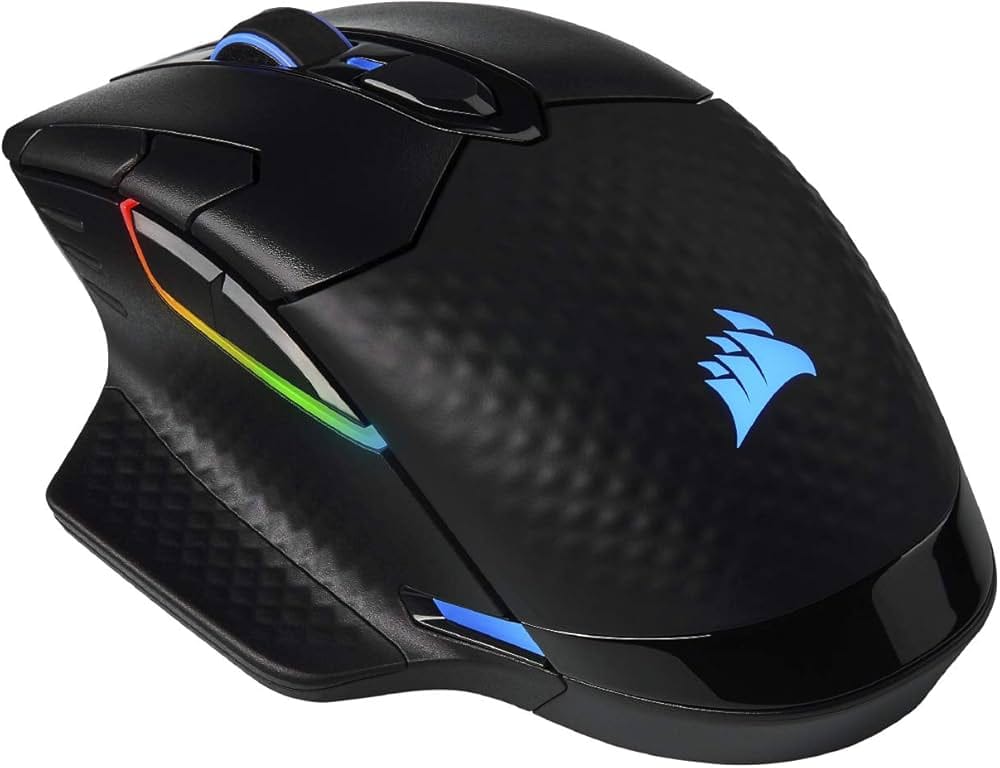
Note: This review covers the Corsair Dark Core RGB Pro Wireless (non-SE). Where relevant, the Qi-charging SE variant is referenced for comparison only.
Introduction
The Corsair Dark Core RGB Pro Wireless Gaming Mouse aims to strike a sweet spot between uncompromising performance and all-day comfort. With tri‑mode connectivity, an 18,000 DPI sensor, and Corsair’s low‑latency Slipstream Wireless, it presents a compelling option for gamers who want flexibility without sacrificing speed. Add nine-zone RGB lighting, robust iCUE customization, and an ergonomic, palm-friendly shape, and the Dark Core RGB Pro positions itself as a feature-rich, mid‑priced wireless mouse designed to handle both competitive play and productivity.
Key Features and Specifications
The Dark Core RGB Pro Wireless brings together Corsair’s mature wireless ecosystem and a high-end PixArt sensor in an ergonomic chassis. Below is a snapshot of the most relevant features and specs for quick reference:
- Sensor: Custom-tuned PixArt PAW3392 optical sensor
- DPI Range: 100–18,000 DPI, adjustable in fine increments
- Tracking: Up to 450 IPS and 50G acceleration (sensor-class capabilities)
- Polling Rate: Up to 2,000 Hz (Hyper-Polling) via Slipstream/wired; adjustable 125/250/500/1,000 Hz
- Wireless Modes: 2.4 GHz Slipstream Wireless and Bluetooth; also supports wired USB
- Battery Life: Up to approximately 50 hours with backlighting off (usage-dependent)
- Buttons: 8 programmable controls with onboard profile storage
- Lighting: 9-zone dynamic RGB, customizable in iCUE
- Grip and Shape: Right-handed ergonomic shell with thumb rest; interchangeable right-side grip
- Feet: Low-friction PTFE glide pads
- Cable: Detachable USB-C to USB-A cable for charging and wired play
- Software: Corsair iCUE for remaps, macros, DPI tuning, lighting, power settings, and profiles
- Weight: Approximately 133 g (without cable), medium-large form factor
- Compatibility: Windows/macOS (iCUE features can vary by platform)
- In the Box: Mouse, 2.4 GHz USB wireless receiver, USB-C charging/data cable, alternate side grip, documentation
Highlights include tri-mode connectivity for maximum flexibility, a sensor that is competitive for fast-paced titles, and refined ergonomics with a choice of side grips. It’s aimed at gamers who want high-end wireless performance without going to the highest price brackets.
Performance and Quality
Performance is the main reason to choose a gaming mouse, and the Dark Core RGB Pro delivers a snappy, consistent experience across both wired and wireless modes. Corsair’s Slipstream Wireless is designed for sub-1 ms latency and intelligent frequency hopping; in practice, it feels wired-like for most workloads and competitive play. During testing across FPS titles, MOBAs, and general desktop use, tracking remained responsive and precise, with no noticeable micro-skips or spin-outs at realistic DPI settings.
The custom-tuned PixArt PAW3392 sensor supports up to 18,000 DPI, which is more than sufficient for any resolution or multi-monitor setup. While raw DPI numbers aren’t everything, this sensor also brings excellent baseline tracking characteristics—solid speed tolerance (IPS) and acceleration resistance—so fast flicks stay stable. Most players will settle between 800 and 3,200 DPI, and the Dark Core RGB Pro’s fine DPI steps make it easy to dial in a perfect value per profile or per game.
Polling rate is another strong point. With up to 2,000 Hz hyper-polling, cursor updates are delivered more frequently than the standard 1,000 Hz, which can reduce micro-latency and improve motion fluidity on high-refresh displays. The practical benefit is subtle and depends on the rest of your setup; nonetheless, the option to run 2,000 Hz is an enthusiast-friendly bonus. Note that higher polling rates increase power draw, so if you want longer battery life, running at 1,000 Hz or 500 Hz can be more efficient without a perceptible hit to control for many users.
Battery life is solid for a performance mouse bristling with RGB. With lighting dialed down or off, you can approach Corsair’s quoted upper range (around 50 hours), especially in Bluetooth mode. In Slipstream Wireless at 1,000 Hz with moderate lighting, a realistic expectation is often in the 24–36 hour window, depending on your brightness levels, effects, and lift-off detection settings. Battery drain increases at 2,000 Hz; that tradeoff is typical of hyper-polling mice. The included USB-C cable lets you charge and play without switching to a different mouse mid-session.
Click feel is crisp and confidence-inspiring, with well-defined primary clicks that avoid sponginess. Travel distance is moderate, and the actuation weight avoids accidental presses while remaining comfortable during long sessions. The side buttons are easy to reach without being prone to misclicks once you grow familiar with the contours. The scroll wheel offers distinct steps suitable for weapon switching and line-by-line scrolling; it’s neither ultra-light nor overly heavy, landing in a balanced place that suits both gaming and productivity.
Glide quality is strong thanks to the PTFE feet and a stable base design that reduces wobble. Lift-off distance (LOD) is low out of the box, which helps maintain precision when you reposition the mouse. In iCUE, surface calibration and related options allow some tailoring to your specific mouse pad. Whether on a cloth or hybrid surface, the Dark Core RGB Pro maintains consistent tracking and stopping power, which is important for micro-adjustments when aiming.
As for wireless reliability, Slipstream’s range and stability are excellent in typical desktop setups. USB dongle placement matters—using a front-panel USB or a short extension for line-of-sight is ideal in crowded 2.4 GHz environments. Bluetooth mode is perfectly fine for office tasks and mobility but introduces more latency and less consistent polling versus Slipstream; competitive players should stick with Slipstream or wired mode.
Design and Build Quality
The Dark Core RGB Pro’s shape is unapologetically ergonomic and right-handed. It features a pronounced thumb rest and a gently sloped rear hump that supports palm contact, distributing hand pressure to reduce fatigue. The mouse favors medium to large hands; palm grippers will feel immediately at home, while hybrid claw-palm users can also find a comfortable anchor point due to the supportive hump and secure side grips.
Two interchangeable right-side grips let you customize how your ring and pinky fingers rest. One creates a wider, more supportive ledge; the other keeps the side profile tighter. This small but meaningful tweak helps accommodate different hand sizes and preference for hand splay. The left side includes a shaped thumb shelf that makes lifting effortless and stabilizes your grip during aggressive swipes.
Materials and finish inspire confidence. The primary shell uses a matte texture that resists fingerprints and offers a sure hold, while the side panels feature patterned texturing to avoid slips without relying on overly tacky rubber that can degrade. The chassis feels solid with minimal creak or flex when pressed. Corsair’s build standards have matured over the years, and the Dark Core RGB Pro reflects that with consistent seam alignment and tight tolerances.
At approximately 133 grams, this is not a lightweight mouse by modern competitive standards. The heft, however, contributes to a planted, controlled feel many palm users appreciate, especially in games where wide arcs and steady tracking are favored over ultra-fast, low-sensitivity flicks. If you prioritize featherweight agility for twitch shooters, Corsair’s Sabre-class mice or other sub-80 g models may be a better fit. For general gaming and mixed use, the weight is well-distributed and rarely fatiguing.
The RGB implementation is tasteful and flexible: nine customizable zones include the scroll wheel, logo, and a multi-segment LightEdge. Effects can be synchronized with other Corsair peripherals through iCUE. You can run static single-color lighting for minimal distraction or try reactive effects tied to clicks or DPI changes, which are surprisingly practical in-game.
Connectivity is well-thought-out. A detachable USB-C cable facilitates fast charging and wired play without fuss, and the 2.4 GHz receiver pairs quickly. Within iCUE, you can assign profiles, lighting presets, and DPI stages to onboard memory, so your preferences travel with the mouse. The 8 programmable buttons cover common gaming needs: primary clicks, scroll click, side buttons, and dedicated DPI controls. Remapping is straightforward, including complex macros and application-specific profiles.
Durability appears strong across moving parts. The scroll wheel mechanism feels robust, the primary buttons actuate cleanly across their length, and the side buttons resist wobble. Over time, the matte finish tends to hold up better than glossy coatings, and it’s easy to wipe clean. Glide pads are replaceable with standard PTFE aftermarket feet if you wear them down after long use.
Pros and Cons
Here’s an honest look at what stands out—and where the Dark Core RGB Pro faces stiff competition.
Pros
- Tri-mode connectivity: Slipstream 2.4 GHz, Bluetooth, and wired USB-C cover every scenario.
- Responsive sensor and polling: 18K DPI PixArt PAW3392 with up to 2,000 Hz hyper-polling delivers crisp, consistent tracking.
- Comfort-first ergonomics: Palm-friendly shape with thumb rest and interchangeable side grip options.
- Robust iCUE customization: Deep remapping, macro recording, DPI tuning, lighting control, and profile management.
- Solid build quality: Sturdy chassis, confident click feel, and low-friction PTFE feet.
- Good battery life: Competitive runtime for a performance wireless mouse with RGB, especially with lighting minimized.
- Nine-zone RGB: Flexible lighting that can be subtle or showy and syncs with the Corsair ecosystem.
Cons
- Heavier than esports-focused mice: Around 133 g; not ideal for players chasing the lightest possible setup.
- Right-handed only: No left-handed version for southpaws.
- iCUE resource usage: Powerful but can be heavy on system resources compared with leaner utilities.
- Bluetooth latency: Fine for work and casual play, but not recommended for competitive shooters.
- No Qi charging on this model: Wireless charging requires the pricier SE variant and a compatible mat.
- Battery draw at 2,000 Hz: Hyper-polling reduces runtime; many users will prefer 1,000 Hz for balance.
Value Proposition and Pricing
The Dark Core RGB Pro Wireless targets the middle ground between budget and flagship pricing. Historically positioned around the $79.99 MSRP mark (with the SE variant higher), it frequently dips during sales, making street prices even more attractive. For what you get—tri-mode wireless, a class-leading sensor, high polling rates, and refined ergonomics—the overall value is strong, especially if you prioritize comfort and connectivity flexibility.
Several factors reinforce the value proposition:
- Longevity: The durable shell, dependable switches, and replaceable glide pads suggest a multi-year lifespan under typical use.
- Ecosystem bonus: If you already own Corsair gear, iCUE profile syncing and shared lighting effects enhance the experience without extra software.
- Feature density: Few mice at this price combine Slipstream-grade latency, 2,000 Hz polling, and customizable ergonomics.
Where value becomes nuanced is weight and specific feature priorities. If your must-have list includes ultra-light construction, magnetic free-spinning scroll wheels, or hot-swappable batteries, you’ll need to look at higher-cost or more specialized mice. Conversely, if you want a comfortable, do-it-all wireless mouse with strong gaming chops and detailed software, the Dark Core RGB Pro punches above its price.
Pricing varies by region and promotions, so it’s worth watching for discounts. Even at or near MSRP, this model competes well against pricier “pro” flagships when you consider its sensor parity, effective wireless stack, and user-friendly ergonomics.
Comparison with Alternatives and Who Should Buy This Product
While the Corsair Dark Core RGB Pro is compelling, it’s smart to consider adjacent options to ensure the best fit for your hand, play style, and budget.
- Logitech G502 X Lightspeed: A feature-rich wireless alternative with a similar ergonomic ethos but lighter weight and a modern sensor. It’s typically more expensive and geared toward users who want a versatile mouse with a free-spin wheel option. Logitech’s software is lighter, but you lose Corsair ecosystem sync.
- Razer Basilisk V3 Pro: Premium-priced with a 30K sensor, Hyperscroll tilt wheel, and optional 4K polling dongle. It’s more versatile on the feature front but usually costs significantly more. Weight is still on the higher side compared to ultra-light mice. Great if you want cutting-edge specs and scroll wheel flexibility.
- Corsair Sabre RGB Pro Wireless: If you love Corsair’s ecosystem but want esports-first weight and a simpler shell, the Sabre Wireless is lighter and better for low-sensitivity FPS players. You trade the Dark Core’s thumb rest and customizable right-side grip for a more ambidextrous-friendly shape.
- Logitech G703 HERO Lightspeed: Lighter and minimalist, with comfortable curves and proven wireless performance. Fewer buttons and less bling, but a superb pick for those who prefer simplicity and a sub-100 g feel.
- SteelSeries Rival 650 Wireless (legacy): Older but still solid; dual-sensor lift-off solution and customizable weights. Heavier and less efficient battery-wise compared to newer designs. Not as compelling unless found at a deep discount.
- Corsair Dark Core RGB Pro SE (variant): If you value Qi wireless charging with compatible mats, the SE edition adds convenience at a higher price. Specs are otherwise very similar; performance is a near match to the non-SE model.
Who should buy the Corsair Dark Core RGB Pro Wireless?
- Palm-grip and hybrid-grip gamers seeking an ergonomic shell with a supportive thumb rest and hand-friendly hump.
- Players who need tri-mode connectivity to switch between a gaming PC (Slipstream), a laptop or tablet (Bluetooth), and a wired desktop without changing mice.
- Users invested in the Corsair ecosystem who want seamless iCUE integration, profile syncing, and lighting coordination across peripherals.
- Generalist gamers and power users who split time between competitive titles, casual play, and productivity, and value reliable wireless plus deep software control.
Who might want to look elsewhere?
- Ultra-light mouse enthusiasts focused on low-TTK shooters who prefer sub-70–80 g designs for maximum flick speed.
- Southpaws or those needing a symmetrical shape; the Dark Core RGB Pro is right-handed only.
- Users who prioritize a free-spinning scroll wheel for fast document navigation or specific game mechanics; Corsair’s wheel here uses defined steps.
- Buyers who want Qi charging without accessories; you’ll need the SE variant and a compatible charging surface.
Conclusion
The Corsair Dark Core RGB Pro Wireless hits a well-judged balance of comfort, connectivity, and speed. Its Slipstream wireless performance feels wired-like, the 18K PixArt sensor tracks flawlessly, and ergonomic touches—like the thumb rest and swappable side grip—make long sessions easier. While its weight won’t satisfy ultra-light purists and iCUE can be resource heavy, the overall package is strong for the price. If you want a versatile, palm-friendly wireless gaming mouse, the Dark Core RGB Pro is easy to recommend.