
ASUS ROG Strix 27-inch 1440p Glossy WOLED 240Hz Review: Elite Speed Meets OLED Perfection
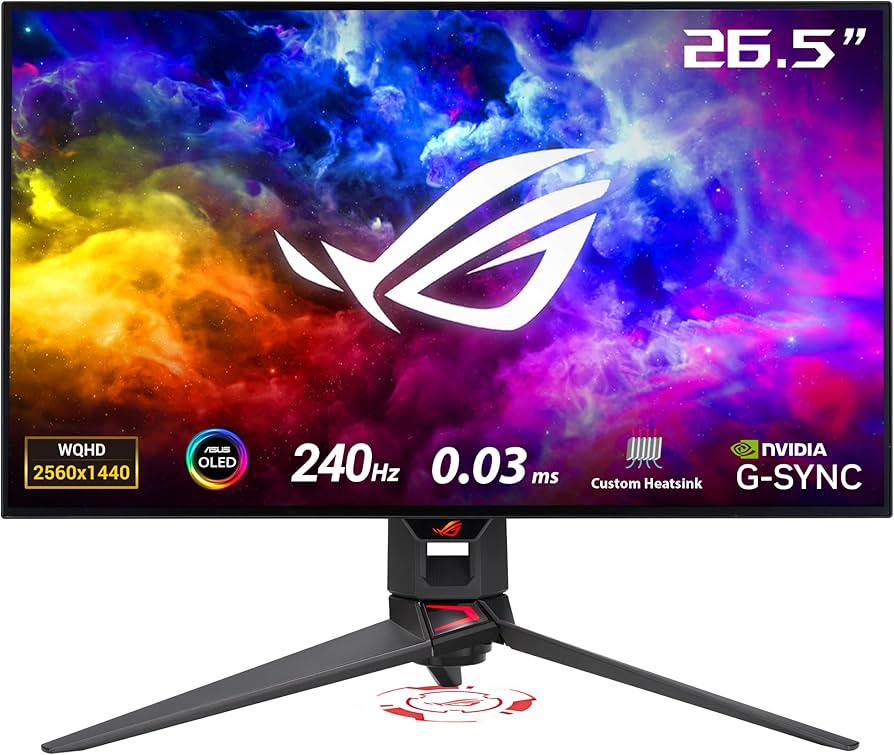
The ROG Strix 27-inch 1440p Glossy WOLED Gaming Monitor (240Hz) aims to deliver esports-grade speed with the cinematic punch of true OLED contrast. With a 27-inch WQHD panel, a blistering 240Hz refresh, and a glossy finish designed for maximum clarity and perceived contrast, it sits at the premium end of the gaming spectrum. Below, we unpack its standout features, day-to-day performance, and where it fits among today’s best fast-OLED displays.
Key features and specifications
This ROG Strix configuration—often marketed in many regions under the model name XG27AQDMG—centers on a 27-inch 2560 × 1440 WOLED panel with a glossy surface. The combination targets competitive gamers and visual purists who want both speed and striking image quality. Exact specifications can vary by region or firmware, but the core highlights are consistent:
- Panel: 27-inch WQHD (2560 × 1440) WOLED with a glossy finish for heightened clarity and perceived contrast.
- Refresh rate: Up to 240Hz, with variable refresh rate (VRR) support for tear-free gameplay.
- Response time: OLED-level near-instant pixel transitions (manufacturer-typical 0.03ms GtG class).
- HDR support: HDR10; OLED’s per-pixel dimming yields virtually infinite contrast. Small highlight peaks can reach high nit levels in ideal content and modes (exact peak brightness varies by unit and settings).
- Color: Wide-gamut coverage (commonly ~98–99% DCI-P3 and full sRGB); 10-bit processing support; factory calibration targets low Delta E for accurate out-of-the-box color.
- Adaptive sync: Compatible with major GPU vendors’ VRR standards (e.g., NVIDIA G-SYNC Compatible and AMD FreeSync Premium).
- Connectivity: Typically includes DisplayPort 1.4 (with DSC), HDMI 2.1, a USB hub, and a headphone jack. Some regional SKUs may add USB-C (DP Alt Mode); check your local listing.
- Ergonomics: Height, tilt, swivel, and pivot adjustments, plus 100 × 100 mm VESA mounting.
- OLED care: Pixel shift/screen move, panel refresh/pixel cleaning, logo brightness limiter, and optional uniform brightness modes to mitigate ABL (Automatic Brightness Limiter) behavior in SDR.
- Warranty: In many regions, ASUS provides multi-year coverage that includes OLED burn-in; verify specifics for your country.
In short, this is a purpose-built, speed-first OLED that still pays attention to creator-friendly color accuracy and everyday usability. The glossy finish is a deliberate differentiator, trading some reflection handling for a punchier, more “window-like” image.
Performance and quality
Motion clarity and latency: Few displays feel as effortless in motion as a 240Hz OLED. The ROG Strix’s near-instant pixel response produces exceptional clarity with minimal blur trails, even during rapid flicks or high-speed strafing. Input latency is effectively imperceptible at 240Hz, and VRR support keeps frame pacing smooth when your GPU dips below the frame cap. Competitive titles—think Valorant, Apex Legends, Counter-Strike 2, Overwatch 2—benefit immediately. While 360Hz TN/IPS panels still exist for esports purists, the perceived motion clarity of OLED plus the deep black floor makes fast action easier to parse and track.
Refresh rate behavior: At native 1440p, DisplayPort 1.4 with DSC and HDMI 2.1 provide ample bandwidth for 240Hz with full-color fidelity. The VRR window is wide, so gameplay remains stable from typical mid-frame rates up to the ceiling. If your GPU can’t sustain 240 fps in every title, the smoothness and responsiveness at 120–200 fps are still superb, and the OLED response characteristics remain consistent throughout.
HDR impact: OLED’s per-pixel lighting is the star of the show. In HDR games, specular highlights (muzzle flashes, neon signage, sunlight glints) gain intensity and dimensionality, while shadow scenes remain noise-free and truly black. Peak highlight brightness depends on window size, picture mode, and thermal conditions, but the monitor can push impactful sparkle in small highlights and maintain accurate tone mapping when configured properly. For the best results in Windows, run the Windows HDR Calibration tool and choose the monitor’s HDR game mode that balances highlight pop with color accuracy.
SDR brightness and ABL: Like all OLED monitors, overall “full-screen” brightness is lower than high-nit LCD competitors, and ABL can gradually limit luminance on very bright, full-screen content. ASUS helps by offering a Uniform Brightness or similar mode for SDR that caps brightness to keep the screen from fluctuating during desktop work. It makes the monitor feel more like a calibrated reference display in productivity apps. If you prefer maximum punch for videos and games, you can leave the cap off—but expect brightness behavior to vary depending on scene content.
Glossy panel advantages—and caveats: This monitor’s glossy surface is a big differentiator. Compared to matte OLEDs, glossy preserves micro-contrast and perceived sharpness, making fine details, UI edges, and text look cleaner and more “etched.” Colors also appear more saturated at a given luminance. The trade-off is reflectivity: in bright rooms or with light sources behind you, you’ll see more distinct reflections than on a strong matte coating. You can mitigate this by placing the display away from windows and using bias lighting or dark backgrounds.
Text clarity and subpixel layout: As a WOLED with an RWBG subpixel structure, this panel can exhibit some text fringing at small font sizes, especially in non-integer scaling on Windows. The glossy layer helps clarity versus many matte OLEDs, but you can further improve text by enabling ClearType, using 125–150% scaling on a 27-inch 1440p desktop, and choosing fonts/hinting that suit OLED. For most users, it becomes a non-issue after basic setup.
Color accuracy and coverage: Factory calibration targets low Delta E, delivering accurate sRGB and wide-gamut performance out of the box. Wide DCI-P3 coverage makes HDR games and modern media look rich without severe oversaturation. ASUS’s sRGB clamp (where provided) is helpful for web work; creators can switch to a wide-gamut mode for grading or HDR previews. For professional color-critical tasks, a hardware or software calibration pass still pays dividends, but this panel’s native precision is already strong.
Thermals, noise, and flicker: ASUS typically equips its OLEDs with an efficient passive heatsink solution; the panel runs warm but quiet with no fan noise. The display relies on DC dimming rather than PWM, so most users won’t notice flicker at normal brightness levels. Thermal management helps maintain brightness stability during extended HDR sessions and reduces the risk of image retention.
Image retention and burn‑in mitigation: Temporary image retention can occur if you leave a static interface up for hours, but it’s usually short-lived and clears with normal content or a quick pixel refresh. The monitor includes OLED care features—pixel shifting, logo detection/limiting, and scheduled panel refreshes. As with any OLED, mix your content, use dark themes where you can, and let the monitor run its maintenance cycles when prompted. Many regions now include multi-year burn-in coverage for added peace of mind; check your local policy.
Design and build quality
ROG styling, refined: The Strix line brings a gamer-forward aesthetic—angular accents, a sturdy metal-fused stand, and tidy cable routing—without overwhelming RGB. Bezels are slim on three sides for a modern, focused look. The glossy panel surface dominates visually; when the display is off, it has that “black mirror” elegance common to high-end OLED TVs.
Ergonomics: The stand typically supports generous adjustments: height, tilt, swivel, and pivot. That matters for both competitive posture and creative workflows. For small desks or multi-monitor rigs, the 100 × 100 mm VESA mount allows easy attachment to arms and wall mounts. The stand’s footprint is compact enough for most 27-inch setups, though it’s still substantial to keep the OLED panel stable.
Controls and OSD: ASUS’s mini-joystick and dedicated buttons make navigating the OSD fast. You’ll find picture presets (Racing, FPS, Cinema, sRGB/wide-gamut modes), HDR modes, Uniform Brightness toggles, and OLED care settings grouped logically. GamePlus overlays (crosshair, timer, FPS counter) and GameVisual picture modes are on hand. ASUS’s companion software (such as DisplayWidget Center, where available) can mirror key OSD options in Windows.
Ports and cable management: Expect DisplayPort 1.4 with DSC and HDMI 2.1 ports for 1440p/240Hz support, alongside a USB hub and a headphone jack. Some regional SKUs add USB-C with DP Alt Mode and charge passthrough—handy for laptops. A rear shroud helps tuck away cables, and the downward-facing port layout makes wall-mounting easier.
Build and thermals: The chassis uses a solid internal frame with ventilation channels plus a beefy, quiet heatsink to distribute panel heat. This assists both brightness stability and long-term panel health. The unit feels rigid, with little wobble at the top, even during vigorous stand adjustments.
Pros and cons
- Pros
- Exceptional motion clarity with 240Hz and near‑instant OLED response; input lag feels negligible.
- Glossy panel delivers standout perceived contrast, color saturation, and text crispness versus many matte OLEDs.
- True black levels and per-pixel lighting produce dazzling HDR highlights and clean shadow detail.
- Wide-gamut color, factory calibration, and useful sRGB clamp make it versatile for gaming and content work.
- Robust OLED care toolkit (pixel shift, panel refresh, logo limiter) plus strong passive thermal design.
- Comprehensive ergonomics and VESA mount support; gamer-friendly OSD features.
- VRR support across major GPU platforms via DP and HDMI.
- Cons
- Glossy coating can reflect bright room lights—best in controlled lighting environments.
- Full-screen SDR/HDR brightness is lower than high-nit LCDs; ABL behavior is inherent to OLED tech.
- WOLED subpixel layout can show minor text fringing at small sizes without proper OS tuning.
- Typically priced at a premium versus 240Hz IPS LCDs; better value appears during sales.
- Some SKUs may omit USB-C or advanced KVM features—check your region’s configuration.
Value proposition, pricing, and comparisons
Where it fits: The ROG Strix 27-inch Glossy WOLED 240Hz sits in the “premium fast OLED” niche. You’re paying for instantaneous response, VRR at 240Hz, deep blacks, and a glossy surface that makes everything look pin-sharp. Street pricing fluctuates by region and retailer; it typically lands in the upper-mid to premium bracket for 27-inch gaming displays. Watch for holiday promos and bundle deals—OLED gaming monitors often see meaningful discounts throughout the year.
Who it beats: Against 240Hz IPS LCDs, the Strix WOLED is on another level for contrast, HDR realism, dark-scene clarity, and perceived motion quality. Even if an IPS can hit higher full-screen nits, it cannot match the pixel-level control and black floor that make games feel more dimensional. The glossy layer amplifies that advantage by preserving micro-contrast and crispness.
Close rivals and alternatives:
- ASUS ROG Swift OLED PG27AQDM (matte, 240Hz, 1440p): A sibling with a matte finish. You trade away the glassy pop and sharpness of the glossy Strix for better reflection handling in bright rooms. If you game in daylight without full light control, the matte Swift can be the more practical pick.
- LG 27GR95QE-B (matte, 240Hz, 1440p WOLED): One of the early 27-inch OLEDs. It’s a strong performer with wide color and excellent motion, typically matte. The Strix’s glossy surface and ASUS’s thermal/OSD refinements will appeal if you prioritize perceived clarity and HDR punch.
- Alienware AW2725DF (QD‑OLED, 360Hz, 1440p): A next-wave competitor with a higher 360Hz ceiling and QD‑OLED’s vibrant color volume. QD‑OLED subpixel geometry differs from WOLED and can also show text fringing characteristics. If you’re chasing the absolute highest refresh and a very vivid look, the Alienware is compelling; the Strix counters with a cleaner glossy presentation and typically excellent factory tuning.
- MSI MPG 271QPX (QD‑OLED, 360Hz, 1440p): Similar story to the Alienware: ultra-high refresh and brilliant colors, generally with a semi‑gloss/matte handling. The ASUS Strix stays attractive if you prefer the gloss aesthetic, ASUS’s OSD feature set, and a proven cooling approach.
- Esports-grade IPS (e.g., 360Hz 1440p or 540Hz 1080p): If your priority is the absolute highest frame rate and maximum full-screen brightness in well-lit venues, top-tier IPS remains relevant. But for home setups and mixed gaming, the OLED advantage in dark scenes, HDR, and perceived motion is hard to ignore.
Price-to-performance verdict: If you want the OLED experience with a premium gloss finish and don’t need 360Hz, the ROG Strix 240Hz WOLED is a sweet spot. It’s not the cheapest way to 240Hz at 27 inches—that honor goes to IPS—but its image quality and motion purity elevate gaming and media alike, often justifying the price delta. Check for bundles, trade-in offers, and extended-warranty promos that include burn-in coverage.
Who should buy this monitor
- Competitive gamers who want OLED clarity: If you’ve tried high-refresh IPS and crave cleaner motion with deeper blacks, this 240Hz WOLED hits the mark. It’s especially strong in tactical shooters where target separation in dark scenes matters.
- HDR enthusiasts and single‑player fans: Story-driven titles with night scenes, neon, and cinematic lighting benefit massively from OLED contrast and the glossy finish’s micro-contrast preservation.
- Hybrid gamer‑creators: For creators who game after work, the wide color, solid factory calibration, and sRGB clamp are great. Just calibrate if you need color-critical accuracy.
- Users with light-controlled rooms: Because it’s glossy, this monitor rewards setups with controlled lighting. If your desk faces a window or bright lamp, consider a different placement or light management.
- Anyone upgrading from 60–144Hz LCDs: The jump to 240Hz OLED is transformative. Even at 120–165 fps, the panel’s response characteristics yield visibly cleaner motion than most LCDs.
You may want something else if you primarily work in bright, sunlit spaces, need the absolute highest full-screen brightness, demand 360Hz+ refresh for top-tier competitive play, or rely on text-heavy applications at very small font sizes with no scaling. In those cases, a matte OLED, a high-nit IPS, or a 360Hz+ esports LCD might be a better fit.
Conclusion
The ROG Strix 27-inch 1440p Glossy WOLED 240Hz monitor blends esports-grade speed with the cinematic immersion only OLED can deliver. Its glossy finish enhances clarity and contrast, motion handling is superb, and HDR content shines with lifelike depth. While ABL behavior, reflections, and premium pricing remain considerations, ASUS’s thermal design, OLED care features, and strong OSD make it a compelling all-rounder. For gamers who can control their lighting, it’s one of the most satisfying 27-inch upgrades you can buy.